AboutTermsPrivacyContact
 
Updating
Race Master Sail Timer + Speed

Race Master Sail Timer + Speed

Released: 2015-07-02
© Kewlanu AB
Race Master Sail Timer + Speed - QR Code
Version 4.5.3
4+
Download on the App Store
Version 4.5.3
4+
Download on the App Store
Released: 2015-07-02
© Kewlanu AB

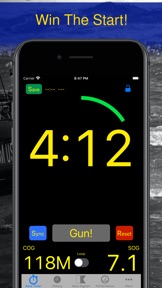
iPhone Screenshots

Screenshot
Screenshot
Screenshot
Screenshot
Screenshot
Screenshot
Screenshot
Screenshot
Screenshot

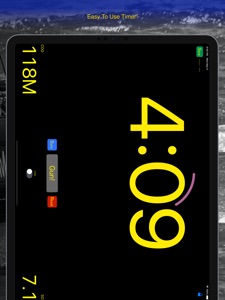
iPad Screenshots

Screenshot
Screenshot
Screenshot
Screenshot
Screenshot
Screenshot
Screenshot
Screenshot

Description

Everybody knows that catching the start is essential in sailing. Finally there is a great Sailing Watch available for the iPhone and it works great with the Apple Watch.
This app provides a timer, speed and course monitoring with unique features and unparalleled ease of use for sail racing. When you hear or see a race signal just press Gun! - You can adjust if it is a 5, 4 or 1 minute warning afterwards! And if it was just a loud noise from a flapping sail and not a race signal you can easily jump back to the previous timer.
It defaults to the standard ISAF 5,4,1,0 sequence but it can handle arbitrary countdown from 30 minutes down to 0
Now you can focus on other things like wind (directly in the app - simply configure your own favourite weather on the config page) and other boats potentially giving you yet another edge!
** Please read more on the info "i" page in the app **
You can enable GPS and get Speed over Ground (SOG) and Course over Ground (COG) presented next to the timer to help you keep track of wind and speed in the seconds before and after start. The Wind page shows a graph of COG and SOG which can help you track wind shifts.
It is designed to work on iPhone with or without Apple Watch and a lot of people seem to be using it with iPads as well.
TIP: On the Watch it is recommended that you (at least temporarily) activate Resume to Last Used App so that you just have to raise your wrist to get the time left:
Settings->General->Activate on Wrist Raise->Resume to: Last Used App
The iPhone application also contains a convenient reference to starting signals and customisable local weather information.
HealthKit integration:
The app provides limited HealthKit integration and can optionally start a Sailing Workout activity during race start.
Summary of Features:
* Simply the best countdown timer ever if you ask us :)
* Really good compass!
* Most of the feature work on Watch and iPhone. Watch Series 2 needed for GPS without iPhone nearby.
* Current Course and Speed Over Ground based on GPS
* GPS based distance to line (still being tuned but works - within limits of GPS accuracy)
* Speed up / Slow down estimate for time to get to line
* History plot of Course and Speed Over Ground that allow you to track wind shifts
* Prevalent headings - advanced formula lists common headings to help identify windshifts
* Man Over Board function - it shows time, distance and compass bearing to the location the button was pressed (NOTE: intended as a secondary non life critical aid only)
* ISAF Race Signals reference - to help settle what that strange flag shown on the race committee means before the race starts...
* Choice of Magnetic or True course indication
* Lock function to prevent unwanted changes
NOTE: Please check the "i" page in the app for more info
This app offers 2 in app subscriptions to 1) support continued development and 2) to enable certain features:
• Payment will be charged to iTunes Account at confirmation of purchase
• Subscription automatically renews unless auto-renew is turned off at least 24-hours before the end of the current period
• Account will be charged for renewal within 24-hours prior to the end of the current period, and identify the cost of the renewal
• Subscriptions may be managed by the user and auto-renewal may be turned off by going to the user's Account Settings after purchase
• Any unused portion of a free trial period, if offered, will be forfeited when the user purchases a subscription to that publication, where applicable
Please review our Terms of Service:
http://www.kewlanu.com/tos
DISCLAIMER: If you enable the GPS feature the app runs in the background for a limited time before it disables GPS.
"Continued use of GPS running in the background can dramatically decrease battery life."

What's New in Version 4.5.3

Fix for watch mark handling

Seller

Name

Kewlanu AB

URL

Information

Developer

Categories

Version

4.5.3

Size

53.2 MB

Game Center

No

VPP Device Licensing

Yes

Rating

Rated: 4+

Compatibility

iOS 14.0 or later

Devices

iPhone 5s, iPhone 6, iPhone 6 Plus, iPhone 6s, iPhone 6s Plus, iPhone SE, iPhone 7, iPhone 7 Plus, iPhone 8, iPhone 8 Plus, iPhone X, iPhone XR, iPhone XS, iPhone XS Max, iPhone 11, iPhone 11 Pro, iPhone 11 Pro Max, iPhone SE (2nd generation), iPhone 12, iPhone 12 Pro, iPhone 12 Pro Max, iPhone 12 mini, iPhone 13, iPhone 13 Pro, iPhone 13 Pro Max, iPhone 13 mini, iPhone SE (3rd generation), iPhone 14, iPhone 14 Plus, iPhone 14 Pro, iPhone 14 Pro Max, iPhone 15, iPhone 15 Plus, iPhone 15 Pro, iPhone 15 Pro Max, iPhone 16, iPhone 16 Plus, iPhone 16 Pro, iPhone 16 Pro Max, iPhone 16e, iPad (5th Generation) Wi-Fi, iPad (5th Generation) Wi-Fi + Cellular, iPad (6th generation) Wi-Fi, iPad (6th generation) Wi-Fi + Cellular, iPad Pro, iPad Pro (Cellular), iPad Pro (9.7-inch), iPad Pro (9.7-inch) (Cellular), iPad Pro 12.9-inch (2nd generation), iPad Pro 12.9-inch (2nd generation) Wi-Fi + Cellular, iPad Pro (10.5-inch), iPad Pro (10.5-inch) Wi-Fi + Cellular, iPad Pro (11-inch), iPad Pro (11-inch) Wi-Fi + Cellular, iPad Pro 12.9-inch (3rd generation), iPad Pro 12.9-inch (3rd generation) Wi-Fi + Cellular, iPad Air, iPad Air (Cellular), iPad Air 2, iPad Air 2 (Cellular), iPad Air (3rd generation), iPad Air (3rd generation) Wi-Fi + Cellular, iPad mini Retina, iPad mini Retina (Cellular), iPad mini 3, iPad mini 3 (Cellular), iPad mini 4, iPad mini 4 (Cellular), iPad mini (5th Generation), iPad mini (5th Generation) Wi-Fi + Cellular, iPad (7th generation) Wi-Fi + Cellular, iPad Pro 11-inch (2nd generation), iPad Pro 11-inch (2nd generation) Wi-Fi + Cellular, iPad Pro 12.9-inch (4th generation), iPad Pro 12.9-inch (4th generation) Wi-Fi + Cellular, iPad Air (4th Generation) (Wi-Fi), iPad Air (4th Generation) (Wi-Fi + Cellular), iPad (8th generation) Wi-Fi, iPad (8th generation) Wi-Fi + Cellular, iPad Pro 11-inch (3rd generation), iPad Pro 11-inch (3rd generation) Wi-Fi + Cellular, iPad Pro 12.9-inch (5th Generation), iPad Pro 12.9-inch (5th Generation) Wi-Fi + Cellular, iPad (9th Generation), iPad (9th Generation) Wi-Fi + Cellular, iPad mini (6th Generation), iPad mini (6th Generation) Wi-Fi + Cellular, iPad Air (5th generation), iPad Air (5th generation) Wi-Fi + Cellular, iPad Pro 11-inch (4th generation), iPad Pro 11-inch (4th generation) Wi-Fi + Cellular, iPad Pro 12.9-inch (6th generation), iPad Pro 12.9-inch (6th generation) Wi-Fi + Cellular, iPad (10th generation), iPad (10th generation) Wi-Fi + Cellular, iPad Air 11-inch (M2) Wi-Fi, iPad Air 13-inch (M2) Wi-Fi, iPad Air 13-inch (M2) Wi-Fi + Cellular, iPad Pro 11-inch (M4) Wi-Fi, iPad Pro 11-inch (M4) Wi-Fi + Cellular, iPad Pro 13-inch (M4) Wi-Fi, iPad Pro 13-inch (M4) Wi-Fi + Cellular, iPad mini (A17 Pro) Wi-Fi, iPad mini (A17 Pro) Wi-Fi + Cellular, iPad (A16) Wi-Fi, iPad (A16) Wi-Fi + Cellular, iPad Air 11-inch (M3) Wi-Fi, iPad Air 11-inch (M3) Wi-Fi + Cellular, iPad Air 13-inch (M3) Wi-Fi, iPad Air 13-inch (M3) Wi-Fi + Cellular, iPod touch (6th Generation), iPod touch (7th generation), Apple Watch Series 4

Languages

English, French, German, Italian, Spanish, Swedish

App Store: Customer Ratings

Ratings & Reviews

4.0 of 5 (17 Ratings)

App Store: Customer Reviews

2024-09-01

Can’t turn it off

I like it but it doesn’t have an off switch as far as I can see. Uses up too much power. Help!
ChappyCarino
Version 4.3.0
2024-08-22

Mostly good

I downloaded this app because of the watch app and it’s mostly good and has improved over the years. The one very bothersome aspect is if you hit the Action button on the Ultra by accident or if you just want to close the app, it keeps relaunching itself, even after a forced close. I would have given it five stars if not for this.
VanMaki
Version 4.3.0
2015-08-17

Apple Watch needs haptic feedback

I bought this because of the watch app, but there's no alarm or haptic feedback to count me down. I expect a vibrate on the minute, as well as every 15 sec less than a minute (45, 30, 15) then at 10sec, 5sec and 0 with a sound.
Currently the built in apple stop watch/timer is the better choice for Apple watch users.
dcolebatch
Version 0.6