Description
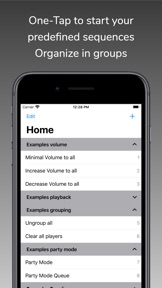
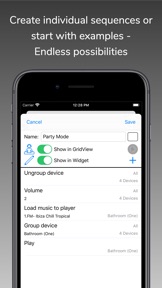
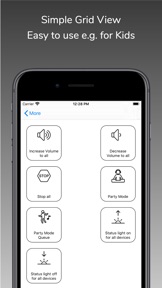
With SonoSequencr you can create individual sequences to set one or multiple Sonos devices with one click.
If you have multiple Sonos devices and for example you just want to play a radio stream on all devices it takes some time to set up. With SonoSequencr you only have to open the app and tap on your created sequence.
Your sequence is processed in background so you can lock your device or use another app.
A few example sequences are included so you can get started right away. Try the "Party Mode"!
SonoSequencr supports and recognizes different locations (e.g home, office, at friends, ...) and only shows up the sequences which are suitable for your current network.
SonoSequencr has a lot of commands e.g:
- Group/Ungroup
- Set Volume (absolute/relative/dynamic)
- Play/Pause/Stop
- Mute/Unmute
- Seek to time
- Load a entry from your 'My Sonos' to your player or your players list
- Load a entry from your TuneIn Radio Stations to your player or your players list
- Set a Sleep Timer (free configurable to seconds/minutes/hours)
- Set to analog input (if your Sonos device has one)
- Set TV mode
- Change Playmode (Repeat/Shuffle)
- Change Equalizer (Treble/Bass) Settings (absolute/relative)
- Speech Enhancement On/Off
- Night Mode On/Off
- Trueplay On/Off (only supported devices)
- Create Stereo pair (only supported devices)
- Separate Stereo pair (only supported devices)
- Switch on/off already paired surround speaker
- Change the level of surround speaker (tv and music playback)
- Change playback-mode of surround speaker (Ambient/Full)
- Set Subwoofer On/Off
- Change Subwoofer level
- Change Audio Delay
- HTTP Request
- Switch to App
- Create and delete alarms (with dynamic alarm time)
- Clear music source (no music in player, like after startup)
To use this app you need a working Sonos system. It was tested with Sonos One, Play1, Play3, Play5 gen1, Play5 gen2, Connect, Connect Amp, the Playbar, Playbase and SYMFONISK deivices.
You can only load music (stream/title/album) to your player if it is saved in your Sonos favorites or your favorites radio stations. You cannot browse all your music sources directly in this app.
It was tested with TuneIn Radio streams, Rdio, Google Music and Deezer but all other services should work also…
The functionality to start sequences automatically to a certain time is only available with a optional in-app-purchase. This auto renewable subscription let you save a individual time on up to 20 sequences when it should be executed. This feature is only available as long as you have a active subscription called "Premium". The subscription will be charged to your iTunes Account and renewed within 24-hours prior to the end of your previous period with the same price and length except you will cancel it in 'Settings' -> 'Manage subscriptions' or your iTunes account settings.
For questions, feature requests or if you have any problems please go to the settings page and use the Online Help, open a support ticket or visit the new support forum.
For terms of use and privacy policy see:
https://celltekk.de/sonosequencr/help/privacy
This is not a official Sonos app.
What's New in Version 5.11.0
- Spotlight search: All sequences and devices are now searchable via Spotlight. If a sequence is selected in search results the sequence is started, if you select a device it gets you directly to the detailed view of this device. The function is enabled by default, but can be disabled in the settings.
- New URL scheme: With the new URL scheme 'sonosequencr://device=xyz' you will be taken directly to the detailed view of the device after starting the app. The URL schema can be copied directly to the clipboard by a long press at the device table (similar to the procedure for sequences).
- Bugfixes
For questions, feature requests or if you have any problems please go to the settings page and use the Online Help, open a support ticket or visit "r/sonosequencr" on Reddit.