AboutTermsPrivacyContact
 
Updating
Canon Camera Connect

Canon Camera Connect

Released: 2015-01-06
© Copyright CANON INC. 2020 All Rights Reserved.
Canon Camera Connect - QR Code
Version 2.6.30
4+
Download on the App Store
Version 2.6.30
4+
Download on the App Store
Released: 2015-01-06
© Copyright CANON INC. 2020 All Rights Reserved.

iPhone Screenshots

Screenshot
Screenshot
Screenshot
Screenshot

iPad Screenshots

Screenshot
Screenshot
Screenshot
Screenshot

Description

Canon Camera Connect is an application to transfer images shot with compatible Canon cameras to smartphone/tablet.
By connecting to a camera with Wi-Fi (direct connection or via wireless router), this application provides the following features:
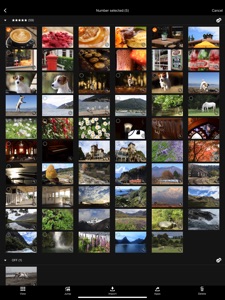
・Transfer and save camera images to a smartphone.
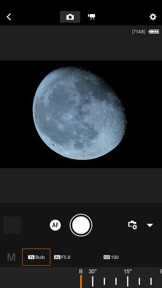
・Remote shoot with live view imaging of the camera from a smartphone.
This application also provides the following features for compatible cameras.
・Acquire location information from a smartphone and add it to the images on the camera.
・Switch to a Wi-Fi connection from pairing status with a Bluetooth enabled camera.
・Remote release of the camera shutter with a Bluetooth connection.
*For compatible models and features, please refer to the following website.
https://global.canon/icc/
-Operating System 
iOS 11.4/12.4/13.5
iPadOS 13.5
-Bluetooth System Requirement
For Bluetooth connection, the camera needs to have a Bluetooth function, and your device needs to have Bluetooth 4.0 or later (supports Bluetooth Low energy technology).
-Compatible File Types
JPEG, MP4, MOV, CR3, CR2
・RAW (CR3/CR2) images can be imported as RAW format by selecting [RAW image save format] > [RAW format] from the [Images on camera] setting while connected to a compatible model (iOS 12.1 or later for CR3).
・Importing RAW (.CR2) format is possible with wireless compatible EOS models and some PowerShot models (G1 X Mark III / G9 X Mark II / G7 X Mark II).
・RAW (CR2/CR3) images are resized and imported into JPEG by selecting [RAW image save format] > [JPEG format].
・RAW burst files cannot be imported to smart devices. Extract the CR3 images from the RAW burst file in advance on the camera side, and then import them to the smart device.
・HEIF (10 bit) files shot with compatible cameras and RAW images shot with [HDR PQ settings] enabled cannot be imported. (They can be saved between apps using the linked mode with the Canon image editing app Canon DPP Express.)
・MOV files and 8K movie files shot with EOS cameras cannot be saved.
・RAW movie files shot with compatible cameras cannot be saved.
・AVCHD files shot with Camcorder cannot be saved.
-Important Notes
・If application does not operate properly, try again after shutting down the application.
・Continued use of GPS running in the background can dramatically decrease battery life. 
・In the case of using Power Zoom Adapter, please set the Live View function to ON.
・The images may include your personal information such as GPS data. Be careful when posting images online where many others can view them.
・Visit your local Canon Web pages for more details.

What's New in Version 2.6.30

Added support for new Canon cameras

Seller

Name

Canon Inc.

Information

Developer

Categories

Version

2.6.30

Size

73.8 MB

Game Center

No

VPP Device Licensing

Yes

Rating

Rated: 4+

Compatibility

iOS 11.0 or later

Devices

iPhone 5s, iPhone 6, iPhone 6 Plus, iPhone 6s, iPhone 6s Plus, iPhone SE, iPhone 7, iPhone 7 Plus, iPhone 8, iPhone 8 Plus, iPhone X, iPhone XR, iPhone XS, iPhone XS Max, iPhone 11, iPhone 11 Pro, iPhone 11 Pro Max, iPhone SE (2nd generation), iPad (5th Generation) Wi-Fi, iPad (5th Generation) Wi-Fi + Cellular, iPad (6th generation) Wi-Fi, iPad (6th generation) Wi-Fi + Cellular, iPad Pro, iPad Pro (Cellular), iPad Pro (9.7-inch), iPad Pro (9.7-inch) (Cellular), iPad Pro 12.9-inch (2nd generation), iPad Pro 12.9-inch (2nd generation) Wi-Fi + Cellular, iPad Pro (10.5-inch), iPad Pro (10.5-inch) Wi-Fi + Cellular, iPad Pro (11-inch), iPad Pro (11-inch) Wi-Fi + Cellular, iPad Pro 12.9-inch (3rd generation), iPad Pro 12.9-inch (3rd generation) Wi-Fi + Cellular, iPad Air, iPad Air (Cellular), iPad Air 2, iPad Air 2 (Cellular), iPad Air (3rd generation), iPad Air (3rd generation) Wi-Fi + Cellular, iPad mini Retina, iPad mini Retina (Cellular), iPad mini 3, iPad mini 3 (Cellular), iPad mini 4, iPad mini 4 (Cellular), iPad mini (5th Generation), iPad mini (5th Generation) Wi-Fi + Cellular, iPad (7th generation) Wi-Fi, iPad Pro 11-inch (2nd generation), iPad Pro 11-inch (2nd generation) Wi-Fi + Cellular, iPad Pro 12.9-inch (4th generation), iPad Pro 12.9-inch (4th generation) Wi-Fi + Cellular, iPod touch (6th Generation), iPod touch (7th generation)

Languages

English, Chinese, French, German, Italian, Japanese, Korean, Portuguese, Russian, Spanish, Turkish

App Store: Customer Ratings

Ratings & Reviews

2.0 of 5 (502 Ratings)

App Store: Customer Reviews

2020-09-14

Planned obsolescence

This app used to work fine with my old phone and now I can’t connect my phone in the camera any longer. Seems like planned obsolescence. Won’t buy a canon camera again.
MARINMD
Version 2.6.30
2020-09-11

Utter crap

Utter crap. Does not connect. Connects then says cannot find camera while connected. Lol.
Used to be Mick
Version 2.6.30
2020-09-08

Doesn’t work with iPhone

Used this app with my iPad and it worked great. Can’t get camera to connect with iPhone even though I have followed all the steps many times.
ddddddddddddfddf
Version 2.6.30
2020-09-07

Horrible app

I wasSo excited to get my camera and when I first got it it connected to the app just fine. Now that it has been updated I cannot for the life of me connect the phone to my camera to download pictures which is the whole purpose of buying this camera..very disappointed the app sucks big-time.I have tried every online help forum that I could find and it is still utterly useless to me now. I would not recommend canon or it’s app to anyone
life_enthusiast22
Version 2.6.30
2020-09-06

Great hardware. TERRIBLE SOFTWARE

Canon cameras are great. But their software sucks, let’s be honest. I’ve buy a 1600$ camera which I’m trying to connect with my phone without any success. That’s a shame.
marc-andre 20019
Version 2.6.30
2020-08-29

Easy to use

Follow the on screen instructions and easy to use.
Farboy-13
Version 2.6.30
2020-08-23

Garbage

So convoluted to connect to 5D Mark four. Can’t get it to connect to my PowerShot G3 X either
Ipixu
Version 2.6.30
2020-08-22

Not good

I’ve had this app for months and it always worked good. Just recently it stopped connecting to my camera. It seems I’ve tried everything and it still will not connect anymore. This app is currently useless.
Teen1999
Version 2.6.30
2020-08-10

Good, but...

Connection to your phone can be a bit difficult at times, but once connected, the app is quite useful in transferring images from camera to phone. Staying connected, well that is sometimes an issue. All in all it’s not a bad app.
Wolfeyez
Version 2.6.30
2020-08-08

Great app

Really enjoying this app. Easy to transfer photos wirelessly to iPhone or iPad. Not sure why so many negative reviews.
canadalikesapps
Version 2.6.30
2020-07-28

Unusable!!!

It literally will not stay open long enough for the app to be usable it crashes before I can connect a camera.
TheCoolJack
Version 2.6.30
2020-07-22

Unusable

It’s pretty much useless , can’t do ANTHING is there a remote for eos mirrorless ? Cuz I am just about to delete this app
Joshyi3
Version 2.6.30
2020-07-18

Can’t connect to iPhone

Used to work fine but now I can’t connect, regardless of any help instructions I’ve read.
Everyday Whimsy
Version 2.6.30
2020-07-14

Not connecting

It’s so difficult to always connect my camera. You should really consider an update to make it easier.
GlossyJungle
Version 2.6.30
2020-07-13

Gets worse with every update

When I first bought my 5Dmk4 in 2018? I loved the app and was happy to sell my CamRanger with my 5Dmk3. I now regret that decision. With every update the speed of connecting to the camera slows down, communication with camera is slower, always a lag when changing settings or focusing that was not there 2 years ago and the distance you can be from the camera and have it function is less now than it was 2 years ago. One with think with every new version the app would improve, sadly that is not the case with this one.
M.B.€
Version 2.6.30
2020-07-13

Works like it should

A lot of the bad reviews seem to be for an older version. My experience getting photos off my camera(90D) onto my phone and using the remote shutter option have worked flawlessly.
Manudrones
Version 2.6.30
2020-07-10

Garbage

This app is so bad. I’ve tried for months now to connect my camera but the app does nothing. It won’t connect to my camera. I’ve tried phone, computer absolutely nothing . I need these photos but I can’t get them to a single device. The app tells me how to connect it but stops halfway trough. Plus it just won’t connect to my camera even after I followed the instructions. The first ever time I downloaded this app I got my camera connected but never again.
Chibikaneki
Version 2.6.10
2020-07-08

My camera isn’t supported.

The camera I spent money on just for photos isn’t supported. It is an EOS Rebel T1i. Please make it so that I can use it on this app!
Rose Landd
Version 2.6.10
2020-07-05

Flawless

Despite the overwhelming negative reviews, this app has worked perfectly for me on my iPhone XS Max and has paired with no issues with my 6D.
Khorog
Version 2.6.10
2020-06-19

Does Not Work Properly!

The connectivity on this app is horrible!!! The amount of time you spend trying to connect to your smart device is ridiculous! The Canon is awesome but this app really sucks. They need to update it.
Lcurt
Version 2.6.10
2020-06-18

Videos do not transfer to ipad

Camera and software for photos is great. BUT it will not transfer video files to an updated ipad version 13.5. This needs to be fixed. Canon needs to remain up to date with all other softwares.
runlikethewolf
Version 2.6.10
2020-06-16

It works well

I don’t fully understand all of the negative reviews. For me, this app works perfectly with my phone, and even though it is a bit of a hassle to set up the wifi to my phone so I am able to get the photos onto my phone from my camera, it is a lot
cheaper than me having to buy something I can connect to my computer and put the SD card into, which can be anywhere from $20-50. Nonetheless, you save money!
thatoneolive
Version 2.6.10
2020-06-13

Easy to connect & use

I just downloaded the app with my new camera and had 0 trouble. I connected it through bluetooth and was able to see all my pictures and save them with ease.
AshMarLow
Version 2.6.10
2020-06-10

Sorry but not sorry

This app sucks when we talk about connectivity. It’s even harder time to time to connect to my camera when suppose to be easier. The experience must be gratifying not a pain *****. Please do something.
Hugocge
Version 2.6.10
2020-06-08

Canon apps

Piece of cake connecting to iPhone and or iPad app works great. I would highly recommend this app.
2 RW RL
Version 2.6.10
2020-06-06

No Issues For Me

Interesting. This app has some bad reviews. I had no issues. Connected like a dream and worked extremely well!
RusJeffrey
Version 2.6.10
2020-05-31

When/IF it works it’s pretty good

HOWEVER getting this app to connect to cameras is a real pain. It’s lots of button pressing, lots of turning Wi-Fi on and off and connecting, reconnecting and re re reconnecting to try establish a link to the camera then FINALLY it connects well...
After all this. If your camera or phone then go to sleep after a couple of minutes, 90% of the time you ba e to start the whole process all over again.
This is not entirely the fault of the canon software though, iPhones are very picky with connecting to a Wifi point that doesn’t have internet. Basically tying to protect less educated users from having a “bad experience” from not getting internet when they think they should.
At the end of the day, the connection is just too much of a pain to have to go through the process each time a device disconnects to be worth using.
The only successful way I have found of keeping the 2 devices paired is to disable sleep modes / auto power off on both phone and camera, this obviously is no good for battery life.
TomCAN2013
Version 2.6.10
2020-05-18

Please develop a functional app

Canon should be embarrassed by this app. Their hardware and support are fantastic but this rarely ever connects to my smartphone properly. Spend some time developing a quality app and I would wager that Canon users would even pay for it.
TheJarC
Version 2.6.10
2020-05-16

Video Export????

Can you add the video exporting option?!
Pawan_1
Version 2.6.10
2020-05-14

Not Impressed

I rarely right reviews because it’s such a waste of time. But I feel like this time is worth it as 1. Canon is an amazing camera company 2. They provide their customers with a terrible app to use to wirelessly download their photos to their phone and other devices. I’ve had nothing but problems with this app and recommend finding other ways to download your photos. Also canon, as a businessman, your weakest link is not your products, it’s your app, please poor some infrastructure into make it more customer friendly. All I have to say is holding a canon camera is an amazing experience and then I come to download my photos and the experience is frustrating and time consuming. Please canon fix this soon.
Inowhatudidlastnite
Version 2.6.10
2020-05-14

Crashes

App won’t even launch on an iPhone XS, what a joke
Azaerin
Version 2.6.10
2020-05-13

Cannon app

I upgraded my iPhone to a XR, the app made me seemingly make a new account and refuses to connect to my phone though camera is connected to wifi. As well, the app has no information as to how to fix this and whether to play with settings on app or on camera.
Elizabeth_1234567
Version 2.6.10
2020-05-08

Not very user friendly

I got my SL2 to connect to wifi and Bluetooth but not without time and frustration. I’m a new DSLR user so maybe it’s just the learning curve for me
Vessygirl
Version 2.6.10
2020-05-07

-10

Probably was developed by single freshman level person with no testing or anything that usually expected to happen for a software for a brand like Canon. I was not able to connect the app to camera till the end of the event. Fantastic app in a categories "shortest life in any device", "most useless", "most time wasting", "best for trashcan".
elgoog.az
Version 2.6.10
2020-05-06

Live veiwing ?

Why is the major function of this app not working ? It’s been months and there has been no update or changes. Please fix this
Duggs7u
Version 2.6.10
2020-05-03

Worst app ever

Ever since the early version of this Ive never had this app work twice in a row. Im not kidding
It’s junk
Canon please just let my app and camera interface for, say, more than one week before it glitches and I have to reinstall and reboot everything
Junk
TorontoBenso
Version 2.6.10
2020-05-03

Aweful

Please fix this, it doesn’t work
TheraRego
Version 2.6.10
2020-04-16

Canon?????

Its a pain to use. It wont even connect via bluetooth or wifi.
70-200mm
Version 2.6.10
2020-04-13

Compatibility issue

Not compatible for iphone11 :(
KeiaTrent
Version 2.6.10
2020-04-13

Not compatible for iphone 8?

Wifi not working for iphone8. Please help
demonikodemoniko
Version 2.6.10
2020-04-12

Très mauvais

La pire application de transfère photo que je connaisse. Je dois tout reconfigurer a chaque fois que je veux transférer mes photos. Vraiment désolant
Nat2646
Version 2.6.10
2020-04-10

Cannot film videos with this app!!

You can only use this app to take photos remotely on your Canon by using your iPhone app. Well, you can also view photos BUT YOU CANNOT START OR STOP VIDEO RECORDING. Sheesh Canon, why can’t you include the option to start and stop video recording???
TorontoCityGirl
Version 2.6.10
2020-04-07

Not reliable

Works great if you’re trying to photograph a stationary object. The remote shutter option seemed too good to be true, and in practice it’s just not reliable. The remote shutter for my T1i works better than this. It doesn’t matter how good the connection between the camera and the phone is, the live view on the phone is always laggy and behind. I had no issues connecting it to my camera, other than it being kind of a slog to go through every time. Could have really used a quick connect feature here.
janus270
Version 2.6.10
2020-04-05

Won’t connect

I won’t get back the 2 1/2 hours trying to connect my 70D to my iPhone. Sorry Canon, this app is horrible. I just came from using Nikon’s app and it’s flawless and fast. I can download raw pics from start to finish in 10 seconds.
Dnanaj
Version 2.6.10
2020-04-03

frustrating

why did you update this canon? why?
everything used to work moderately well but now every time i go to download pictures off of my camera i have to go through a painful process of trying to connect my phone. which never seems to work ???? the ‘easy connection guide’ has nothing to do with how to actually connect your devices and i always have to [try] to reset my wifi on my camera in order to connect my phone but it never seems to make a difference. now i’m left here, with a camera, and pictures on it, but nowhere to put them.
and judging by all these other reviews, it doesn’t seem like i’m the first person who’s gone through this problem.
please try and change something to fix this. :( i love my photos
#Valued Customer
Version 2.6.10
2020-03-25

Unbelievable how a top camera maker...

Makes such a useless poorly designed app. It is worth zero stars really. Pls redesign it and make it a worthy companion to your cameras
jumpin'mack
Version 2.6.10
2020-03-21

Rubbish!

Never got connect since update. Almost let me escape from the canon system. Zero star.
Lalalalaniu
Version 2.6.10
2020-03-19

Frustrating

This app is frustrating, connection is poor and drops frequently. Not ideal for video monitoring. Set up is time consuming and constant every time the phone or camera sleep it needs reconnection. Transfer speeds are slow; way slower than airdrop which is technically I would have preferred. Also needs connection to wifi password at new locations which isn’t always available.
Canon you have to talk to some developers and help make this app more like DJI Osmo app. Even if you have to plug your phone into the camera for reliabke connection.
Halifaxstudios
Version 2.6.10
2020-03-08

Très bien

Cette app est très pratique.j’ai plus besoin de mon pc pour transférer mes photos!!
FlooflooYT&Mindy ytb
Version 2.6.10