AboutTermsPrivacyContact
 
Updating
PDF Reader Pro – Lite Edition

PDF Reader Pro – Lite Edition

Released: 2014-10-08
© 2014-2020 PDF Technologies, Inc. All Rights Reserved.
PDF Reader Pro – Lite Edition - QR Code
Version 1.8.6
4+
Download on the App Store
Version 1.8.6
4+
Download on the App Store
Released: 2014-10-08
© 2014-2020 PDF Technologies, Inc. All Rights Reserved.

iPhone Screenshots

Screenshot
Screenshot
Screenshot
Screenshot
Screenshot
Screenshot
Screenshot
Screenshot

iPad Screenshots

Screenshot
Screenshot
Screenshot
Screenshot
Screenshot
Screenshot
Screenshot

Description

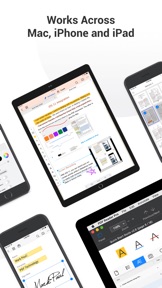
PDF Reader Pro is an essential app for anyone who reads, highlights, OCR, signs, convert, create, protect and fills out PDFs on their iPhone and iPad. This full-featured powerhouse makes it easy to organize, annotate and edit your PDF library. Import files from your computer or the cloud, then complete forms, add freehand drawings and audio notes and more.
PDF Reader Pro offers even more - merge and combine multiple documents, split your PDF into several files, insert pages from another PDF, insert photos or hyperlinks to your PDF files, Convert PDF to Word and any other Microsoft Office® formats. With support for reading files from popular productivity suites, it’s a convenient way to take the office anywhere you go.
PDF Reader Pro Edition for Professional is your last PDF application you would ever need.
READ
・ Reading modes - Multi-tab viewing(iPad only), full-screen, horizontal or vertical orientation, auto scroll
・ Presentation - Slideshow Mode to present your PDF as PPT
・ Night mode - Night mode supported for long time reading to comfort eyes
・ Bookmark - Make bookmarks when it comes to intuitive navigation through PDF files
・ Smart Crop - Automatically hide the white margins of your PDFs
・ DRM - supports Vitrium* protected PDF files (Like University of Phoenix ebooks)
・ Enable full text search, scroll, zoom in and out.
ANNOTATE
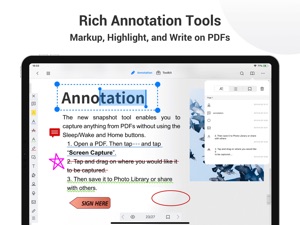
・Classic tools - Annotate your PDF with highlight, underline, strikethrough, note, freehand, text box, anchored note, rectangle, circle, line and etc.
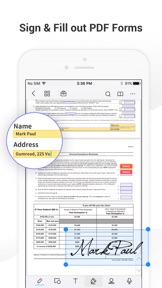
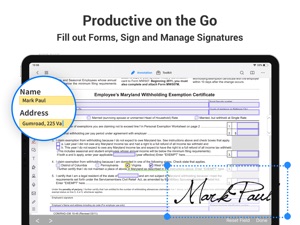
・Sign - Create multiple signatures for any situations with trackpad, keyboard or images.
・Stamps - Insert predesigned stamps such as Approved, Not Approved, Confidential and more.
・Link - Now linking any part of the text to a different page or even a website is fast.
Fill FORMS
・ Work with static PDF forms created in Adobe Acrobat.
・ Fill out any PDF forms with interactive fields such as text fields, checkboxes, radio buttons, combo boxes, list boxes and etc.
CONVERT PDF
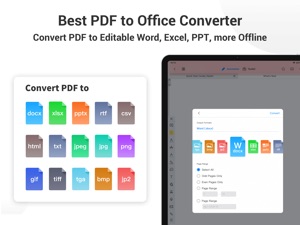
· Export from PDF to Microsoft Word (.docx), PowerPoint (.pptx), Excel (.xlsx), RTF, Text, Image, HTML, CSV, and more Offline
・ Convert MS Office documents, iWorks, web content, and images to PDFs.
・ Create a new PDF as a blank PDF or from your clipboard content
PAGE EDITOR
・ Merge & Split - Split documents into multiple documents or combine multiple pages into a new one.
・ Extract - Extract the desired pages to create a new PDF.
・ Rotate, rearrange, append, and delete PDF pages.
PDF Editing Toolkit
・Watermark - Add fantastic watermarks to keep your documents safe and professional.
・Extract images from PDFs
・Flatten - Flatten PDF to make the contents static.
OCR
· Convert scanned PDF files or pictures into editable and searchable PDFs or TXT files. 50+ languages supported!
· OCR helps extract texts from scanned PDF forms or images.
PROTECT CONTENT WITH PASSWORD AND ENCRYPTION
・ Passcode - Restrict access to PDF Reader with a password.
・ Encrypt - Protect your PDF files from unauthorized reading with a password.
Scanner
・Make continuous scans and automatically detect edges of scanned objects.
Text-to-Speech(TTS)
・ Support a total of 36 voices for 26 languages.
WORK IN THE CLOUD
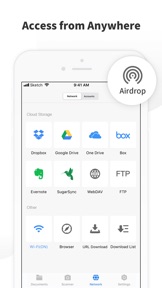
・ Store and secure files on iCloud Drive, Dropbox, OneDrive, Google Drive, Evernote, Box, FTP, WebDav, etc.
Backup Files between iOS Devices, Mac and PC
・ Connect your iPhone/iPad with desktop for transferring files using USB or WiFi connection.
Support Various File Types
・ MS Office documents(docx, pptx)
・ iWork files (key, pages, numbers)
・ image files (png, jpg, thm, jpeg, tif, tiff, gif, bmp)
・ Compressed files (zip, rar)
・ winmail.dat
・ audio files (aiff, aifc, wav, mp3)
・ video files (mov, mp4, mpv)
・ Comic files (cbr, cbz,ePub)
・ HTML files and Safari webarchives
・ Other file formats
MAKE THE BEST OF PDF READER PRO, AND TONS OF OTHER FEATURES!
Have any feedback, comments or issues? Please contact us directly at support@pdfreaderpro.com

What's New in Version 1.8.6

Now you can enjoy the best PDF to Office Converter! Export from PDF to Microsoft Word (.docx), PowerPoint (.pptx), Excel (.xlsx), RTF, HTML, Text, Image, CSV, and more Offline
・PDF to Word. With PDF to Word Converter, it’s easy to start new projects without starting over. Just convert your PDFs to Word files that are easy to update. Fonts and formatting get converted, too.
・PDF to Excel. Need to edit and analyze spreadsheet data but all you have is a PDF? Don’t spend time reentering numbers. Turn that PDF table into a formatted Excel file — columns, layouts, and all.
・PDF to PowerPoint. When you use PDF Reader Pro to convert PDFs to PowerPoint, you know your formats will be saved, too. So you don’t have to bother redoing bullets, tables, objects, or master layouts.
・PDF to RTF. Turn PDF documents into Rich Text Format (RTF) files that can be opened in virtually any word processor.
・PDF to Image. Convert PDFs to JPG, PNG, bmp, gif, tiff, tga and jp2
・OCR (Optical Character Recognition). Convert scanned PDF & images into editable and searchable PDFs or TXT files. 50+ languages supported!
・Minor bug fixes and performance improvements.
If you want to thank our never-resting developers, please write a review or recommend PDF Reader Pro to your friends and teammates.
We believe these features meet all your needs. If not - just drop us a line at support@pdfreaderpro.com, Stay tuned!

Seller

Name

PDF Technologies, Inc.

Information

Categories

Version

1.8.6

Size

166.7 MB

Game Center

No

VPP Device Licensing

Yes

Rating

Rated: 4+

Compatibility

iOS 10.0 or later

Devices

iPhone 5, iPhone 5c, iPhone 5s, iPhone 6, iPhone 6 Plus, iPhone 6s, iPhone 6s Plus, iPhone SE, iPhone 7, iPhone 7 Plus, iPhone 8, iPhone 8 Plus, iPhone X, iPhone XR, iPhone XS, iPhone XS Max, iPhone 11, iPhone 11 Pro, iPhone 11 Pro Max, iPhone SE (2nd generation), iPad (4th Generation) (Wi-Fi), iPad (4th Generation) (4G), iPad (5th Generation) Wi-Fi, iPad (5th Generation) Wi-Fi + Cellular, iPad (6th generation) Wi-Fi, iPad (6th generation) Wi-Fi + Cellular, iPad Pro, iPad Pro (Cellular), iPad Pro (9.7-inch), iPad Pro (9.7-inch) (Cellular), iPad Pro 12.9-inch (2nd generation), iPad Pro 12.9-inch (2nd generation) Wi-Fi + Cellular, iPad Pro (10.5-inch), iPad Pro (10.5-inch) Wi-Fi + Cellular, iPad Pro (11-inch), iPad Pro (11-inch) Wi-Fi + Cellular, iPad Pro 12.9-inch (3rd generation), iPad Pro 12.9-inch (3rd generation) Wi-Fi + Cellular, iPad Air, iPad Air (Cellular), iPad Air 2, iPad Air 2 (Cellular), iPad Air (3rd generation), iPad Air (3rd generation) Wi-Fi + Cellular, iPad mini Retina, iPad mini Retina (Cellular), iPad mini 3, iPad mini 3 (Cellular), iPad mini 4, iPad mini 4 (Cellular), iPad mini (5th Generation), iPad mini (5th Generation) Wi-Fi + Cellular, iPad (7th generation) Wi-Fi + Cellular, iPad Pro 11-inch (2nd generation), iPad Pro 11-inch (2nd generation) Wi-Fi + Cellular, iPad Pro 12.9-inch (4th generation), iPad Pro 12.9-inch (4th generation) Wi-Fi + Cellular, iPod touch (6th Generation), iPod touch (7th generation), Apple Watch Series 4, Apple Watch Series 5

Languages

English, Chinese, Czech, French, German, Italian, Japanese, Korean, Portuguese, Russian, Spanish, Thai

App Store: Customer Ratings

Ratings & Reviews

4.0 of 5 (89 Ratings)

App Store: Customer Reviews

2020-07-08

Very good program!

I'm glad I found this program for my iPad, it does exactly what I need it for.
this_is_just_stupid
Version 1.8.3
2020-05-27

Do Not Purchase The Premium Feature

I was using the Lite version but needed the Premium features. I thought I had purchased the upgrade but nothing showed in the app to confirm this, nothing in My Purchases. Nothing changed at all. So I went ahead and purchased the PDF Pro version. I now have been charged for both versions and can not get a refund. It is really a very poor business practice to have two versions offered and have them compete in features.
ECS Doug
Version 1.8.3
2020-04-17

Jump out of the app

The app is great but it jumps out of the app while I try to search for key words in text books!!!
etdubdhnts
Version 1.8.3
2019-12-10

Works well

Works well for me.
Marc9473
Version 1.8
2019-11-16

No UNDO in annotation

The app is a great reader. I like being able to sort my documents in different folders. It zooms very nicely which is great for reading without my glasses. My big big complaint is that while the annotations are great, there is no UNDO function. So if I highlight some text and change my mind, it is highlighted for ever. I searched the internet with no result. Some sites refer to a back arrow on the annotation toolbar. It is simply not there.
C.Duval
Version 1.8
2019-09-15

Crap

Was going away, so sent some PDF files for ref. onto iPad. When I came to open the files when I had arrived at my destination, when I clicked on a file, it took me into a page to purchase the pro version, I couldn’t open or see my files.
What a waste of time this program is...0 stars, but won’t let you submit, hows that for controlling rating....
dekfit
Version 1.7
2019-09-08

Mr GHELLAB Rezak

Merci beaucoup
zmalat
Version 1.7
2019-07-06

Free?

Is this a free app??
roseyanna02
Version 1.6.1
2019-04-29

Good but could be better

Very responsive but could do without the ads.
luck1966
Version 1.5.4
2019-02-12

Trop de publicités

Je préférais la version précédente qui ne comprenait pas de publicités. C’est agaçant de voir apparaître une publicité chaque fois qu’on souhaite enregistrer ou ouvrir un fichier. Sinon les options sont bien.
Sylsco1602
Version 1.5.4
2019-02-04

Bugs

Nice design.
Highlighting and underlining tools are not very accurate.
Apps keeps shutting down and losing my progress on adding highlights
solotutti
Version 1.5.4
2019-01-31

Excellent

I love it
Lolo the moon
Version 1.5
2018-09-23

Bugs

Locked up with my phone with non functioning buttons. Had to do a hard reboot.
appDevious
Version 1.4
2017-09-20

great

great app
Yilomka
Version 1.1
2017-09-04

Acrobat Pro

This is close to the desktop version and is great for working in PDF on your phone.
The only thing that I can't do is rotate the PDF.
Colleenbalaban
Version 1.1
2016-01-14

PDF reader

Great App!
Cancerean
Version 1.0
2015-04-23

Great App

Very convenient & easy to use.
Aminjet
Version 1.0