AboutTermsPrivacyContact
 
Updating
Phraseboard Keyboard

Phraseboard Keyboard

Released: 2014-09-23
© Daniel Soffer
Phraseboard Keyboard - QR Code
Version 6.1
4+
Download on the App Store
Version 6.1
4+
Download on the App Store
Released: 2014-09-23
© Daniel Soffer

iPhone Screenshots

Screenshot
Screenshot
Screenshot
Screenshot
Screenshot
Screenshot

iPad Screenshots

Screenshot
Screenshot
Screenshot
Screenshot
Screenshot
Screenshot

Description

Tired of typing the same response over and over all the time? Phraseboard customizes and categorizes your keyboard with easy to access phrases.
Add a category and a few common phrases, you can immediately edit, hear and translate the text and then share it on Facebook, Twitter, Instagram or simply send by email, LINE or as SMS.
Customize your phrases and keyboard with unique fonts and colors!
100+ Creative fonts to choose from!
Translates to more than 59 languages!
Features:
• Full keyboard with creative fonts.
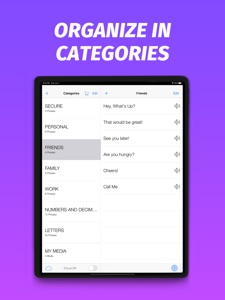
• Create your most common phrases and sort them by categories.
• Use your phrases in any App right in your keyboard.
• Change the font of phrases to match the look and feel of your choice.*
• Design your keyboard styles including button and background colors.*
• Choose which fonts are enabled and manage their order.
• Change keyboard and button size
• Translate your phrases to multiple languages and use them directly in your keyboard.*
• Speak mode will read your phrases out loud.*
• Use all types of Emojis to express your creativity.
• Simply tap a button to send off a quick reply.
• Great tool for business professionals and social media creators!
Also:
• Send GIFs and images in any app.
• Share your location with a single tap.
• Switch between various fonts without changing phrases.*
• Choose from a large collection of fonts.*
• Customize font size.*
• Customize font color.*
• Protect your phrases using the Secure category.
• Add phrases directly from Notification Center using the Phraseboard Widget.
• Sync you’re phrases in all your devices using iCloud.
• Use directly inside your favorite social media app like Instagram, Facebook or Twitter.
• Use directly in iMessage, SMS or Apps.
• Create auto reply text that helps with quick and easy typing.
• Communicate with confidence using phrase shortcuts.
(*) Requires an active subscription
REMEMBER: In order to show you’re phrases on the keyboard you must allow OPEN ACCESS. To allow it please go to Settings > Keyboard, click on Phraseboard and turn the switch ON.
( Phraseboard ONLY needs open access to be able to show your custom phrases on the keyboard. We never save or log any of your keystrokes).
Phraseboard Premium Subscription Information
Joining Phraseboard Premium enables a 3-day free trail followed by a monthly membership fee.
• Subscription automatically renews unless auto-renew is turned off at least 24-hours before the end of the current period.
• Account will be charged for renewal within 24-hours prior to the end of the current period.
• Subscriptions may be managed by the user and auto-renewal may be turned off by going to the user's Account Settings after purchase.
• Any unused portion of a free trial period, if offered, will be forfeited when the user purchases a subscription, where applicable.
Privacy Policy : https://phraseboard.wixsite.com/phraseboard/untitled-c82w
Terms of Service : https://phraseboard.wixsite.com/phraseboard/terms
What's New in Version 6.1

We now have 100+ Fonts to choose from!
Keep your fonts organized with our new Font Manager.

Seller

Information

Developer

Categories

Version

6.1

Size

149.6 MB

Game Center

No

VPP Device Licensing

Yes

Rating

Rated: 4+

Compatibility

iOS 10.0 or later

Devices

iPhone 5, iPhone 5c, iPhone 5s, iPhone 6, iPhone 6 Plus, iPhone 6s, iPhone 6s Plus, iPhone SE, iPhone 7, iPhone 7 Plus, iPhone 8, iPhone 8 Plus, iPhone X, iPhone XR, iPhone XS, iPhone XS Max, iPhone 11, iPhone 11 Pro, iPhone 11 Pro Max, iPhone SE (2nd generation), iPhone 12, iPhone 12 Pro, iPhone 12 Pro Max, iPhone 12 mini, iPad (4th Generation) (Wi-Fi), iPad (4th Generation) (4G), iPad (5th Generation) Wi-Fi, iPad (5th Generation) Wi-Fi + Cellular, iPad (6th generation) Wi-Fi, iPad (6th generation) Wi-Fi + Cellular, iPad Pro, iPad Pro (Cellular), iPad Pro (9.7-inch), iPad Pro (9.7-inch) (Cellular), iPad Pro 12.9-inch (2nd generation), iPad Pro 12.9-inch (2nd generation) Wi-Fi + Cellular, iPad Pro (10.5-inch), iPad Pro (10.5-inch) Wi-Fi + Cellular, iPad Pro (11-inch), iPad Pro (11-inch) Wi-Fi + Cellular, iPad Pro 12.9-inch (3rd generation), iPad Pro 12.9-inch (3rd generation) Wi-Fi + Cellular, iPad Air, iPad Air (Cellular), iPad Air 2, iPad Air 2 (Cellular), iPad Air (3rd generation), iPad Air (3rd generation) Wi-Fi + Cellular, iPad mini Retina, iPad mini Retina (Cellular), iPad mini 3, iPad mini 3 (Cellular), iPad mini 4, iPad mini 4 (Cellular), iPad mini (5th Generation), iPad mini (5th Generation) Wi-Fi + Cellular, iPad (7th generation) Wi-Fi + Cellular, iPad Pro 11-inch (2nd generation), iPad Pro 11-inch (2nd generation) Wi-Fi + Cellular, iPad Pro 12.9-inch (4th generation), iPad Pro 12.9-inch (4th generation) Wi-Fi + Cellular, iPad Air (4th Generation) (Wi-Fi), iPad Air (4th Generation) (Wi-Fi + Cellular), iPad (8th generation) Wi-Fi, iPad (8th generation) Wi-Fi + Cellular, iPod touch (6th Generation), iPod touch (7th generation)

Languages

English, Chinese, French, German, Hebrew, Italian, Japanese, Portuguese, Spanish, Thai

App Store: Customer Ratings

Ratings & Reviews

4.0 of 5 (2 Ratings)

App Store: Customer Reviews

2017-01-18

So Productive....

Love this app. If you get annoyed typing the same sentence, same address, phrase, contact info or what ever it be then get this app! It's easy to configure. It also syncs to your icloud so you don't have to set it up all over again. Smart.
Once you customise your most used phrases/templates/links/websites/important info into the keyboard, its gravy. Makes everyday input nice and easy.
Levidicuz
Version 2.4
2015-07-05

Very handy!

I don't use this much, but I'm sure glad it's there when I need it.
Pauljrush
Version 2.2
2015-04-15

Really helpful

I use this for tumblr and it's great. Although it would be better if we could put titles on the phrases since I usually have to search up if it's the right tags on Tumblr. :/
Anomanous0101
Version 2.2
2015-02-27

Fully loaded and free

Since ios 8 keyboard shortcut's mess up, have tried kuaiboard(free version), opentype(free).
Kuaiboard was good;
likes - support multiple line phrase, wheel entry selector
Dislikes - limit on # of entry with option to upgrade to pro at $2.29.
Opentype;
Likes - functional and free
Dislikes - not support multiple line phrase,
Pb meets both of good, free and no limit. Only suggestion to add is 1) when edit entry, option to interchange categories and 2) "return/enter" keyboard.
Bbbbbbrrrrrrrrrrrrrrrrr
Version 2.1.1