Updating


±0
#86 in Top Paid Apps > Shopping
±0
#49 in Top Paid iPad Apps > Shopping
iPhone Screenshots




iPad Screenshots


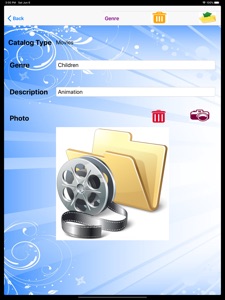


Description
Media Catalog is created to help you keep a catalog of your collection of movies, game, music, etc. The catalog will be grouped based on the catalog type and genre. You have the option to print (single copy, multiple copies, or page range), post on Facebook, display pdf file, SMS or email to your friends.
There are four functions available:
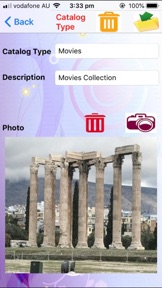
Manage Catalog Types - Enter the catalog types (e.g. movies, games, music), description and photo. You can select the catalog type photo from your photo album, delete selected photo or take a new photo. To search for a catalog type, simply enter the name and the description and photo will be shown. You can then change the description or photo if you wish. You can also delete unwanted catalog types. Deleting a catalog type will also delete all items and genres under that catalog type.
Manage Genres - Enter the genre (e.g. drama, horror, etc.), description and photo. You can choose the genre photo from your photo album, delete selected photo, or take a new photo. To search for a genre, simply enter the genre name and the genre details will be displayed. You will also be able to change the description and the photo. You can also delete unwanted genres. Deleting a genre will delete all items under that genre.
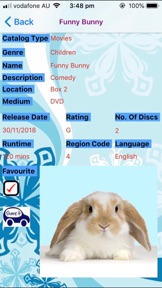
Manage Items - Details entered include name, description, location, medium, release date, rating, no. of discs, runtime, region code, language, photo and favourite. You can choose the photo from your photo album or take a new one. To search for the item, simply enter the name and the details will be displayed. You then have the option to change any of the details and the photo.
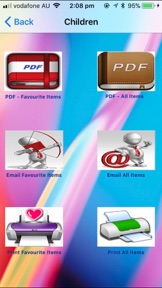
Display Catalog - There are two functions. You can display a chosen item in the catalog. You can either print the item details to an iphone compatible printer, display the PDF file, SMS the item details, post on Facebook or email the item. A pdf file of the item will be attached to the email and a copy of the item details will be displayed in the email body. The Facebook post will include the item details and a photo. The second function allows you to email, display PDF or print all items in a genre or only your favourite items. The pdf file can also be sent to WhatsApp, Messenger, iBooks, Yahoo Mail, Evernote, Notes, Viber, iCloud Drive, etc.
There is also a 'Help' button to guide you in using this app.
What's New in Version 1.0.18
Added Launch screen. Improve layout.
Information
Developer
Categories
Version
1.0.18
Size
39.1 MB
Game Center
No
VPP Device Licensing
Yes
Rating
Rated: 4+
Compatibility
iOS 8.0 or later
Devices
iPhone 4S, iPhone 5, iPhone 5c, iPhone 5s, iPhone 6, iPhone 6 Plus, iPhone 6s, iPhone 6s Plus, iPhone SE, iPhone 7, iPhone 7 Plus, iPhone 8, iPhone 8 Plus, iPhone X, iPhone XR, iPhone XS, iPhone XS Max, iPhone 11, iPhone 11 Pro, iPhone 11 Pro Max, iPhone SE (2nd generation), iPad 2 (Wi-Fi), iPad 2 (3G), iPad (3rd Generation) (Wi-Fi), iPad (3rd Generation) (4G), iPad (4th Generation) (Wi-Fi), iPad (4th Generation) (4G), iPad (5th Generation) Wi-Fi, iPad (5th Generation) Wi-Fi + Cellular, iPad (6th generation) Wi-Fi, iPad (6th generation) Wi-Fi + Cellular, iPad Pro, iPad Pro (Cellular), iPad Pro (9.7-inch), iPad Pro (9.7-inch) (Cellular), iPad Pro 12.9-inch (2nd generation), iPad Pro 12.9-inch (2nd generation) Wi-Fi + Cellular, iPad Pro (10.5-inch), iPad Pro (10.5-inch) Wi-Fi + Cellular, iPad Pro (11-inch), iPad Pro (11-inch) Wi-Fi + Cellular, iPad Pro 12.9-inch (3rd generation), iPad Pro 12.9-inch (3rd generation) Wi-Fi + Cellular, iPad Air, iPad Air (Cellular), iPad Air 2, iPad Air 2 (Cellular), iPad Air (3rd generation), iPad Air (3rd generation) Wi-Fi + Cellular, iPad mini (Wi-Fi), iPad mini (4G), iPad mini Retina, iPad mini Retina (Cellular), iPad mini 3, iPad mini 3 (Cellular), iPad mini 4, iPad mini 4 (Cellular), iPad mini (5th Generation), iPad mini (5th Generation) Wi-Fi + Cellular, iPad (7th generation) Wi-Fi + Cellular, iPad Pro 11-inch (2nd generation), iPad Pro 11-inch (2nd generation) Wi-Fi + Cellular, iPad Pro 12.9-inch (4th generation), iPad Pro 12.9-inch (4th generation) Wi-Fi + Cellular, iPod touch (5th generation), iPod touch (6th Generation), iPod touch (7th generation)
Languages
English
App Store: Customer Ratings
Ratings & Reviews
1.0 of 5 (1 Rating)
App Store: Customer Reviews
No Entry