AboutTermsPrivacyContact
 
Updating
Gift Exchange Mobile

Gift Exchange Mobile

Released: 2014-09-09
© 2019 wilsonware.com
Gift Exchange Mobile - QR Code
Version 1.1.4
4+
Download on the App Store
Version 1.1.4
4+
Download on the App Store
Released: 2014-09-09
© 2019 wilsonware.com

iPhone Screenshots

Screenshot
Screenshot
Screenshot
Screenshot
Screenshot

iPad Screenshots

Screenshot
Screenshot
Screenshot
Screenshot

Description

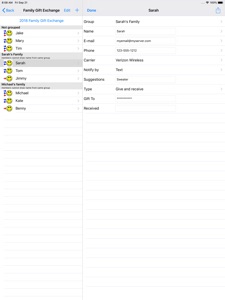
The easy and fun way to do your name drawings for gift exchanges. Participants may be selected from contacts or entered manually. Participants may be selected to notify by email or text. The text option even works with wifi only devices (iPad or iPod Touch) because it uses the various carriers email to SMS gateways for sending. Notification messages may be customized. The person running the app does not need to see the names drawn.
You may group your participants so that they will not draw a name of someone in the same group. This is often used for spouses. The app also maintains exchange history and will prevent participants from drawing the same name as the previous drawing.
Each participant may be designated as "Gives and receives a gift in shared exchange", "Gives and receives in shared exchange, also may give to receive only participant(s)", "Does not receive gift, may give to receive only participant(s)", or "Does not give gift, receive only. For example, child". The results can be printed to an Airprint printer for each participant without email, or who want a printed copy. History display shows the name drawn and gift given for each person for previous drawings.
There is no advertising. Your data is on your device and backed up when you perform iTunes/iCloud backup. Compatible with PC Gift Exchange files. You may email your *.gx files from PC to yourself and open on iPhone, iPad, or iPod touch. Multiple exchanges may be created and saved. For example, an exchange file can be used for your direct family. A separate file may be used for an exchange for your spouse’s family. Optional gift suggestions may be included in notification emails. The organizer may add any suggestions received and the option will appear to notify the person who has that name.

What's New in Version 1.1.4

Updated. Compiled with latest Xcode version.

Seller

Information

Categories

Version

1.1.4

Size

3.2 MB

Game Center

No

VPP Device Licensing

Yes

Rating

Rated: 4+

Compatibility

iOS 12.0 or later

Devices

iPhone 5s, iPhone 6, iPhone 6 Plus, iPhone 6s, iPhone 6s Plus, iPhone SE, iPhone 7, iPhone 7 Plus, iPhone 8, iPhone 8 Plus, iPhone X, iPhone XR, iPhone XS, iPhone XS Max, iPhone 11, iPhone 11 Pro, iPhone 11 Pro Max, iPhone SE (2nd generation), iPhone 12, iPhone 12 Pro, iPhone 12 Pro Max, iPhone 12 mini, iPhone 13, iPhone 13 Pro, iPhone 13 Pro Max, iPhone 13 mini, iPhone SE (3rd generation), iPhone 14, iPhone 14 Plus, iPhone 14 Pro, iPhone 14 Pro Max, iPhone 15, iPhone 15 Plus, iPhone 15 Pro, iPhone 15 Pro Max, iPhone 16, iPhone 16 Plus, iPhone 16 Pro, iPhone 16 Pro Max, iPhone 16e, iPhone 17, iPhone 17 Pro, iPhone 17 Pro Max, iPhone Air, iPad (5th Generation) Wi-Fi, iPad (5th Generation) Wi-Fi + Cellular, iPad (6th generation) Wi-Fi, iPad (6th generation) Wi-Fi + Cellular, iPad Pro, iPad Pro (Cellular), iPad Pro (9.7-inch), iPad Pro (9.7-inch) (Cellular), iPad Pro 12.9-inch (2nd generation), iPad Pro 12.9-inch (2nd generation) Wi-Fi + Cellular, iPad Pro (10.5-inch), iPad Pro (10.5-inch) Wi-Fi + Cellular, iPad Pro (11-inch), iPad Pro (11-inch) Wi-Fi + Cellular, iPad Pro 12.9-inch (3rd generation), iPad Pro 12.9-inch (3rd generation) Wi-Fi + Cellular, iPad Air, iPad Air (Cellular), iPad Air 2, iPad Air 2 (Cellular), iPad Air (3rd generation), iPad Air (3rd generation) Wi-Fi + Cellular, iPad mini Retina, iPad mini Retina (Cellular), iPad mini 3, iPad mini 3 (Cellular), iPad mini 4, iPad mini 4 (Cellular), iPad mini (5th Generation), iPad mini (5th Generation) Wi-Fi + Cellular, iPad (7th generation) Wi-Fi + Cellular, iPad Pro 11-inch (2nd generation), iPad Pro 11-inch (2nd generation) Wi-Fi + Cellular, iPad Pro 12.9-inch (4th generation), iPad Pro 12.9-inch (4th generation) Wi-Fi + Cellular, iPad Air (4th Generation) (Wi-Fi), iPad Air (4th Generation) (Wi-Fi + Cellular), iPad (8th generation) Wi-Fi, iPad (8th generation) Wi-Fi + Cellular, iPad Pro 11-inch (3rd generation), iPad Pro 11-inch (3rd generation) Wi-Fi + Cellular, iPad Pro 12.9-inch (5th Generation), iPad Pro 12.9-inch (5th Generation) Wi-Fi + Cellular, iPad (9th Generation), iPad (9th Generation) Wi-Fi + Cellular, iPad mini (6th Generation), iPad mini (6th Generation) Wi-Fi + Cellular, iPad Air (5th generation), iPad Air (5th generation) Wi-Fi + Cellular, iPad Pro 11-inch (4th generation), iPad Pro 11-inch (4th generation) Wi-Fi + Cellular, iPad Pro 12.9-inch (6th generation), iPad Pro 12.9-inch (6th generation) Wi-Fi + Cellular, iPad (10th generation), iPad (10th generation) Wi-Fi + Cellular, iPad Air 11-inch (M2) Wi-Fi, iPad Air 13-inch (M2) Wi-Fi, iPad Air 13-inch (M2) Wi-Fi + Cellular, iPad Pro 11-inch (M4) Wi-Fi, iPad Pro 11-inch (M4) Wi-Fi + Cellular, iPad Pro 13-inch (M4) Wi-Fi, iPad Pro 13-inch (M4) Wi-Fi + Cellular, iPad mini (A17 Pro) Wi-Fi, iPad mini (A17 Pro) Wi-Fi + Cellular, iPad (A16) Wi-Fi, iPad (A16) Wi-Fi + Cellular, iPad Air 11-inch (M3) Wi-Fi, iPad Air 11-inch (M3) Wi-Fi + Cellular, iPad Air 13-inch (M3) Wi-Fi, iPad Air 13-inch (M3) Wi-Fi + Cellular, iPad Pro 11-inch (M5) Wi-Fi, iPad Pro 11-inch (M5) Wi-Fi + Cellular, iPad Pro 13-inch (M5) Wi-Fi, iPad Pro 13-inch (M5) Wi-Fi + Cellular, iPod touch (6th Generation), iPod touch (7th generation)

Languages

English, Spanish

App Store: Customer Ratings

Ratings & Reviews

2.5 of 5 (3 Ratings)

App Store: Customer Reviews

2016-05-19

Does the job

For the price, I was expecting a slicker interface and look/feel. I would also have like an option to allow/disallow loops of gift recipients. But it does the job.
Karen2145
Version 1.0.8
2015-11-14

A bit crashy, rough UI, but works as advertised

Chose this one over others in the App Store because it has key feature of being able to put people into groups who should not buy for each other (e.g. If you have a groups of families getting together for the holidays, whom will have already exchanged presents amongst themselves).
The UI is a bit crude and confusing in places, but the link to the FAQ on the web site helps with that. Being able to customize the message is handy.
It also was a bit crashy when putting people into groups. But it didn't lose the list in progress, so I was able to get past that with a cople of retries.
I only used e-mail notification. So can't comment on the text message method.
Northquarter
Version 1.0.4
2015-10-27

Do not buy this app

Waste of money, does not do what it advertises and crashes frequently
Mel354687
Version 1.0.4