AboutTermsPrivacyContact
 
Updating
UniChar — Unicode Keyboard

UniChar — Unicode Keyboard

Released: 2014-06-04
© 2014 Jordan Hipwell
UniChar — Unicode Keyboard - QR Code
Version 7.2.2
4+
Download on the App Store
Version 7.2.2
4+
Download on the App Store
Released: 2014-06-04
© 2014 Jordan Hipwell

iPhone Screenshots

Screenshot
Screenshot
Screenshot
Screenshot
Screenshot
Screenshot
Screenshot

iPad Screenshots

Screenshot
Screenshot
Screenshot
Screenshot
Screenshot
Screenshot
Screenshot

Description

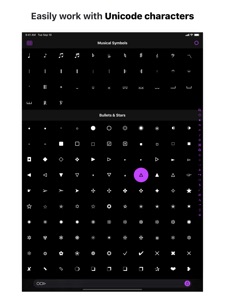
UniChar is a powerful yet beautiful Unicode symbol app and keyboard that allows you to quickly find, type, and work with special characters.
“UniChar is a cool little app and keyboard, and offers access to a huge world of Unicode characters that are otherwise absent within the standard iOS keyboard.”
– iDownloadBlog
"On the Mac, you can type any character [with] the Emoji & Symbols viewer ... The selection on iOS is much more limited ... But UniChar changes that."
– Cult of Mac
"This iOS keyboard app will give you all the Unicode characters you’ll ever need."
– lifehacker
“It’s a full-featured utility for searching and copying symbols … it’s always nice to see a developer who’s dedicated to improving this kind of utility over time and adopting new features … it's a very handy app.”
– AppStories
UniChar features thousands of symbols organized neatly into categories as well as a complete Unicode table.* You can type these symbols in any app with the custom keyboard or quickly search for the symbol you’re looking for in the app – by name or by drawing! No more searching Google. You can also favorite symbols to access them even quicker in the keyboard, widget, and on your Apple Watch.
For developers, UniChar is an efficient tool to work with Unicode code points and HTML entities. Revamp your workflow with Universal Clipboard – copy on your iPhone, paste in the code editor on your Mac. Or use UniChar alongside your editor with Split View on iPad.
App
◉ Search for symbols by name or by drawing**
◉ Browse the entire Unicode table by character blocks
◉ Collect and organize your favorite symbols
◉ Efficiently work with symbols and their info including code points and HTML entities
◉ Insert symbols into the text field and compose text using the system keyboard
◉ Share your text via Messages, Twitter, AirDrop, etc – or open the text in other apps
Keyboard
◎ Type special symbols in any app
◎ Quickly input your recently used and favorite symbols
◎ Designed to compliment the Emoji keyboard
Widget
◆ Convenient access to your recently used and favorite symbols
◆ Copy to the clipboard with a single tap
◆ Drag and drop character info into other apps on iPad
Apple Watch App
◇ Quickly glance at your favorites and recents
◇ Copy character info to your iPhone’s clipboard
◇ Add your favorite symbol to your watch face
iMessage App
■ Send symbol stickers to your friends
■ Create stickers for any Unicode character
■ Utilize your stickers in the Messages camera and FaceTime
MORE FEATURES
□ Beautiful and simple design
□ Stunning dark mode
□ Handoff support
□ Spotlight Search integration
□ Keyboard shortcuts
□ Drag and Drop, Split View, and Multiple Windows support on iPad
□ Accessibility support including Dynamic Type, VoiceOver, and Voice Control
□ Universal app for iPad, iPhone, and iPod touch
□ Ad-free experience
* All Categories can be unlocked via a one-time in-app purchase.
** Search by Drawing is powered by machine learning algorithms utilizing Create ML, Core ML, and Vision. As you draw, a convolutional neural network processes your drawing to predict which symbols it matches. You can help improve symbol recognition by submitting your own drawings!

What's New in Version 7.2.2

This update includes minor bug fixes and enhancements.

Seller

Name

Jordan Hipwell

Information

Categories

Version

7.2.2

Size

112.5 MB

Game Center

No

VPP Device Licensing

Yes

Rating

Rated: 4+

Compatibility

iOS 13.0 or later

Devices

iPhone 5s, iPhone 6, iPhone 6 Plus, iPhone 6s, iPhone 6s Plus, iPhone SE, iPhone 7, iPhone 7 Plus, iPhone 8, iPhone 8 Plus, iPhone X, iPhone XR, iPhone XS, iPhone XS Max, iPhone 11, iPhone 11 Pro, iPhone 11 Pro Max, iPhone SE (2nd generation), iPad (5th Generation) Wi-Fi, iPad (5th Generation) Wi-Fi + Cellular, iPad (6th generation) Wi-Fi, iPad (6th generation) Wi-Fi + Cellular, iPad Pro, iPad Pro (Cellular), iPad Pro (9.7-inch), iPad Pro (9.7-inch) (Cellular), iPad Pro 12.9-inch (2nd generation), iPad Pro 12.9-inch (2nd generation) Wi-Fi + Cellular, iPad Pro (10.5-inch), iPad Pro (10.5-inch) Wi-Fi + Cellular, iPad Pro (11-inch), iPad Pro (11-inch) Wi-Fi + Cellular, iPad Pro 12.9-inch (3rd generation), iPad Pro 12.9-inch (3rd generation) Wi-Fi + Cellular, iPad Air, iPad Air (Cellular), iPad Air 2, iPad Air 2 (Cellular), iPad Air (3rd generation), iPad Air (3rd generation) Wi-Fi + Cellular, iPad mini Retina, iPad mini Retina (Cellular), iPad mini 3, iPad mini 3 (Cellular), iPad mini 4, iPad mini 4 (Cellular), iPad mini (5th Generation), iPad mini (5th Generation) Wi-Fi + Cellular, iPad (7th generation) Wi-Fi, iPad Pro 11-inch (2nd generation), iPad Pro 11-inch (2nd generation) Wi-Fi + Cellular, iPad Pro 12.9-inch (4th generation), iPad Pro 12.9-inch (4th generation) Wi-Fi + Cellular, iPad Air4, iPad Air4Cellular, iPad EighthGen, iPad EighthGenCellular, iPod touch (6th Generation), iPod touch (7th generation), Apple Watch Series 4

Languages

English

App Store: Customer Ratings

Ratings & Reviews

4.5 of 5 (55 Ratings)

App Store: Customer Reviews

2020-04-06

This is amazing don’t worry-

This app is amazing! It has legit all the symbols I might need- except for two, could you pleeeeaaaseee add these two symbols? I would rate this five star if it had them, cause I’m definitely buying premium!
꧁ ꧂
Tidepool...
Version 7.1
2020-03-01

My keyboard disappeared

I have been happily using this keyboard for months. Then suddenly it was gone . The app symbol will not stay loaded. It no longer shows in my keyboard listing. And it will not let me down load it again.
I want it back
Dragonfly-dreamcatcher
Version 7.0.3
2019-11-03

★Easily the best symbol keyboard I’ve ever used★

Unlike most I’ve tried, the keyboard is designed well, and looks very nice. Has plenty of symbols, and is reasonably priced☺︎, though you get plenty of great symbols without paying. The only thing I can say bad about it, is that it’s so underrated! This keyboard deserves sooo much more attention.
Bsuxbwgzuuwhqhuau
Version 7.0.1
2018-12-06

iOS 12.1 - where’s the keyboard option in settings?

iPhone w/iOS 12.1.
Contrary to the included documentation, there’s no “keyboards” option in system settings (and I know I’m in the right place, as both Google and TextExpander have the option where I’d expect to find it).
Anfour71
Version 6.2
2018-03-10

Works well !

I like it.
It's quite useful.
PierJes
Version 5.4.1
2017-12-09

I’ve tried them all, this is the one.

Alright your looking around for a Unicode character app, maybe you’ve tried a few options and you stumbled upon this one. I was you, I was looking at every option available on the App Store over the last few months and getting frustrated with the horrible apps that were available. I can tell you with confidence that you should go no further. This is the app you need, it has changed my life! Great keyboard, store multiple characters before copying them to your clipboard, nice minimalist ui and great search. This app is stable and quick, not bogged down by UI animations. Even better the developer is actively working, unlIke the majority of apps out there.
Do it, I know your convinced.
♥︎☻☁︎⚑☯︎⚙︎☮︎☎︎
shanesype
Version 5.2
2017-08-20

Very useful

Verrrrrrrrrrrry good
Help game problem
Version 4.3.2
2016-11-16

Unichar

Good but there are emojis on pictographs
😊🎨
Version 4.1
2016-04-23

Unichar rate

I love this app so much
Taylortaytay15
Version 3.2
2014-11-16

Great!

👍
Maxxx ay
Version 1.3