Updating

CASIO Graph Calculator Manual
Released: 2014-05-03
© Economic Solution Apps


iPhone Screenshots


iPad Screenshots



Description
• This app shows all important functions of the graphing calculator CASIO fx-9860GII, which are very useful for final secondary-school examinations (also suited for fx-9860G and CFX-9850G).
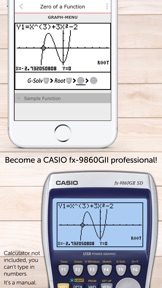
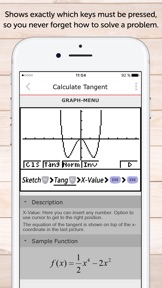
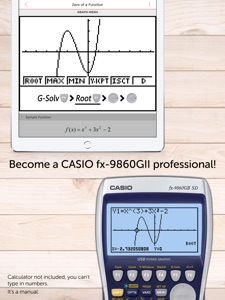
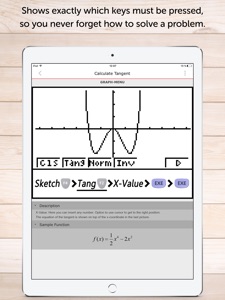
• The apps shows exactly which buttons you have to press on your calculator for every topic.
• Through the support of CASIO the original illustrations can be used.
• You can swipe through screenshots of the original graphing calculator which show every step you have to do.
• There are helpful descriptions in the app which give some additional info.
6 Reasons to buy this app:
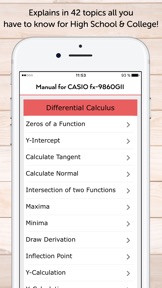
1. Includes 42 topics for high school and college(all you need)
2. Easy key-press-sequences to solve math problems fast
3. The app includes more than 300 screenshots (one screenshot for each step of each topic)
4. An example for every topic to learn new stuff
5. Infoboxes for more detailed explanations
6. More than 60 math problems and a quiz to practice your skills
Not yet convinced? Here's the detailed description:
• Every topic shows a detailed instruction through screenshots of the original graphing calculator how to solve the exercise. You only have to slide to get the next screenshot which looks similar with your calculator!
• To ”become warm” you have the possibility to insert a sample function in your calculator which is used in the App. The App shows an example for every topic (e. g. a registered function in the GRAPH-Menu). After that, press the first button of the particular key-press-sequence on the graphing calculator. Then slide once again to get the next Screenshot. These will look like the display of your calculator, if you did everything right. The App contains for each step a picture to make it easier to solve the exercise.
The key-press-sequence contains images of the original buttons, that you can find the keys very fast on your calculator!
• The app is also useful for preparing your examination, because you often don't remember all instructions of the calculator.
• Your teacher will be grateful as well, because he doesn't have to walk around the classroom until everyone's calculator shows the right solution. You only have to take a look at the app and know how to do!
• The app contains the following topics:
Differential Calculus, Integral Calculus, Solve Equations, Matrices, Basic Knowledge in GRAPH-Menu, how to fix all kinds of errors, the calculator might show (Syntax Error, Condition Error…) and:
• CAS (Computer Algebra System)
The App describes the CAS, how to install it on your calculator ( then you can install games on the same way) and the use of it. With a CAS you are able to calculate the derivative or antiderivative (not only graphically) and much more.
• The app contains the following topics:
DIFFERENTIAL CALCULUS
• Zeros of a Function
• Y-Intercept
• Calculate Tangent
• Calculate Normal
• Intersection of two Functions
• Maxima
• Minima
• Draw Derivation
• Inflection Points
• Y-Calculation
• X-Calculation
• Regression
• Find the Equation of a Curve
INTEGRAL CALCULUS
• Integral in RUN-Menu
• Integral in GRAPH-Menu
• Area between two Functions
• Find Area with Absolute Value
SOLVE EQUATIONS
• Simultaneous
• Polynomial
• Solve Equations
MATRICES
• Save Matrix
• Put into Row Echelon Form
• Solve Matrix
• Transpose of a Matrix
• Inversion of a Matrix
• Identity Matrix
BASIC KNOWLEDGE
• MENU Settings
• Insert Functions with Parameter
• Select/ deselect Functions
HOW TO FIX... ?
• Syntax ERROR
• Condition ERROR
• Range ERROR
• Argument ERROR
• Stack ERROR
• Memory ERROR
CAS
• What's that?
• Installation Instructions
• Differentiation
• Integration
• Expand an Expression
• Simplification
• Solve Equations exactly
MATH PROBLEMS
• Practice with over 60 math problems and solutions
• You can practice math problems of a single topic (e.g. Zeros of a Function) or random math problems of Differential Calculus for example.
• As an alternative the app shows you mixed math problems of all topics.
What's New in Version 2.2.4
+ iPhone X support
+ Performance improvements
Information
Categories
Version
2.2.4
Size
38.7 MB
Game Center
No
VPP Device Licensing
Yes
Rating
Rated: 4+
Compatibility
iOS 9.0 or later
Devices
iPhone 4S, iPhone 5, iPhone 5c, iPhone 5s, iPhone 6, iPhone 6 Plus, iPhone 6s, iPhone 6s Plus, iPhone SE, iPhone 7, iPhone 7 Plus, iPhone 8, iPhone 8 Plus, iPhone X, iPhone XR, iPhone XS, iPhone XS Max, iPhone 11, iPhone 11 Pro, iPhone 11 Pro Max, iPhone SE (2nd generation), iPhone 12, iPhone 12 Pro, iPhone 12 Pro Max, iPhone 12 mini, iPad 2 (Wi-Fi), iPad 2 (3G), iPad (3rd Generation) (Wi-Fi), iPad (3rd Generation) (4G), iPad (4th Generation) (Wi-Fi), iPad (4th Generation) (4G), iPad (5th Generation) Wi-Fi, iPad (5th Generation) Wi-Fi + Cellular, iPad (6th generation) Wi-Fi, iPad (6th generation) Wi-Fi + Cellular, iPad Pro, iPad Pro (Cellular), iPad Pro (9.7-inch), iPad Pro (9.7-inch) (Cellular), iPad Pro 12.9-inch (2nd generation), iPad Pro 12.9-inch (2nd generation) Wi-Fi + Cellular, iPad Pro (10.5-inch), iPad Pro (10.5-inch) Wi-Fi + Cellular, iPad Pro (11-inch), iPad Pro (11-inch) Wi-Fi + Cellular, iPad Pro 12.9-inch (3rd generation), iPad Pro 12.9-inch (3rd generation) Wi-Fi + Cellular, iPad Air, iPad Air (Cellular), iPad Air 2, iPad Air 2 (Cellular), iPad Air (3rd generation), iPad Air (3rd generation) Wi-Fi + Cellular, iPad mini (Wi-Fi), iPad mini (4G), iPad mini Retina, iPad mini Retina (Cellular), iPad mini 3, iPad mini 3 (Cellular), iPad mini 4, iPad mini 4 (Cellular), iPad mini (5th Generation), iPad mini (5th Generation) Wi-Fi + Cellular, iPad (7th generation) Wi-Fi + Cellular, iPad Pro 11-inch (2nd generation), iPad Pro 11-inch (2nd generation) Wi-Fi + Cellular, iPad Pro 12.9-inch (4th generation), iPad Pro 12.9-inch (4th generation) Wi-Fi + Cellular, iPad Air (4th Generation) (Wi-Fi), iPad Air (4th Generation) (Wi-Fi + Cellular), iPad (8th generation) Wi-Fi, iPad (8th generation) Wi-Fi + Cellular, iPod touch (5th generation), iPod touch (6th Generation), iPod touch (7th generation), Apple Watch Series 4, Apple Watch Series 5, Apple Watch Series 6 (GPS), Apple Watch Series 6 (GPS + Cellular), Apple Watch Series SE (GPS), Apple Watch Series SE (GPS + Cellular)
Languages
English
App Store: Customer Ratings
Ratings & Reviews
0.0 of 5 (No rating)
App Store: Customer Reviews
No Entry