Updating


iPhone Screenshots
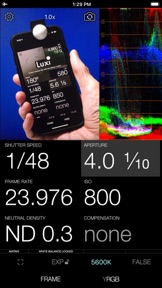


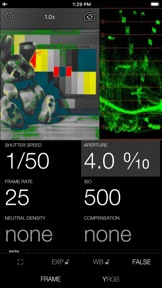

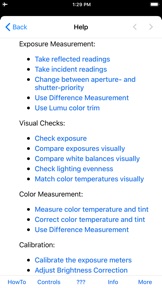
iPad Screenshots

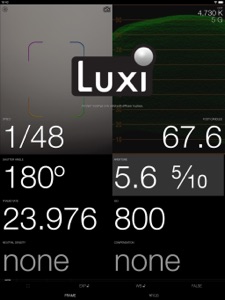




Description
Cine Meter II measures light and color, so you can light and shoot and know what you'll get.
“Cine Meter II is an essential app for every cinematographer.”
— Jon Fauer, ASC
“[T]he perfect app to have with you at all times.”
— Roberto “Ganzo” Schaefer, ASC, AIC
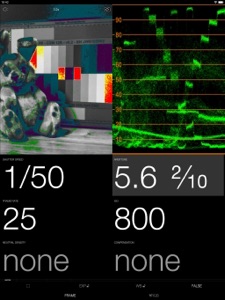
It's a zoomable spotmeter with an RGB waveform monitor and a false-color picture.
It's an incident meter using a Luxi™ or Lumu™ Lite attachment, with lux and foot-candle readouts. (Lumu Power is NOT supported, and flash metering is NOT possible.)
It's a color meter, showing color temperature and green/magenta tint, and giving you corrections to or from your target color (color metering requires iOS 8+, and Luxi, other diffusion, or a gray card).
Measure more than just shutter-priority or aperture-priority: calculate shutter speed, shutter angle, aperture, ND, or ISO directly.
• The exposure meter shows your stop as a decimal value (for cameras with EVF iris readouts) or as a full stop and fraction (for cine lenses with marked iris rings). Cine Meter II lets you use shutter angles – ideal for Digital Bolex and Blackmagic cameras – as well as speeds, and you can dial in ND filters and arbitrary exposure compensations. The spotmeter is zoomable up to 15x magnification (recent devices, iOS 7 or later), using either the front or back camera.
• The waveform monitor shows you how light levels vary across a scene. You'll see how smooth and even the lighting is on a greenscreen or background, and find subtle hotspots and shadows at a glance. The waveform’s RGB mode shows you color imbalances in the image and gives you a handy way to check color purity and separation for chroma-keying.
• False-color mode lets you define allowable contrast ranges, and see instantly which shadows are underexposed and what highlights risk clipping.
_______________________
READ BEFORE YOU BUY:
Cine Meter II is NOT a flash meter; it can't measure strobes.
Cine Meter II does NOT work with Lumu Power (the Lightning port Lumu), only Lumu Lite (the headphone jack Lumu).
Cine Meter II gives you *absolute* light meter readings, but *relative* picture and waveform monitor levels: Cine Meter II’s picture and waveform monitor do not use the *exact* exposure shown by the light meter (they are close to the meter reading, but can differ from it slightly). The picture and waveform monitor show you *relative* levels within a scene, not *absolute* levels based on the meter reading.
Shutter speeds, apertures, and ISOs shown in Cine Meter II are for metering purposes only and do not control the shutter speed, aperture, and ISO of the iPhone camera. The iPhone camera uses whatever exposure settings it needs to capture a reading. Cine Meter II is a light and color meter only; it is *not* a camera simulator.
See http://www.adamwilt.com/cinemeterii/details.html#How_It_Works for details.
What's New in Version 4.1
• Disable all unwanted “sensors”, leaving only those you normally use (for example: enable Front Luxi and Back Spotmeter, disable all the rest).
• Display color tint as Wratten CC number, plusgreen/minusgreen value, or ∆uv.
• Save calibration data to a file, so you can delete and reinstall Cine Meter II without losing your calibration.
• Haptic feedback on haptics-compatible iDevices.
• Fixed a camera lockup bug on older iDevices when closing and reopening Cine Meter II with the Settings screen displayed.
Seller
Name
Adam Wilt
Information
Developer
Categories
Version
4.1
Size
6.2 MB
Game Center
No
VPP Device Licensing
Yes
Rating
Rated: 4+
Compatibility
iOS 8.0 or later
Devices
iPhone 4S, iPhone 5, iPhone 5c, iPhone 5s, iPhone 6, iPhone 6 Plus, iPhone 6s, iPhone 6s Plus, iPhone SE, iPhone 7, iPhone 7 Plus, iPhone 8, iPhone 8 Plus, iPhone X, iPhone XR, iPhone XS, iPhone XS Max, iPhone 11, iPhone 11 Pro, iPhone 11 Pro Max, iPhone SE (2nd generation), iPhone 12, iPhone 12Mini, iPhone 12Pro, iPhone 12ProMax, iPad 2 (Wi-Fi), iPad 2 (3G), iPad (3rd Generation) (Wi-Fi), iPad (3rd Generation) (4G), iPad (4th Generation) (Wi-Fi), iPad (4th Generation) (4G), iPad (5th Generation) Wi-Fi, iPad (5th Generation) Wi-Fi + Cellular, iPad (6th generation) Wi-Fi, iPad (6th generation) Wi-Fi + Cellular, iPad Pro, iPad Pro (Cellular), iPad Pro (9.7-inch), iPad Pro (9.7-inch) (Cellular), iPad Pro 12.9-inch (2nd generation), iPad Pro 12.9-inch (2nd generation) Wi-Fi + Cellular, iPad Pro (10.5-inch), iPad Pro (10.5-inch) Wi-Fi + Cellular, iPad Pro (11-inch), iPad Pro (11-inch) Wi-Fi + Cellular, iPad Pro 12.9-inch (3rd generation), iPad Pro 12.9-inch (3rd generation) Wi-Fi + Cellular, iPad Air, iPad Air (Cellular), iPad Air 2, iPad Air 2 (Cellular), iPad Air (3rd generation), iPad Air (3rd generation) Wi-Fi + Cellular, iPad mini (Wi-Fi), iPad mini (4G), iPad mini Retina, iPad mini Retina (Cellular), iPad mini 3, iPad mini 3 (Cellular), iPad mini 4, iPad mini 4 (Cellular), iPad mini (5th Generation), iPad mini (5th Generation) Wi-Fi + Cellular, iPad (7th generation) Wi-Fi, iPad Pro 11-inch (2nd generation), iPad Pro 11-inch (2nd generation) Wi-Fi + Cellular, iPad Pro 12.9-inch (4th generation), iPad Pro 12.9-inch (4th generation) Wi-Fi + Cellular, iPad Air (4th Generation) (Wi-Fi), iPad Air (4th Generation) (Wi-Fi + Cellular), iPad (8th generation) Wi-Fi, iPad (8th generation) Wi-Fi + Cellular, iPod touch (5th generation), iPod touch (6th Generation), iPod touch (7th generation)
Languages
English
App Store: Customer Ratings
Ratings & Reviews
4.5 of 5 (3 Ratings)
App Store: Customer Reviews
No Entry