Updating


iPhone Screenshots


iPad Screenshots


Description
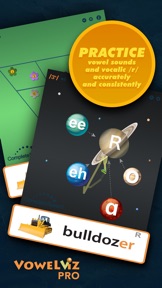
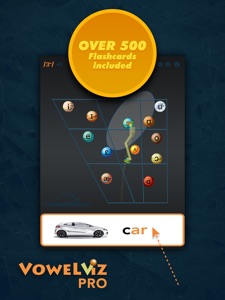
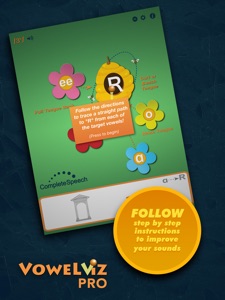
VowelViz Pro takes the innovative speech mapping app, VowelViz, and makes it even more FUN! VowelViz Pro implements fun, new themes, flash cards, and Vocalic R View to help further engage students in speech therapy! Let your students control the UFO and Bee voice trackers and get them in the correct target ranges. Flashcards provide words and images associated with target vowels and R. The real-time, interactive feedback from VowelViz Schools helps students practice target vowels and R accurately and consistently.
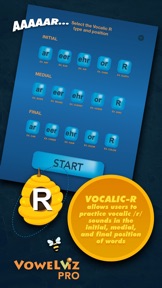
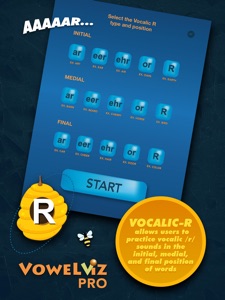
VowelViz Pro includes the Vocalic-R View, which allow users to focus on properly producing the English "R" sound. The Vocalic-R view includes easy to understand, spelling-based letter to help therapists, parents, and students to understand how to pronounce vocalic R's correctly.
VowelViz is an innovative speech mapping tool that displays vowel production in real-time. With applications in speech therapy, accent reduction/second language learning, and home practice, VowelViz is a versatile and easy to use tool for practicing vowels.
VowelViz provides a fun and engaging foundation to practice clear and consistent vowels, without guessing, in order to develop and strengthen muscle memory effectively. The app’s display is designed around the vowel quadrilateral and existing research on average vowel formants. When voicing is detected, an orange ball plots the position of the sound on the screen, presenting an easy to understand visual representation of the vowel. By tracking the movement and position of speech over time, learners can better visualize the movements needed for clear and distinct vowels. This understanding provides the framework to practice making those distinctions clear and precise.
The vowel quadrilateral display shows learners where vowels are produced within the mouth. By moving their tongues up and down and forward and back in their mouths, learners gain control of their speech as they hear, feel and see the differences in sounds. This control allows them to find target vowels and practice them repeatedly until they become natural and fluent in their speech. Quadrants within the vowel quadrilateral act as relative targets and help users orient themselves to where in the mouth they should be producing the vowel. Learners are also able to see how their vowels compare with the researched averages of others. These averages are represented in the app as ranges around each vowel that can also function as relative targets for learning or improving vowels.
VowelViz provides a platform to transition from simple to more complex speech. In addition to isolated sounds, it can be used to see and practice dipthongs, blends, and even words and phrases. An adjustable tail can be added to VowelViz’s speech tracker to increase understanding of how combinations of sounds work together to form words and other complex speech. The longer the tail, the more clear the connection between sounds.
VowelViz is designed to be simple and easy to use so that anyone can practice clear, consistent vowel productions. The app is equipped with step-by-step instructions on how to use the various features and options. Also included in the app are diagrams, charts, and descriptions of IPA, the vowel quadrilateral, and vowel formants. Anyone who is unfamiliar with these terms can quickly learn to use VowelViz without any misunderstanding of the terminology or technical aspects used in the app.
What's New in Version 1.7.3
Microphone bug fixed and app updated for latest version of IOS
Information
Developer
Categories
Version
1.7.3
Size
78.9 MB
Game Center
No
VPP Device Licensing
Yes
Rating
Rated: 4+
Compatibility
iOS 12 or later
Devices
iPhone 5s, iPhone 6, iPhone 6 Plus, iPhone 6s, iPhone 6s Plus, iPhone SE, iPhone 7, iPhone 7 Plus, iPhone 8, iPhone 8 Plus, iPhone X, iPhone XR, iPhone XS, iPhone XS Max, iPhone 11, iPhone 11 Pro, iPhone 11 Pro Max, iPhone SE (2nd generation), iPhone 12, iPhone 12 Pro, iPhone 12 Pro Max, iPhone 12 mini, iPhone 13, iPhone 13 Pro, iPhone 13 Pro Max, iPhone 13 mini, iPhone SEThirdGen, iPad (5th Generation) Wi-Fi, iPad (5th Generation) Wi-Fi + Cellular, iPad (6th generation) Wi-Fi, iPad (6th generation) Wi-Fi + Cellular, iPad Pro, iPad Pro (Cellular), iPad Pro (9.7-inch), iPad Pro (9.7-inch) (Cellular), iPad Pro 12.9-inch (2nd generation), iPad Pro 12.9-inch (2nd generation) Wi-Fi + Cellular, iPad Pro (10.5-inch), iPad Pro (10.5-inch) Wi-Fi + Cellular, iPad Pro (11-inch), iPad Pro (11-inch) Wi-Fi + Cellular, iPad Pro 12.9-inch (3rd generation), iPad Pro 12.9-inch (3rd generation) Wi-Fi + Cellular, iPad Air, iPad Air (Cellular), iPad Air 2, iPad Air 2 (Cellular), iPad Air (3rd generation), iPad Air (3rd generation) Wi-Fi + Cellular, iPad mini Retina, iPad mini Retina (Cellular), iPad mini 3, iPad mini 3 (Cellular), iPad mini 4, iPad mini 4 (Cellular), iPad mini (5th Generation), iPad mini (5th Generation) Wi-Fi + Cellular, iPad (7th generation) Wi-Fi + Cellular, iPad Pro 11-inch (2nd generation), iPad Pro 11-inch (2nd generation) Wi-Fi + Cellular, iPad Pro 12.9-inch (4th generation), iPad Pro 12.9-inch (4th generation) Wi-Fi + Cellular, iPad Air (4th Generation) (Wi-Fi), iPad Air (4th Generation) (Wi-Fi + Cellular), iPad (8th generation) Wi-Fi, iPad (8th generation) Wi-Fi + Cellular, iPad Pro 11-inch (3rd generation), iPad Pro 11-inch (3rd generation) Wi-Fi + Cellular, iPad Pro 12.9-inch (5th Generation), iPad Pro 12.9-inch (5th Generation) Wi-Fi + Cellular, iPad (9th Generation), iPad (9th Generation) Wi-Fi + Cellular, iPad mini (6th Generation), iPad mini (6th Generation) Wi-Fi + Cellular, iPad AirFifthGen, iPad AirFifthGenCellular, iPod touch (6th Generation), iPod touch (7th generation)
Languages
English
App Store: Customer Ratings
Ratings & Reviews
0.0 of 5 (No rating)
App Store: Customer Reviews
No Entry