Updating


iPhone Screenshots


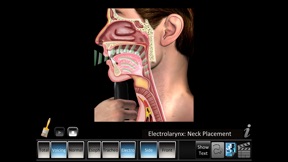


iPad Screenshots


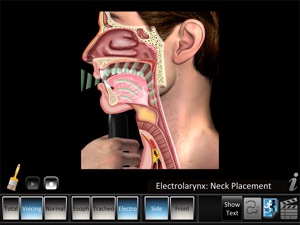
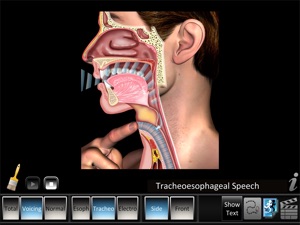
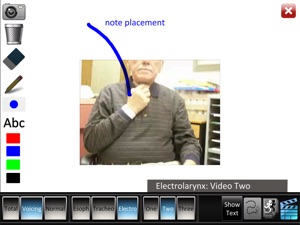
Description
The Laryngectomy app covers normal voice, total laryngectomy and voicing post laryngectomy. The app includes six side cutaway and three non-cutaway front animations and eleven videos covering esophageal, traceoesophageal and electrolarynx speech example cases. Disclaimer: seek a doctor’s advice in addition to using this app and before making any medical decisions.
• Structure ID: as each part is touched, the part highlights and the part name and description text changes. Description text shows or hides on demand.
◊ Head Anatomy - 45 parts, includes nose, mouth and throat structure ID. Structure ID zoom and pans.
• Highlight Views: key front and side illustrated views of total laryngectomy and voicing post laryngectomy. Highlights zoom and Pan.
◊ Side and front views: Total Laryngectomy, Voicing - Tracheoesophageal and Electrolarynx Speech
◊ Side view: Esophageal Speech.
• Animations: for normal, total laryngectomy and voicing post laryngectomy. Animations pan.
◊ Side cutaway and non-cutaway front views: Total Laryngectomy, Voicing - Tracheoesophageal and Electrolarynx Speech
◊ Side cutaway views: Normal Breathing and Voice production, Esophageal Speech
◊ Includes play and stop controls
• Two finger pan and zoom of all highlighted views and Structure ID
• Two finger pan of all animations and videos.
• Drawing Whiteboard feature:
◊ Drawing: freeform lines in red, blue, green or black hue. Adjust line thickness with the size panel.
◊ Draw and place text directly on active animation and video.
◊ Text: Adjust font size with the size panel, auto wrap, non-movable in red, blue, green or black hue.
◊ Eraser: touch and rub lines and text on whiteboard to erase.
◊ Trash: one tap deletes all whiteboard lines and text.
◊ Screenshot whiteboard direct to Photos App for easy email and printing.
• iOS 6.0+ required, designed for iPad and iPhone.
• Best results on iPad 4th generation/iPhone 5 and newer.
The Laryngectomy app makes learning about total laryngectomy and voicing post laryngectomy easy. See example screen shots below. Get the app today!
What's New in Version 1.2.1
Bug fixes, security update and performance improvements.
Seller
Name
Blue Tree Publishing, Inc.
Information
Developer
Categories
Version
1.2.1
Size
179.4 MB
Game Center
No
VPP Device Licensing
Yes
Rating
Rated: 4+
Compatibility
iOS 11.0 or later
Devices
iPhone 5s, iPhone 6, iPhone 6 Plus, iPhone 6s, iPhone 6s Plus, iPhone SE, iPhone 7, iPhone 7 Plus, iPhone 8, iPhone 8 Plus, iPhone X, iPhone XR, iPhone XS, iPhone XS Max, iPhone 11, iPhone 11 Pro, iPhone 11 Pro Max, iPhone SE (2nd generation), iPhone 12, iPhone 12 Pro, iPhone 12 Pro Max, iPhone 12 mini, iPhone 13, iPhone 13 Pro, iPhone 13 Pro Max, iPhone 13 mini, iPhone SE (3rd generation), iPhone 14, iPhone 14 Plus, iPhone 14 Pro, iPhone 14 Pro Max, iPhone 15, iPhone 15 Plus, iPhone 15 Pro, iPhone 15 Pro Max, iPhone 16, iPhone 16 Plus, iPhone 16 Pro, iPhone 16 Pro Max, iPhone 16e, iPad (5th Generation) Wi-Fi, iPad (5th Generation) Wi-Fi + Cellular, iPad (6th generation) Wi-Fi, iPad (6th generation) Wi-Fi + Cellular, iPad Pro, iPad Pro (Cellular), iPad Pro (9.7-inch), iPad Pro (9.7-inch) (Cellular), iPad Pro 12.9-inch (2nd generation), iPad Pro 12.9-inch (2nd generation) Wi-Fi + Cellular, iPad Pro (10.5-inch), iPad Pro (10.5-inch) Wi-Fi + Cellular, iPad Pro (11-inch), iPad Pro (11-inch) Wi-Fi + Cellular, iPad Pro 12.9-inch (3rd generation), iPad Pro 12.9-inch (3rd generation) Wi-Fi + Cellular, iPad Air, iPad Air (Cellular), iPad Air 2, iPad Air 2 (Cellular), iPad Air (3rd generation), iPad Air (3rd generation) Wi-Fi + Cellular, iPad mini Retina, iPad mini Retina (Cellular), iPad mini 3, iPad mini 3 (Cellular), iPad mini 4, iPad mini 4 (Cellular), iPad mini (5th Generation), iPad mini (5th Generation) Wi-Fi + Cellular, iPad (7th generation) Wi-Fi + Cellular, iPad Pro 11-inch (2nd generation), iPad Pro 11-inch (2nd generation) Wi-Fi + Cellular, iPad Pro 12.9-inch (4th generation), iPad Pro 12.9-inch (4th generation) Wi-Fi + Cellular, iPad Air (4th Generation) (Wi-Fi), iPad Air (4th Generation) (Wi-Fi + Cellular), iPad (8th generation) Wi-Fi, iPad (8th generation) Wi-Fi + Cellular, iPad Pro 11-inch (3rd generation), iPad Pro 11-inch (3rd generation) Wi-Fi + Cellular, iPad Pro 12.9-inch (5th Generation), iPad Pro 12.9-inch (5th Generation) Wi-Fi + Cellular, iPad (9th Generation), iPad (9th Generation) Wi-Fi + Cellular, iPad mini (6th Generation), iPad mini (6th Generation) Wi-Fi + Cellular, iPad Air (5th generation), iPad Air (5th generation) Wi-Fi + Cellular, iPad Pro 11-inch (4th generation), iPad Pro 11-inch (4th generation) Wi-Fi + Cellular, iPad Pro 12.9-inch (6th generation), iPad Pro 12.9-inch (6th generation) Wi-Fi + Cellular, iPad (10th generation), iPad (10th generation) Wi-Fi + Cellular, iPad Air 11-inch (M2) Wi-Fi, iPad Air 13-inch (M2) Wi-Fi, iPad Air 13-inch (M2) Wi-Fi + Cellular, iPad Pro 11-inch (M4) Wi-Fi, iPad Pro 11-inch (M4) Wi-Fi + Cellular, iPad Pro 13-inch (M4) Wi-Fi, iPad Pro 13-inch (M4) Wi-Fi + Cellular, iPad mini (A17 Pro) Wi-Fi, iPad mini (A17 Pro) Wi-Fi + Cellular, iPad (A16) Wi-Fi, iPad (A16) Wi-Fi + Cellular, iPad Air 11-inch (M3) Wi-Fi, iPad Air 11-inch (M3) Wi-Fi + Cellular, iPad Air 13-inch (M3) Wi-Fi, iPad Air 13-inch (M3) Wi-Fi + Cellular, iPod touch (6th Generation), iPod touch (7th generation)
Languages
English
App Store: Customer Ratings
Ratings & Reviews
0.0 of 5 (No rating)
App Store: Customer Reviews
No Entry