Updating


iPhone Screenshots




iPad Screenshots

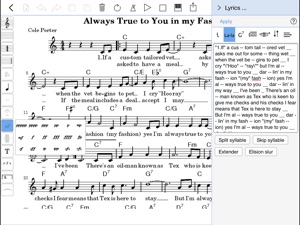
Description
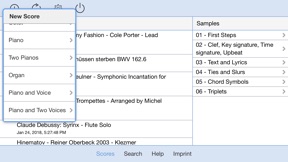
Write down melodies, lead sheets with chords and lyrics, arrangements, and full blown scores with the brand new scorio Music Notator app. Follow your inspiration - on a bench in the park, in a bar, in the subway, wherever you have internet access.
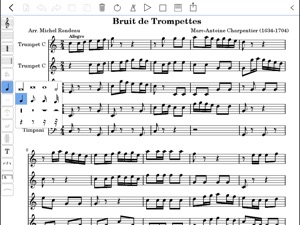
Enjoy the comfortable and intuitive Music Notator App. Enter and edit music intuitively with the tips of your fingers. Short touches select notation elements, long touches let you insert new notes into melodies and chords. Edit notes by moving them with your fingers. Fast scrolling, zooming, page turning and orientation change give you quick and comfortable access to every little detail and a perfect overview. Edit lyrics, chords and modify the score structure with the dialog area on the right side of the app.
scorio Music Notator App works hand in hand with scorio notation portal on the web and requires an internet connection. When you write and save a score within the app you will also find it online in your scorio account. After saving, you can edit your compositions in any web browser, even outside the app on your PC or Mac. Yes, even on a friend's laptop.
App features include:
- Insert and edit notes and other notation elements
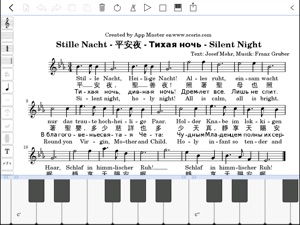
- Virtual Keyboard for entering notes
- Insert and edit chord and fret symbols
- Display and edit lyrics
- Export scores as high quality PDF files
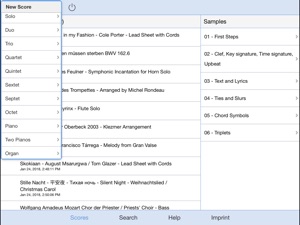
- Select from 19 score templates
- Edit score structure (add/delete staves)
- Transpose scores
- Automatic part extraction
- MIDI play back with 128 selectable MIDI instruments
- Load scores from the scorio database
- Publish your scores
- Continue to work on the scores in your account on PC, Mac and other tablet devices
What's New in Version 3.0.4
* More search results
* Bug fixes
Seller
Name
scorio GmbH
Information
Developer
Categories
Version
3.0.4
Size
118.6 MB
Game Center
No
VPP Device Licensing
Yes
Rating
Rated: 4+
Compatibility
iOS 9.0 or later
Devices
iPhone 4S, iPhone 5, iPhone 5c, iPhone 5s, iPhone 6, iPhone 6 Plus, iPhone 6s, iPhone 6s Plus, iPhone SE, iPhone 7, iPhone 7 Plus, iPhone 8, iPhone 8 Plus, iPhone X, iPhone XR, iPhone XS, iPhone XS Max, iPhone 11, iPhone 11 Pro, iPhone 11 Pro Max, iPhone SE (2nd generation), iPhone 12, iPhone 12 Pro, iPhone 12 Pro Max, iPhone 12 mini, iPad 2 (Wi-Fi), iPad 2 (3G), iPad (3rd Generation) (Wi-Fi), iPad (3rd Generation) (4G), iPad (4th Generation) (Wi-Fi), iPad (4th Generation) (4G), iPad (5th Generation) Wi-Fi, iPad (5th Generation) Wi-Fi + Cellular, iPad (6th generation) Wi-Fi, iPad (6th generation) Wi-Fi + Cellular, iPad Pro, iPad Pro (Cellular), iPad Pro (9.7-inch), iPad Pro (9.7-inch) (Cellular), iPad Pro 12.9-inch (2nd generation), iPad Pro 12.9-inch (2nd generation) Wi-Fi + Cellular, iPad Pro (10.5-inch), iPad Pro (10.5-inch) Wi-Fi + Cellular, iPad Pro (11-inch), iPad Pro (11-inch) Wi-Fi + Cellular, iPad Pro 12.9-inch (3rd generation), iPad Pro 12.9-inch (3rd generation) Wi-Fi + Cellular, iPad Air, iPad Air (Cellular), iPad Air 2, iPad Air 2 (Cellular), iPad Air (3rd generation), iPad Air (3rd generation) Wi-Fi + Cellular, iPad mini (Wi-Fi), iPad mini (4G), iPad mini Retina, iPad mini Retina (Cellular), iPad mini 3, iPad mini 3 (Cellular), iPad mini 4, iPad mini 4 (Cellular), iPad mini (5th Generation), iPad mini (5th Generation) Wi-Fi + Cellular, iPad (7th generation) Wi-Fi, iPad Pro 11-inch (2nd generation), iPad Pro 11-inch (2nd generation) Wi-Fi + Cellular, iPad Pro 12.9-inch (4th generation), iPad Pro 12.9-inch (4th generation) Wi-Fi + Cellular, iPad Air (4th Generation) (Wi-Fi), iPad Air (4th Generation) (Wi-Fi + Cellular), iPad (8th generation) Wi-Fi, iPad (8th generation) Wi-Fi + Cellular, iPod touch (5th generation), iPod touch (6th Generation), iPod touch (7th generation), Apple Watch Series 4, Apple Watch Series 5, Apple Watch Series 6 (GPS), Apple Watch Series 6 (GPS + Cellular), Apple Watch Series SE (GPS), Apple Watch Series SE (GPS + Cellular)
Languages
English, German
App Store: Customer Ratings
Ratings & Reviews
1.0 of 5 (2 Ratings)
App Store: Customer Reviews
No Entry