Updating
Oxygen Offline Browser
Released: 2014-02-11
© John Denne Design & Consulting


iPhone Screenshots



iPad Screenshots

Description
Oxygen Browser is not just faster and easier. With this app, you can access your favorite websites where there is no internet connection and keep the contents updated, in a highly customizable and smart way.
*:._.:*~*:._.:*~*:._.:*~*:._.:*~*:._.:*~*:._.:*~*:._.:*~*:._.:*~
This app is great for you, if -
- You need to access to your favorite websites where there is no internet connection, such as in a plane
- You are frustrated with your current browser where internet is unstable, such as in a subway
- You want to update websites automatically when you have Wifi to avoid cellular data usage and save money*
- You want to archive webpages or PDF files and keep them as they are
- You’ve signed up the mission to Mars and you want to be prepared because other browsers are going to be useless
- Still not ringing any bells? Well, you might simply want an easier, cleaner and smarter web browser
Features
*:._.:*~*:._.:*~*:._.:*~*:._.:*~*:._.:*~*:._.:*~*:._.:*~*:._.:*
*:._.:*~*:._.:*~*:_.:*~Offline Browsing:*~*:._.:**:._.:*~*:.
- Automatically make currently tabs offline viewable
- Create offline pages to view them offline
- Save pages linked to the offline pages, you can specify how deep the pages should be saved and how many page at maximum it can save.
- Option to save the whole website. The number of the linked pages you can save for each offline page is up to 9999.
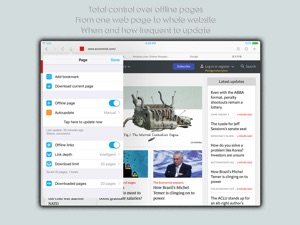
- Schedule auto-update your offline pages, it can be at a specific time daily or with a specific time interval. Each page can have its own update schedule.
- Autoupdate works when the app is in the background. (Due to system limitation, background auto-update may not always be on time. If your web updates are critical, please launch the app and let it update in the foreground)
*:._.:*~*:._.:*~*:._.:*~*Save Web Page:._.:*~*:._.:*~*:._.:*
- Different from offline page. You can save a web page as it is and the saved page won’t be updated. It helps you archive different versions of the same web page.
- Effective way to save PDF and serve as PDF document reader
*:._.:*~*:._.:*Ads and social plugins blocker:._.:*~*:._.:*~
- Effectively block ads and social network plugins. Make your browsing faster and save data usage.
*:._.:*~*:._.:*~*:._.:*~*:.Utilities.:*~*:._.:*~*:._.:*~*:._.:*~*
- Import bookmarks from most other browsers and export bookmarks
- Autosave your login and password and synchronize across your devices
- Choose your favorite search engine as default
- Choose desired user agent
FAQ
A. Are all the web page can be made viewable offline?
Q. Almost all the web pages can be created as offline pages, except contents that are not originally supported by iOS, such as Flash player.
A. Is this app going to consume a lot of storage?
Q. It depends on how many offline pages you create and how deep the links are enabled. Suppose average web page size is 1.3 MB, if you create 5 offline pages with each page has its whole web site enabled, say 200 web pages for each site, then the app will consume about 1.3 GB space.
What's New in Version 2.01
- minor bug fixed
Information
Categories
Version
2.01
Size
26.2 MB
Game Center
No
VPP Device Licensing
Yes
Rating
Rated 17+ for the following:
Unrestricted Web Access
Compatibility
iOS 8.0 or later
Devices
iPhone 4S, iPhone 5, iPhone 5c, iPhone 5s, iPhone 6, iPhone 6 Plus, iPhone 6s, iPhone 6s Plus, iPhone SE, iPhone 7, iPhone 7 Plus, iPhone 8, iPhone 8 Plus, iPhone X, iPhone XR, iPhone XS, iPhone XS Max, iPhone 11, iPhone 11 Pro, iPhone 11 Pro Max, iPhone SE (2nd generation), iPhone 12, iPhone 12 Pro, iPhone 12 Pro Max, iPhone 12 mini, iPad 2 (Wi-Fi), iPad 2 (3G), iPad (3rd Generation) (Wi-Fi), iPad (3rd Generation) (4G), iPad (4th Generation) (Wi-Fi), iPad (4th Generation) (4G), iPad (5th Generation) Wi-Fi, iPad (5th Generation) Wi-Fi + Cellular, iPad (6th generation) Wi-Fi, iPad (6th generation) Wi-Fi + Cellular, iPad Pro, iPad Pro (Cellular), iPad Pro (9.7-inch), iPad Pro (9.7-inch) (Cellular), iPad Pro 12.9-inch (2nd generation), iPad Pro 12.9-inch (2nd generation) Wi-Fi + Cellular, iPad Pro (10.5-inch), iPad Pro (10.5-inch) Wi-Fi + Cellular, iPad Pro (11-inch), iPad Pro (11-inch) Wi-Fi + Cellular, iPad Pro 12.9-inch (3rd generation), iPad Pro 12.9-inch (3rd generation) Wi-Fi + Cellular, iPad Air, iPad Air (Cellular), iPad Air 2, iPad Air 2 (Cellular), iPad Air (3rd generation), iPad Air (3rd generation) Wi-Fi + Cellular, iPad mini (Wi-Fi), iPad mini (4G), iPad mini Retina, iPad mini Retina (Cellular), iPad mini 3, iPad mini 3 (Cellular), iPad mini 4, iPad mini 4 (Cellular), iPad mini (5th Generation), iPad mini (5th Generation) Wi-Fi + Cellular, iPad (7th generation) Wi-Fi + Cellular, iPad Pro 11-inch (2nd generation), iPad Pro 11-inch (2nd generation) Wi-Fi + Cellular, iPad Pro 12.9-inch (4th generation), iPad Pro 12.9-inch (4th generation) Wi-Fi + Cellular, iPad Air (4th Generation) (Wi-Fi), iPad Air (4th Generation) (Wi-Fi + Cellular), iPad (8th generation) Wi-Fi, iPad (8th generation) Wi-Fi + Cellular, iPod touch (5th generation), iPod touch (6th Generation), iPod touch (7th generation)
Languages
English, Chinese, Japanese, Korean, Portuguese, Russian, Spanish
App Store: Customer Ratings
Ratings & Reviews
3.0 of 5 (1 Rating)
App Store: Customer Reviews
No Entry