AboutTermsPrivacyContact
 
Updating
HashPhotos

HashPhotos

Released: 2013-12-16
© 2021 kobaltlab Inc.
HashPhotos - QR Code
Version 4.6.9
4+
Download on the App Store
Version 4.6.9
4+
Download on the App Store
Released: 2013-12-16
© 2021 kobaltlab Inc.

iPhone Screenshots

Screenshot
Screenshot
Screenshot
Screenshot
Screenshot
Screenshot
Screenshot
Screenshot
Screenshot

iPad Screenshots

Screenshot
Screenshot
Screenshot
Screenshot
Screenshot
Screenshot
Screenshot
Screenshot
Screenshot
Screenshot

Description

Search photos/videos exactly you want to see, edit or share!
If you want to do anything with your photos/videos, run HashPhotos first!
HashPhotos is beautifully designed and easy to use.
If you love to take a photo/video or you are a photographer, HashPhotos is a must have app.
No more scrolling up and down to search photos.
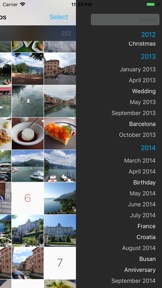
Tag, Map, Timeline and many great features will help you search, manage, edit and share your photos/videos.
Don't just make your good memories sitting in your iPhone/iPad.
Make your memories alive and having fun with them!
* If you have bought or downloaded before version 3.7.0, you don't need to buy In-App features. Tap "Restore" button if you see Shop Page.
****** FEATURES ******
[Search / Manage]
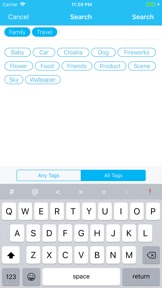
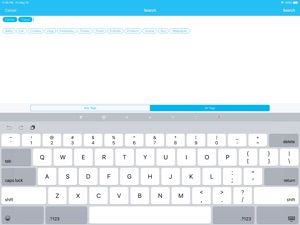
- Tag
- Timeline
- Map
- Powerful Search (User Tags, Predefined Tags, Date/Time, Size)
- Support Spotlight Search
- User Smart Album
- Folder/Album Manager
[Customize UI]
- Thumbnail Size and Style
- Thumbnail Badges
- Additional Info on Thumbnail
- Grouping
[Edit]
- beyondFoto
Easy to use and powerful Photo and Video Editor
- Quick Edit
[Viewer]
- Support Animated GIF, APNG, WebP
- Zoom option
- Information
- Metadata(Exif) Viewer
- Histogram
- Memo
- Slideshow
- Tilt Scroll Panorama
[Security / Privacy]
- Private Album (Photo/Video Vault)
- Passcode and Touch ID
- Remove Metadata
[Clean Up]
- Find Similar Photos
- Compare and Pick Tool
[Transfer]
- Import from Mac/PC via Wi-Fi
- Send to Mac/PC via Wi-Fi
[Batch Tools]
- Adjust Date/Time
- Favorite/Unfavorite
- Set/Change Location
- Resize
- Hide
[Combine Tools]
- Create Animated GIF
- Combine Vertically
- Combine Horizontally
[Convert Tools]
- Video to GIF
- Live Photo to GIF
- Live Photo to Still Image
- Extract Image from Video
- Live Photo to Still Image
[Camera]
- Filters
- Live Photo
- RAW
- Save to album
[Other Tools]
- Duplicate
--------------------------------------------------------
HashPhotos Preview Video:
https://vimeo.com/186517906
HashPhotos Guide:
https://hashphotos.app/guide/v3/en/

What's New in Version 4.6.9

- Bug fixes

Seller

Name

kobaltlab Inc.

Information

Developer

Categories

Version

4.6.9

Size

61.1 MB

Game Center

No

VPP Device Licensing

Yes

Rating

Rated: 4+

Compatibility

iOS 12.0 or later

Devices

iPhone 5s, iPhone 6, iPhone 6 Plus, iPhone 6s, iPhone 6s Plus, iPhone SE, iPhone 7, iPhone 7 Plus, iPhone 8, iPhone 8 Plus, iPhone X, iPhone XR, iPhone XS, iPhone XS Max, iPhone 11, iPhone 11 Pro, iPhone 11 Pro Max, iPhone SE (2nd generation), iPhone 12, iPhone 12 Pro, iPhone 12 Pro Max, iPhone 12 mini, iPad (5th Generation) Wi-Fi, iPad (5th Generation) Wi-Fi + Cellular, iPad (6th generation) Wi-Fi, iPad (6th generation) Wi-Fi + Cellular, iPad Pro, iPad Pro (Cellular), iPad Pro (9.7-inch), iPad Pro (9.7-inch) (Cellular), iPad Pro 12.9-inch (2nd generation), iPad Pro 12.9-inch (2nd generation) Wi-Fi + Cellular, iPad Pro (10.5-inch), iPad Pro (10.5-inch) Wi-Fi + Cellular, iPad Pro (11-inch), iPad Pro (11-inch) Wi-Fi + Cellular, iPad Pro 12.9-inch (3rd generation), iPad Pro 12.9-inch (3rd generation) Wi-Fi + Cellular, iPad Air, iPad Air (Cellular), iPad Air 2, iPad Air 2 (Cellular), iPad Air (3rd generation), iPad Air (3rd generation) Wi-Fi + Cellular, iPad mini Retina, iPad mini Retina (Cellular), iPad mini 3, iPad mini 3 (Cellular), iPad mini 4, iPad mini 4 (Cellular), iPad mini (5th Generation), iPad mini (5th Generation) Wi-Fi + Cellular, iPad (7th generation) Wi-Fi + Cellular, iPad Pro 11-inch (2nd generation), iPad Pro 11-inch (2nd generation) Wi-Fi + Cellular, iPad Pro 12.9-inch (4th generation), iPad Pro 12.9-inch (4th generation) Wi-Fi + Cellular, iPad Air (4th Generation) (Wi-Fi), iPad Air (4th Generation) (Wi-Fi + Cellular), iPad (8th generation) Wi-Fi, iPad (8th generation) Wi-Fi + Cellular, iPad ProFifthGen, iPad ProFifthGenCellular, iPad ProThirdGen, iPad ProThirdGenCellular, iPod touch (6th Generation), iPod touch (7th generation)

Languages

English, Chinese, German, Japanese, Korean

App Store: Customer Ratings

Ratings & Reviews

4.5 of 5 (124 Ratings)

App Store: Customer Reviews

2020-12-12

Used to be a great app but now it’s broken

Unfortunately this app has trouble displaying RAW files (Nikon). When zooming in they become pixelated and broken. I flagged this issue to the developer but got no reaction.
It’s quite sad because I really used to like this app.
Mettwurstpabst
Version 4.6.1
2020-11-02

Limited

Downloaded app, found out keywords are stored in the app, not the photo. This means other apps can’t use them. All work will be removed if app is removed. Deleted the app.
WManser
Version 4.5.9
2020-09-13

Very useful app for organizing photos

Using it like notes organizer, if you have lots of photos and need search them with tags.
But, plz add auto sync functions for iCloud tags backup!
BZ599
Version 4.5.6
2020-08-13

Tags (keywords) can only be organized alphabetically

A great app, probably my favorite App Store app ever.
But I am disappointed that keyword tags can now only be organized alphabetically instead of in the the order they are entered.
Contacted the developer about the issue but received no response. Changed my 5 star review to 4 stars because of this.
Weaver847536
Version 4.5.6
2020-06-26

Good app

Good app for tagging photos.
loc323
Version 4.5.4
2020-05-05

Tag feature

The Tag feature is a very easy and friendly way to categorize photos. Very useful for searching.
Ernie2345
Version 4.5.1
2020-04-27

Whoa this is good!

Really like this app and find I interact with my photos way more now that it’s on my phone and iPad. I think it’s an upgrade over the native photos app. Wish there was pinch to make the grid bigger and smaller instead of being buried in the settings - but other than that, strong app!
Countingcook
Version 4.5.1
2020-02-24

Amazing

Everything I was looking for in a photo managed app
pototobug
Version 4.4.8
2019-11-22

Powerful!

Powerful and amazing app!
hvnctzn
Version 4.4.6
2019-07-21

Amazing but....

This is hands down the most powerful, comprehensive, cloud centred photo management app for iOS. It thumps Apple's own Photos app. The calendar and album functions are brilliant. Location and map integration is a lesson in how it should be done. Someone coding this gets interface and function.
That said, the app needs work. Some of the add-ones like the GIF maker work poorly and some of the editing controls need refining. The app crashed when using videos too frequently.
The metadata functions and organizational capacities are top of the charts, it the editing features are a little ambitious.
This is a developer to keep an eye on.
Ari5tophanes
Version 4.3.2
2019-05-12

INVALUABLE

This is the app that I wish was native to iOS.
jlnmyr
Version 4.2.1
2019-01-30

Greatest photo app ever!

I use this app almost every day in my ongoing project to organize a lifetime of photos. The ability to change the date is particularly useful when I’m scanning photos and want them to be sorted in chronological order.
OKZ1
Version 4.2.0
2018-12-13

Wow

Still angry at Apple for blowing up iPhoto. Laboriously re-sorted 15K photos into ‘Photos’ clumsy album system with still no search/filter!? This app works brilliantly to re-store what iPhotos used to do. Just wirelessly (and cloudlessly) transferred entire PhotoRoll from 1st Gen iPad to new 11” Pro and all tags migrated.
One quibble is inability to edit Tags, either to delete from menu, or sort into headings. Perhaps in later version? More of a problem as photos have picked up old (previously hidden) tags from original photographers/posters during the migration, adding hundreds to my tags menu.
I hope Apple comes knocking at your door with their check-book because this is what organizing photos is supposed to be.
abandonedbydrwu
Version 4.2.0
2018-11-27

Organizing your camera Roll!

Organizing your Camera Roll
I use about 300 GB for photos. With that much, I found it unmanageable. This app lets you create tags for all your photos so you can find them quickly. E.g. For 'vase' pictures you can tag them with 'vase' etc. Then you can search through the camera roll and find any tagged photo with 'vase' this at least helps. it worked very well with 300 GB of data. What bugged me was that the camera roll couldn't be organized. On the camera roll photos are placed in order of creation date. I tried changing these dates on a Mac and then moving them to the iPad, but airdrop gives them today's date and they get all placed with the most recent photos. I tried other apps and methods that did not work, but then I found that HashPhotos has a way to change the creation dates of a large selection of photos on the iPad. This means that I can create artificial groups of photos be assigning specific dates, eg 1900 for statues, 1901 of oil paintings, 1902 for drawings etc. The photo library on your camera roll which you use for iColorama mask objects etc can now be organized. Maybe the 1TB iPad could actually be used by some of you. Check ‘help’ to find how to do it.
BoyOboy!
Version 4.2.0
2018-09-01

amazing but why no ios 11 files app folder support?!

amazing but why no ios 11 files app folder support?!
please include ability to have folders in on my ipad/ ios 11 folders
also no onedrive, googledrive nor NAS / network drive support...:(
top top stuff but need above to be out of this world...
Leonidas2017
Version 4.1.6
2017-08-19

Critical Work Tool

I use this for work, where photo documentation is extensive and critical. I tried a dozen photo managing programs. HashPhotos is so much better than the rest: faster, simpler and more powerful UI, more features.
Rabbit-Light
Version 3.9.8
2016-12-21

Really impressed!

I never write reviews. But for this app I had to. It definitely deserves more attention. It's has an absolutely great interface. Much better than the stock photos app with iOS.
Not only does it look amazing but it has so many excellent uses. Batch tagging images is so useful. It will let you creat gifs with several images. It edits video right in the app (along with image editing built in as well)!
It can basically function as any photographers main app, letting them organize, compare and pick their best images, then tag and edit them, all within this one app!
If you need more advanced editing like layer masks, you will still need to use another app. However, given how great this app already is, I wouldn't be surprised if more advanced image editing gets added. Just yesterday, for example, they added noise reduction.
A big thanks to the developers from me! This was exactly what I was looking for as a photographer to organize, tag, and edit my images.
Ps. For only a few dollars for add ons inside the app, this is a great deal!
Arrvon
Version 3.7.5
2016-12-13

闪退

iOS9 iPhone6 闪退
思危#25
Version 3.7.1
2016-06-10

Need more action on multiple images

Can we add rotate capability as a supported activity when multiple images are selected? Right now I have to rotate my image one by one...
For the new compare and pick mode, when you overlay the 2 images the switch button is too close to the Done button, making it very easy to exit this mode accidentally.
drc.lvs
Version 3.4.0
2016-03-09

nice

works well and it's really useful.
easy to use with some great features.
good app thank you!
c c n z
Version 3.1.5
2015-06-18

Nice viewer

I really like this. I can see basic EXIF data and zoom into my pics quickly to pixel peep. Not overly complicated to use.
Alphabase
Version 2.6.1