Updating


iPhone Screenshots




iPad Screenshots




Description
Graffiti Spray AR
Unleash Your Inner Artist with Graffiti Spray AR!
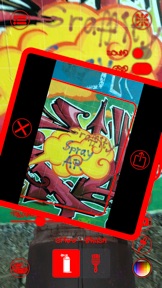
Graffiti Spray AR transforms your environment into a dynamic canvas, allowing you to create stunning graffiti art on walls, floors, and ceilings using augmented reality. Experience the thrill of street art from the comfort of your device!
Realistic Spray Paint Simulation: Enjoy a lifelike spray paint experience. The spray behaves just like a real can: the closer you are, the more intense and thinner the paint; the further you are, the lighter and wider it gets. The center of your spray is always more intense, mimicking the true physics of spray paint.
Main Features:
- User-Friendly Interface: Easy to use with a clean and intuitive interface. Quick access to all the tools you need to start painting.
- Brush Mode: Switch to Brush Mode to paint with your finger for different control and detailed artwork.
- Color Selection: Choose from a wide range of colors to create your masterpiece. Easily pick and change colors using the intuitive tools.
- Multipeer Collaboration: Share your canvas with friends and collaborate in real-time. Connect multiple devices and create art together.
Advanced Options: Customize your painting experience with various options:
- Adjust spray thickness for different effects.
- Enable physically-based rendering (PBR) for realistic lighting and textures.
- Toggle grid view for precise painting.
- Use normal maps to add realistic surface details.
- Capture and Share: Save your artwork and share it with friends or on social media.
- Ambient Music: Create a relaxing atmosphere with optional ambient music.
- Easily Undo Errors: Quickly undo mistakes for a seamless painting experience.
How to Use:
- Scan Your Environment: Point your device at a wall, floor, or ceiling to place your canvas.
- Start Painting: Use the spray can or switch to Brush Mode and let your creativity flow.
- Customize Your Experience: Adjust settings and choose your colors to create unique artwork.
- Share and Collaborate: Connect with friends and share your canvas for a collaborative graffiti experience.
Why Graffiti Spray AR?
Graffiti Spray AR brings the excitement of street art to your fingertips. Whether you're a seasoned artist or a beginner, you'll love the realistic spray physics, extensive customization options, and the ability to collaborate with others. Download Graffiti Spray AR today and start painting your world!
Seller
Name
Philippe Zay
Information
Developer
Categories
Version
1.0.0
Size
331.8 MB
Game Center
No
VPP Device Licensing
Yes
Rating
Rated: 4+
Compatibility
iOS 14.0 or later
Devices
iPhone 6s, iPhone 6s Plus, iPhone SE, iPhone 7, iPhone 7 Plus, iPhone 8, iPhone 8 Plus, iPhone X, iPhone XR, iPhone XS, iPhone XS Max, iPhone 11, iPhone 11 Pro, iPhone 11 Pro Max, iPhone SE (2nd generation), iPhone 12, iPhone 12 Pro, iPhone 12 Pro Max, iPhone 12 mini, iPhone 13, iPhone 13 Pro, iPhone 13 Pro Max, iPhone 13 mini, iPhone SE (3rd generation), iPhone 14, iPhone 14 Plus, iPhone 14 Pro, iPhone 14 Pro Max, iPhone 15, iPhone 15 Plus, iPhone 15 Pro, iPhone 15 Pro Max, iPhone 16, iPhone 16 Plus, iPhone 16 Pro, iPhone 16 Pro Max, iPhone 16e, iPad (5th Generation) Wi-Fi, iPad (5th Generation) Wi-Fi + Cellular, iPad (6th generation) Wi-Fi, iPad (6th generation) Wi-Fi + Cellular, iPad Pro, iPad Pro (Cellular), iPad Pro (9.7-inch), iPad Pro (9.7-inch) (Cellular), iPad Pro 12.9-inch (2nd generation), iPad Pro 12.9-inch (2nd generation) Wi-Fi + Cellular, iPad Pro (10.5-inch), iPad Pro (10.5-inch) Wi-Fi + Cellular, iPad Pro (11-inch), iPad Pro (11-inch) Wi-Fi + Cellular, iPad Pro 12.9-inch (3rd generation), iPad Pro 12.9-inch (3rd generation) Wi-Fi + Cellular, iPad Air (3rd generation), iPad Air (3rd generation) Wi-Fi + Cellular, iPad mini (5th Generation), iPad mini (5th Generation) Wi-Fi + Cellular, iPad (7th generation) Wi-Fi + Cellular, iPad Pro 11-inch (2nd generation), iPad Pro 11-inch (2nd generation) Wi-Fi + Cellular, iPad Pro 12.9-inch (4th generation), iPad Pro 12.9-inch (4th generation) Wi-Fi + Cellular, iPad Air (4th Generation) (Wi-Fi), iPad Air (4th Generation) (Wi-Fi + Cellular), iPad (8th generation) Wi-Fi, iPad (8th generation) Wi-Fi + Cellular, iPad Pro 11-inch (3rd generation), iPad Pro 11-inch (3rd generation) Wi-Fi + Cellular, iPad Pro 12.9-inch (5th Generation), iPad Pro 12.9-inch (5th Generation) Wi-Fi + Cellular, iPad (9th Generation), iPad (9th Generation) Wi-Fi + Cellular, iPad mini (6th Generation), iPad mini (6th Generation) Wi-Fi + Cellular, iPad Air (5th generation), iPad Air (5th generation) Wi-Fi + Cellular, iPad Pro 11-inch (4th generation), iPad Pro 11-inch (4th generation) Wi-Fi + Cellular, iPad Pro 12.9-inch (6th generation), iPad Pro 12.9-inch (6th generation) Wi-Fi + Cellular, iPad (10th generation), iPad (10th generation) Wi-Fi + Cellular, iPad Air 11-inch (M2) Wi-Fi, iPad Air 13-inch (M2) Wi-Fi, iPad Air 13-inch (M2) Wi-Fi + Cellular, iPad Pro 11-inch (M4) Wi-Fi, iPad Pro 11-inch (M4) Wi-Fi + Cellular, iPad Pro 13-inch (M4) Wi-Fi, iPad Pro 13-inch (M4) Wi-Fi + Cellular, iPad mini (A17 Pro) Wi-Fi, iPad mini (A17 Pro) Wi-Fi + Cellular, iPad (A16) Wi-Fi, iPad (A16) Wi-Fi + Cellular, iPad Air 11-inch (M3) Wi-Fi, iPad Air 11-inch (M3) Wi-Fi + Cellular, iPad Air 13-inch (M3) Wi-Fi, iPad Air 13-inch (M3) Wi-Fi + Cellular, iPod touch (7th generation)
Languages
English
App Store: Customer Ratings
Ratings & Reviews
0.0 of 5 (No rating)
App Store: Customer Reviews
No Entry