AboutTermsPrivacyContact
 
Updating
Breakroom Chat & Scheduling

Breakroom Chat & Scheduling

Released: 2023-08-18
© Johto, Inc.
Breakroom Chat & Scheduling - QR Code
Version 1.13
4+
Download on the App Store
Version 1.13
4+
Download on the App Store
Released: 2023-08-18
© Johto, Inc.

iPhone Screenshots

Screenshot
Screenshot
Screenshot
Screenshot
Screenshot
Screenshot
Screenshot
Screenshot
Screenshot

Description

Goodbye missed messages and scheduling spreadsheets. Breakroom’s team messaging and scheduling app is the most simple, capable, and affordable solution to manage your team!
From McDonalds to hair salons, businesses of all sizes use Breakroom to help unify team communications, manage employee schedules, and streamline operations. Keep your team updated and communications flowing, with simple tools for day-to-day employee engagement to strengthen your company’s culture and lower employee churn.
Read why thousands rely on Breakroom’s business chat and scheduling features:
"The one thing that's been the bane of my existence as leadership is how do I communicate effectively with everybody? I really see Breakroom being a fantastic tool." - Eric Hougland (Director of Operations, Argos, 75+ employees)
UNIFIED TEAM MESSAGING
- Send important messages, images, and videos to everyone
- Create 1:1 or group conversations with specific team members such as Managers or Shift Leads
- Keep your team connected without sharing sensitive information like phone numbers
- See who's read important messages
- Get reactions and acknowledgement from your team with work-appropriate emojis
SCHEDULING & SHIFT COVERAGE
- Create a schedule in minutes from your mobile device or the computer
- Distribute work schedules that everyone can see from the app
- Allow your team to request coverage and swap shifts
- Automatically notify team members when shifts are published or changed
TIME OFF & AVAILABILITY
- Team members can make time off requests straight from the app
- Time off requests are sent to managers and owners for approval
- Allow your team to submit their availability to make scheduling easier
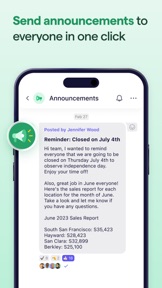
ANNOUNCEMENTS
- Share updates with your team in just a few clicks
- Separate important information from daily messages using Announcements
- Restrict who can send announcements to just admins and managers
COMPLIANCE & CONTROL
- Add and remove team members from your organization
- Delete inappropriate content
- Grant admin and manager permissions to others in your organization
FILES & RESOURCES
- Share files such as employee handbooks and training materials with your team
- Keep your team updated with information about the business
We offer in-app purchases of auto-renewing subscriptions for Breakroom. Breakroom offers unlimited access to chat, scheduling, invitations, and more. The subscription renews month-to-month and is purchased in-app. You can easily cancel anytime, online, 24 hours a day. There are no long-term contracts or cancellation fees. To avoid renewal, you must turn off auto-renew at least 24 hours before your subscription ends. You can turn off auto-renew at any time from your iTunes account settings.
Privacy policy: https://www.breakroomapp.com/privacy
Terms of service: https://www.breakroomapp.com/terms

What's New in Version 1.13

Last Active: View team members last active status through the contact screen
Joining an Organization: Team members will be prompted with a join organization flow
More Kudos: Kudos is available for all group conversations. You can send 30 per month now!

Seller

Name

Johto Inc.

URL

Information

Developer

Categories

Version

1.13

Size

34.1 MB

Game Center

No

VPP Device Licensing

Yes

Rating

Rated: 4+

Compatibility

iOS 12.4 or later

Devices

iPhone 5s, iPhone 6, iPhone 6 Plus, iPhone 6s, iPhone 6s Plus, iPhone SE, iPhone 7, iPhone 7 Plus, iPhone 8, iPhone 8 Plus, iPhone X, iPhone XR, iPhone XS, iPhone XS Max, iPhone 11, iPhone 11 Pro, iPhone 11 Pro Max, iPhone SE (2nd generation), iPhone 12, iPhone 12 Pro, iPhone 12 Pro Max, iPhone 12 mini, iPhone 13, iPhone 13 Pro, iPhone 13 Pro Max, iPhone 13 mini, iPhone SE (3rd generation), iPhone 14, iPhone 14 Plus, iPhone 14 Pro, iPhone 14 Pro Max, iPhone 15, iPhone 15 Plus, iPhone 15 Pro, iPhone 15 Pro Max, iPad (5th Generation) Wi-Fi, iPad (5th Generation) Wi-Fi + Cellular, iPad (6th generation) Wi-Fi, iPad (6th generation) Wi-Fi + Cellular, iPad Pro, iPad Pro (Cellular), iPad Pro (9.7-inch), iPad Pro (9.7-inch) (Cellular), iPad Pro 12.9-inch (2nd generation), iPad Pro 12.9-inch (2nd generation) Wi-Fi + Cellular, iPad Pro (10.5-inch), iPad Pro (10.5-inch) Wi-Fi + Cellular, iPad Pro (11-inch), iPad Pro (11-inch) Wi-Fi + Cellular, iPad Pro 12.9-inch (3rd generation), iPad Pro 12.9-inch (3rd generation) Wi-Fi + Cellular, iPad Air, iPad Air (Cellular), iPad Air 2, iPad Air 2 (Cellular), iPad Air (3rd generation), iPad Air (3rd generation) Wi-Fi + Cellular, iPad mini Retina, iPad mini Retina (Cellular), iPad mini 3, iPad mini 3 (Cellular), iPad mini 4, iPad mini 4 (Cellular), iPad mini (5th Generation), iPad mini (5th Generation) Wi-Fi + Cellular, iPad (7th generation) Wi-Fi + Cellular, iPad Pro 11-inch (2nd generation), iPad Pro 11-inch (2nd generation) Wi-Fi + Cellular, iPad Pro 12.9-inch (4th generation), iPad Pro 12.9-inch (4th generation) Wi-Fi + Cellular, iPad Air (4th Generation) (Wi-Fi), iPad Air (4th Generation) (Wi-Fi + Cellular), iPad (8th generation) Wi-Fi, iPad (8th generation) Wi-Fi + Cellular, iPad Pro 11-inch (3rd generation), iPad Pro 11-inch (3rd generation) Wi-Fi + Cellular, iPad Pro 12.9-inch (5th Generation), iPad Pro 12.9-inch (5th Generation) Wi-Fi + Cellular, iPad (9th Generation), iPad (9th Generation) Wi-Fi + Cellular, iPad mini (6th Generation), iPad mini (6th Generation) Wi-Fi + Cellular, iPad Air (5th generation), iPad Air (5th generation) Wi-Fi + Cellular, iPad Pro 11-inch (4th generation), iPad Pro 11-inch (4th generation) Wi-Fi + Cellular, iPad Pro 12.9-inch (6th generation), iPad Pro 12.9-inch (6th generation) Wi-Fi + Cellular, iPad (10th generation), iPad (10th generation) Wi-Fi + Cellular, iPad Air11M2, iPad Air11M2Cellular, iPad Air13M2, iPad Air13M2Cellular, iPad Pro11M4, iPad Pro11M4Cellular, iPad Pro13M4, iPad Pro13M4Cellular, iPod touch (6th Generation), iPod touch (7th generation)

Languages

English

App Store: Customer Ratings

Ratings & Reviews

4.5 of 5 (16 Ratings)

App Store: Customer Reviews

2024-05-27

Great for scheduling and communication with employees

So glad I found this app, made everything I needed to do a breeze. Thanks so much breakroom I will be subscribing annually 😀
saraahbaraah
Version 1.12
2024-04-29

Too bright with no dark mode. Cmon.

Make dark mode. The app burns out my retinas.
mercuryteaparty
Version 1.9
2023-11-23

Easy to use

Simple, easy to use communication app. I would recommend it for small businesses
Cruise9991
Version 1.6.1
2023-10-13

Gets the job done

We’ve been looking for a messaging app to help us with communication and Breakroom has worked really well for us
Changster_Official
Version 1.3.5
2023-10-11

Great for coordinating with my team

We’ve been using this app to communicate and stay on top of customer requests at our vehicle calibration shop. We’ve found it helpful to be able to create different GCs for different purposes. Like, we have a GC for our sales team, separate from a GC for our techs.
As a manager, I like that all phone numbers and emails are kept private. I don’t have to worry about that stuff being shared broadly across my team, unlike whatsapp. I’ve had issues where a phone number found in a GC led to a huge headache.
Barton Block
Version 1.3.5
2023-09-18

Easy to use

Better than texts. I do want to see more around employee onboarding like handbooks and doc signing. Otherwise pretty good for what it is
Agus1837
Version 1.3.3