AboutTermsPrivacyContact
 
Updating
Engineering Survey Calculator

Engineering Survey Calculator

Released: 2013-05-03
© all rights reserved
Engineering Survey Calculator - QR Code
Version 6.0
4+
Download on the App Store
Version 6.0
4+
Download on the App Store
Released: 2013-05-03
© all rights reserved

iPhone Screenshots

Screenshot
Screenshot
Screenshot
Screenshot
Screenshot
Screenshot
Screenshot
Screenshot
Screenshot
Screenshot

iPad Screenshots

Screenshot
Screenshot
Screenshot
Screenshot
Screenshot
Screenshot
Screenshot

Description

Engineering Survey Calculator has got 33 Calculators for different Surveying,measurement and Civil Engineering Parameters.
- Handy Tool for Engineering Surveyors
- Available in Imperial (USCS) and Metric (SI) Units.
- Available for i Pad and iPhone
List of Calculators in the App
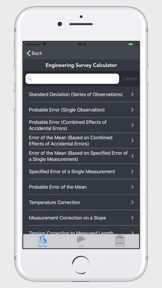
1. Standard Deviation (Series of Observations)
2. Probable Error (Single Observation)
3. Probable Error (Combined Effects of Accidental Errors)
4. Error of the Mean (Based on Combined Effects of Accidental Errors)
5. Error of the Mean (Based on Specific Error of a Single Measurement)
6. Specified Error of a Single Measurement
7. Probable Error of the Mean
8. Temperature Correction
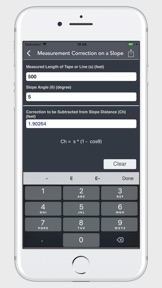
9. Measurement Correction on a Slope
10. Tension Correction to Measured Length
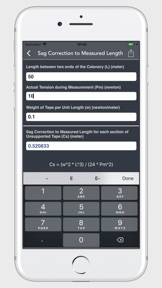
11. Sag Correction to Measured Length
12. Horizontal Distance (Slope Measurements)
13. Slope Correction (Slopes of 10% or less)
14. Slope Correction (Slopes greater than 10%)
15. Correction due to Incorrect Tape Length
16. Correction due to Nonstandard Tension
17. Sag Correction (Between Points of Support)
18. Departure from a Level Surface
19. Displacement (Horizontal Sights)
20. Combined Effect of Refraction and Curvature of Earth
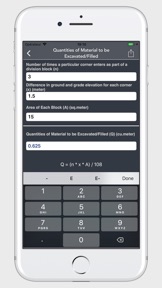
21. Quantities of Material to be Excavated/Filled
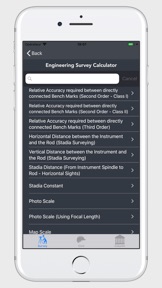
22. Relative Accuracy required between directly connected Bench marks (First Order - Class I)
23. Relative Accuracy required between directly connected Bench marks (First Order - Class II)
24. Relative Accuracy required between directly connected Bench marks (Second Order - Class I)
25. Relative Accuracy required between directly connected Bench marks (Second Order - Class II)
26. Relative Accuracy required between directly connected Bench marks (Third Order)
27. Horizontal Distance between the Instrument and the Rod (Stadia Surveying)
28. Vertical Distance between the Instrument and the Rod (Stadia Surveying)
29. Distance (From Instrument Spindle to Rod - Horizontal Sights)
30. Stadia Constant
31. Photo Scale
32. Photo Scale (Using Focal Length)
33. Map Scale

What's New in Version 6.0

- updated for iOS 18
- All new user interface for better performance
- Available in more languages now

Seller

Name

V PUGAZHENTHI

URL

Information

Developer

Categories

Version

6.0

Size

3.9 MB

Game Center

No

VPP Device Licensing

Yes

Rating

Rated: 4+

Compatibility

iOS 16.0 or later

Devices

iPhone 5s, iPhone 6, iPhone 6 Plus, iPhone 6s, iPhone 6s Plus, iPhone SE, iPhone 7, iPhone 7 Plus, iPhone 8, iPhone 8 Plus, iPhone X, iPhone XR, iPhone XS, iPhone XS Max, iPhone 11, iPhone 11 Pro, iPhone 11 Pro Max, iPhone SE (2nd generation), iPhone 12, iPhone 12 Pro, iPhone 12 Pro Max, iPhone 12 mini, iPhone 13, iPhone 13 Pro, iPhone 13 Pro Max, iPhone 13 mini, iPhone SE (3rd generation), iPhone 14, iPhone 14 Plus, iPhone 14 Pro, iPhone 14 Pro Max, iPhone 15, iPhone 15 Plus, iPhone 15 Pro, iPhone 15 Pro Max, iPhone 16, iPhone 16Plus, iPhone 16Pro, iPhone 16ProMax, iPhone 16e, iPad (5th Generation) Wi-Fi, iPad (5th Generation) Wi-Fi + Cellular, iPad (6th generation) Wi-Fi, iPad (6th generation) Wi-Fi + Cellular, iPad Pro, iPad Pro (Cellular), iPad Pro (9.7-inch), iPad Pro (9.7-inch) (Cellular), iPad Pro 12.9-inch (2nd generation), iPad Pro 12.9-inch (2nd generation) Wi-Fi + Cellular, iPad Pro (10.5-inch), iPad Pro (10.5-inch) Wi-Fi + Cellular, iPad Pro (11-inch), iPad Pro (11-inch) Wi-Fi + Cellular, iPad Pro 12.9-inch (3rd generation), iPad Pro 12.9-inch (3rd generation) Wi-Fi + Cellular, iPad Air, iPad Air (Cellular), iPad Air 2, iPad Air 2 (Cellular), iPad Air (3rd generation), iPad Air (3rd generation) Wi-Fi + Cellular, iPad mini Retina, iPad mini Retina (Cellular), iPad mini 3, iPad mini 3 (Cellular), iPad mini 4, iPad mini 4 (Cellular), iPad mini (5th Generation), iPad mini (5th Generation) Wi-Fi + Cellular, iPad (7th generation) Wi-Fi + Cellular, iPad Pro 11-inch (2nd generation), iPad Pro 11-inch (2nd generation) Wi-Fi + Cellular, iPad Pro 12.9-inch (4th generation), iPad Pro 12.9-inch (4th generation) Wi-Fi + Cellular, iPad Air (4th Generation) (Wi-Fi), iPad Air (4th Generation) (Wi-Fi + Cellular), iPad (8th generation) Wi-Fi, iPad (8th generation) Wi-Fi + Cellular, iPad Pro 11-inch (3rd generation), iPad Pro 11-inch (3rd generation) Wi-Fi + Cellular, iPad Pro 12.9-inch (5th Generation), iPad Pro 12.9-inch (5th Generation) Wi-Fi + Cellular, iPad (9th Generation), iPad (9th Generation) Wi-Fi + Cellular, iPad mini (6th Generation), iPad mini (6th Generation) Wi-Fi + Cellular, iPad Air (5th generation), iPad Air (5th generation) Wi-Fi + Cellular, iPad Pro 11-inch (4th generation), iPad Pro 11-inch (4th generation) Wi-Fi + Cellular, iPad Pro 12.9-inch (6th generation), iPad Pro 12.9-inch (6th generation) Wi-Fi + Cellular, iPad (10th generation), iPad (10th generation) Wi-Fi + Cellular, iPad Air 11-inch (M2) Wi-Fi, iPad Air 13-inch (M2) Wi-Fi, iPad Air 13-inch (M2) Wi-Fi + Cellular, iPad Pro 11-inch (M4) Wi-Fi, iPad Pro 11-inch (M4) Wi-Fi + Cellular, iPad Pro 13-inch (M4) Wi-Fi, iPad Pro 13-inch (M4) Wi-Fi + Cellular, iPad MiniA17Pro, iPad MiniA17ProCellular, iPod touch (6th Generation), iPod touch (7th generation)

Languages

English, Chinese, Dutch, French, German, Italian, Portuguese, Spanish

App Store: Customer Ratings

Ratings & Reviews

0.0 of 5 (No rating)

App Store: Customer Reviews

2013-06-10

Functional but not slick

The app is pretty basic, the calculations seem to work fine, but the UI could use some work. Units default to imperial too often, can't be set and stay on Metric. It would also be nice to see things like resulting values for things like a slope correction to horizontal distance, ie. if I say SD is 10, slope is 32%, I do want to know the correction is subtracting 1.52, but it would be nice to also get 8.48 as the corrected HD shown somewhere. Unique icons for calculations would help in searching too.
All in all it works, just klunkily.
plasmatronlaboratories
Version 1.0