Updating


iPhone Screenshots



iPad Screenshots


Description
Crayon Style is a painting application reproducing the warm experience of drawing with crayons. Transform your iPhone or iPad into a sheet of drawing paper and enjoy creating all kinds of drawings ranging from doodling and sketching to full-blown art.
Crayon Style's simple and stylish user interface is light and easy to use, allowing you to enjoy the application anywhere and at any time. Use it in all kinds of situations to note down ideas, sketch scenery, create illustrations, etc.
- Drawing engine reproducing the appearance of crayon art.
Crayon Style's original drawing engine simulates the characteristics of drawing with crayons, such as rough lines, pigment depth and the mixed colors produced when layering strokes, reproducing faithfully the warm look and feel of crayon art.
-Set photos you like as a background with Sketch Guide.
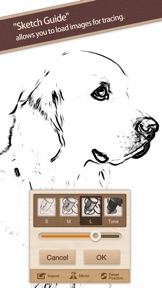
With the Sketch Guide feature, you can set a photo or image as a background to your drawing. Use it to trace over a picture you like or to create an original coloring page.
- Smart and fun user interface.
With its polished design, seamless screen transitions and casual feel, the user interface feels good and is fun to use. Combined with the features above, you get a simple and smart application which can be enjoyed by children and adults alike.
- Share your artwork on social networks!
You can post your illustrations to social networks such as Facebook and Twitter using the "Share..." functionality.
- Easier, more natural drawing. Supports Apple Pencil and 3D Touch.
You can pleasantly draw using your fingers, but you can experience an even more wonderful drawing experience by using a stylus. The app supports stroke pressure with the iPad Pro's Apple Pencil. On the iPhone, the app uses 3D Touch to simulate stroke pressure and unlock more shades of color. With the 3D Touch functionality, it is possible to use stroke pressure with your finger as well as standard styluses.
■Main Features
- Drawing engine reproducing the look and feel of crayon art.
- 24 colors available.
- Rub colors with the sponge tool to blend them together.
- Eraser tool.
- Color selection history (up to 3 colors).
- 5 levels of line thickness (line thickness saved separately for each tool).
- Undo / Redo (up to 4 times each).
- Enlarge, reduce and rotate the canvas.
- Toolbar can be moved to the top or bottom of the screen.
- Artwork gallery feature.
- Set a photo or image as a background with the Sketch Guide feature.
- Output (export) to:
- Camera roll (jpg format)
- Share..
- Open In..
- Supports Apple Pencil (pressure).
- Supports 3D Touch.
What's New in Version 1.04
This app has been updated by Apple to use the latest Apple signing certificate.
- Support for iOS 11.
- Updated requirements. iOS 10 and up is now required.
- Supports 3D Touch and pressure with the Apple Pencil.
- Minor bug fixes.
Seller
Name
P SOFTHOUSE Co., Ltd.
Information
Developer
Categories
Version
1.04
Size
47.6 MB
Game Center
No
VPP Device Licensing
Yes
Rating
Rated: 4+
Compatibility
iOS 10.0 or later
Devices
iPhone 5, iPhone 5c, iPhone 5s, iPhone 6, iPhone 6 Plus, iPhone 6s, iPhone 6s Plus, iPhone SE, iPhone 7, iPhone 7 Plus, iPhone 8, iPhone 8 Plus, iPhone X, iPhone XR, iPhone XS, iPhone XS Max, iPhone 11, iPhone 11 Pro, iPhone 11 Pro Max, iPhone SE (2nd generation), iPhone 12, iPhone 12 Pro, iPhone 12 Pro Max, iPhone 12 mini, iPad (4th Generation) (Wi-Fi), iPad (4th Generation) (4G), iPad (5th Generation) Wi-Fi, iPad (5th Generation) Wi-Fi + Cellular, iPad (6th generation) Wi-Fi, iPad (6th generation) Wi-Fi + Cellular, iPad Pro, iPad Pro (Cellular), iPad Pro (9.7-inch), iPad Pro (9.7-inch) (Cellular), iPad Pro 12.9-inch (2nd generation), iPad Pro 12.9-inch (2nd generation) Wi-Fi + Cellular, iPad Pro (10.5-inch), iPad Pro (10.5-inch) Wi-Fi + Cellular, iPad Pro (11-inch), iPad Pro (11-inch) Wi-Fi + Cellular, iPad Pro 12.9-inch (3rd generation), iPad Pro 12.9-inch (3rd generation) Wi-Fi + Cellular, iPad Air, iPad Air (Cellular), iPad Air 2, iPad Air 2 (Cellular), iPad Air (3rd generation), iPad Air (3rd generation) Wi-Fi + Cellular, iPad mini Retina, iPad mini Retina (Cellular), iPad mini 3, iPad mini 3 (Cellular), iPad mini 4, iPad mini 4 (Cellular), iPad mini (5th Generation), iPad mini (5th Generation) Wi-Fi + Cellular, iPad (7th generation) Wi-Fi + Cellular, iPad Pro 11-inch (2nd generation), iPad Pro 11-inch (2nd generation) Wi-Fi + Cellular, iPad Pro 12.9-inch (4th generation), iPad Pro 12.9-inch (4th generation) Wi-Fi + Cellular, iPad Air (4th Generation) (Wi-Fi), iPad Air (4th Generation) (Wi-Fi + Cellular), iPad (8th generation) Wi-Fi, iPad (8th generation) Wi-Fi + Cellular, iPod touch (6th Generation), iPod touch (7th generation)
Languages
English, Japanese
App Store: Customer Ratings
Ratings & Reviews
5.0 of 5 (3 Ratings)
App Store: Customer Reviews
No Entry