AboutTermsPrivacyContact
 
Updating
devCalc Pro

devCalc Pro

Released: 2013-03-11
© Tamas Rudnai
devCalc Pro - QR Code
Version 1.8.6
4+
Download on the App Store
Version 1.8.6
4+
Download on the App Store
Released: 2013-03-11
© Tamas Rudnai

iPhone Screenshots

Screenshot
Screenshot
Screenshot
Screenshot
Screenshot

iPad Screenshots

Screenshot
Screenshot
Screenshot
Screenshot
Screenshot

Description

devCalc Pro is an perfect blend of an engineering, a scientific and a programmers calculator.
Unique features:
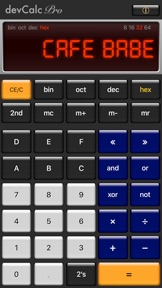
• Easy number base conversion from Binary, Octal, Decimal and Hexadecimal (bin, oct, dec, hex)
• Real Engineering mode allows you to display big and small numbers in human readable format
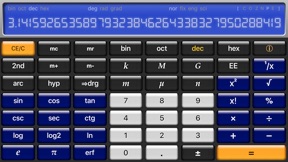
• Extensive functions for Scientists and Software Developers - Rotate device to landscape mode
• Swipe LCD display sideways to change color theme
devCalc is designed from top to bottom developers and engineers in mind. As a hybrid scientific and programmer calculator it gives smooth blend for IT professionals, engineers and scientists as well as university students.
Real Engineering Mode is an innovative input and display method, that makes engineers life easier by automatically scaling the number to a human readable format. This allows you to concentrate on the calculation rather than how to translate that to a calculator friendly format.
To enter a number in Real Engineering Format even in decimal mode: Just tap on the Kilo, Mega, Giga, Milli, Micro or Nano buttons. The calculator then automatically scales the calculated numbers and displays it in the way you got used to.
For example 500k * 3 automatically displayed as 1.5M. In the meanwhile devCalc Pro keeps the high precision value, therefore later on you can switch the view back to Kilo to see 1'500k, or turning the Real Engineering Mode completely off by tapping on the "k" button again to see all the decimal digits (1'500'000). Try this new and unique feature out and tell us your story how you use Real Engineering Mode.
One of the great examples is to calculate Ohm’s law in electronics: You are looking for a resistor value for 5V and 3mA, so you type: 5 / 3m and you will see 1.67k on the screen (1.67 kilo-Ohm).

What's New in Version 1.8.6

Improved external keyboard support & Native Mac version.

Seller

Name

Tamas Rudnai

Information

Developer

Categories

Version

1.8.6

Size

5.6 MB

Game Center

No

VPP Device Licensing

Yes

Rating

Rated: 4+

Compatibility

iOS 9.0 or later

Devices

iPhone 5s, iPhone 6, iPhone 6 Plus, iPhone 6s, iPhone 6s Plus, iPhone SE, iPhone 7, iPhone 7 Plus, iPhone 8, iPhone 8 Plus, iPhone X, iPhone XR, iPhone XS, iPhone XS Max, iPhone 11, iPhone 11 Pro, iPhone 11 Pro Max, iPhone SE (2nd generation), iPhone 12, iPhone 12 Pro, iPhone 12 Pro Max, iPhone 12 mini, iPhone 13, iPhone 13 Pro, iPhone 13 Pro Max, iPhone 13 mini, iPhone SE (3rd generation), iPhone 14, iPhone 14 Plus, iPhone 14 Pro, iPhone 14 Pro Max, iPhone 15, iPhone 15 Plus, iPhone 15 Pro, iPhone 15 Pro Max, iPhone 16, iPhone 16 Plus, iPhone 16 Pro, iPhone 16 Pro Max, iPhone 16e, iPad (5th Generation) Wi-Fi, iPad (5th Generation) Wi-Fi + Cellular, iPad (6th generation) Wi-Fi, iPad (6th generation) Wi-Fi + Cellular, iPad Pro, iPad Pro (Cellular), iPad Pro (9.7-inch), iPad Pro (9.7-inch) (Cellular), iPad Pro 12.9-inch (2nd generation), iPad Pro 12.9-inch (2nd generation) Wi-Fi + Cellular, iPad Pro (10.5-inch), iPad Pro (10.5-inch) Wi-Fi + Cellular, iPad Pro (11-inch), iPad Pro (11-inch) Wi-Fi + Cellular, iPad Pro 12.9-inch (3rd generation), iPad Pro 12.9-inch (3rd generation) Wi-Fi + Cellular, iPad Air, iPad Air (Cellular), iPad Air 2, iPad Air 2 (Cellular), iPad Air (3rd generation), iPad Air (3rd generation) Wi-Fi + Cellular, iPad mini Retina, iPad mini Retina (Cellular), iPad mini 3, iPad mini 3 (Cellular), iPad mini 4, iPad mini 4 (Cellular), iPad mini (5th Generation), iPad mini (5th Generation) Wi-Fi + Cellular, iPad (7th generation) Wi-Fi + Cellular, iPad Pro 11-inch (2nd generation), iPad Pro 11-inch (2nd generation) Wi-Fi + Cellular, iPad Pro 12.9-inch (4th generation), iPad Pro 12.9-inch (4th generation) Wi-Fi + Cellular, iPad Air (4th Generation) (Wi-Fi), iPad Air (4th Generation) (Wi-Fi + Cellular), iPad (8th generation) Wi-Fi, iPad (8th generation) Wi-Fi + Cellular, iPad Pro 11-inch (3rd generation), iPad Pro 11-inch (3rd generation) Wi-Fi + Cellular, iPad Pro 12.9-inch (5th Generation), iPad Pro 12.9-inch (5th Generation) Wi-Fi + Cellular, iPad (9th Generation), iPad (9th Generation) Wi-Fi + Cellular, iPad mini (6th Generation), iPad mini (6th Generation) Wi-Fi + Cellular, iPad Air (5th generation), iPad Air (5th generation) Wi-Fi + Cellular, iPad Pro 11-inch (4th generation), iPad Pro 11-inch (4th generation) Wi-Fi + Cellular, iPad Pro 12.9-inch (6th generation), iPad Pro 12.9-inch (6th generation) Wi-Fi + Cellular, iPad (10th generation), iPad (10th generation) Wi-Fi + Cellular, iPad Air 11-inch (M2) Wi-Fi, iPad Air 13-inch (M2) Wi-Fi, iPad Air 13-inch (M2) Wi-Fi + Cellular, iPad Pro 11-inch (M4) Wi-Fi, iPad Pro 11-inch (M4) Wi-Fi + Cellular, iPad Pro 13-inch (M4) Wi-Fi, iPad Pro 13-inch (M4) Wi-Fi + Cellular, iPad mini (A17 Pro) Wi-Fi, iPad mini (A17 Pro) Wi-Fi + Cellular, iPad (A16) Wi-Fi, iPad (A16) Wi-Fi + Cellular, iPad Air 11-inch (M3) Wi-Fi, iPad Air 11-inch (M3) Wi-Fi + Cellular, iPad Air 13-inch (M3) Wi-Fi, iPad Air 13-inch (M3) Wi-Fi + Cellular, iPod touch (6th Generation), iPod touch (7th generation), Mac Desktop

Languages

English

App Store: Customer Ratings

Ratings & Reviews

2.0 of 5 (1 Rating)

App Store: Customer Reviews

2013-04-06

Needs more thought/work

A nice calc with a nice set of features, but not very friendly to use:
On the vertical mode, you have to use the '2nd' key to access brackets '()', and when you do, you have to use it again to access memory functions. Things like x! are on this keypad, but not Pi (not even using the '2nd' key. Yet things like unit change keys (k, M, G, etc) stay as prominent keys wasting space and don't even change with the '2nd' key. So basically, not very logically thought out or convenient to use. Nice programmers calc features on the horizontal view, but still same issues with bracket access and inconvenient key/function access.
Also, the author has the value of Pi incorrect in the calculator!! This can also be seen in the app screen shot on iTunes, it is not …89793792, it is …89793238(46…)
MasterFR
Version 1.2