AboutTermsPrivacyContact
 
Updating
Cine Meter

Cine Meter

Released: 2013-01-18
© 2014-2017 Adam J. Wilt
Cine Meter - QR Code
Version 1.10
4+
Download on the App Store
Version 1.10
4+
Download on the App Store
Released: 2013-01-18
© 2014-2017 Adam J. Wilt

iPhone Screenshots

Screenshot
Screenshot
Screenshot
Screenshot
Screenshot

Description

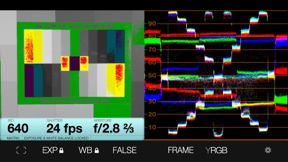
SEE the light: Cine Meter gives you an RGB waveform monitor and a false-color picture in addition to a cine-style, shutter-priority reflected light meter, using the camera in your iPhone / iPod / iPad.
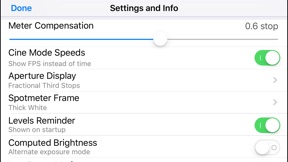
• The light meter shows you your stop as a decimal value (such as f/5.0, good for cameras with EVF iris readouts) or as a full stop and fraction (like f/4.0 ⅔, good for cine lenses with marked iris rings). You can calibrate Cine Meter to match other meters to a tenth of a stop.
• The waveform monitor shows you how light levels vary across a scene. You'll see how smooth and even the lighting is on a greenscreen or background, and find subtle hotspots and shadows at a glance. The waveform’s RGB mode shows you color imbalances in the image and gives you a handy way to check color purity and separation for chroma-keying.
• The false-color mode lets you define allowable contrast ranges, and see instantly which shadows are underexposed and what highlights risk clipping.
_______________________
READ BEFORE YOU BUY:
Cine Meter is NOT a color-temperature meter; it can't measure white balance.
It's NOT a flash meter; it can't measure strobes.
It's designed solely for cine/video work and isn't optimized for still photography; for example, it's shutter-priority only.
Cine Meter gives you *absolute* light meter readings, but *relative* picture and waveform monitor levels:
1) Cine Meter’s picture and waveform monitor do not use the *exact* exposure shown by the light meter (they are close to the meter reading, but can differ from it slightly). The picture and waveform monitor show you *relative* levels within a scene, not *absolute* levels based on the meter reading.
2) You can't *preset* exposure or color temperature in Cine Meter. To compare exposures and colors, you lock Cine Meter’s auto-exposure and auto-white-balance settings while looking at a known good reference, such as a gray card. The picture and waveform monitor then show you levels and colors relative to your locked settings.
See http://www.adamwilt.com/cinemeter/details.html#How_It_Works for details.
(Why am I telling you this? I would rather have you understand these limitations up-front and not buy Cine Meter, than have you buy Cine Meter unaware of them and be disappointed.)

What's New in Version 1.10

This app has been updated by Apple to display the Apple Watch app icon.
• Improved error handling when no mail account is found for sending feedback.

Information

Developer

Categories

Version

1.10

Size

2.9 MB

Game Center

No

VPP Device Licensing

Yes

Rating

Rated: 4+

Compatibility

iOS 5.1.1 or later

Devices

iPhone 3GS, iPhone 4, iPhone 4S, iPhone 5, iPhone 5c, iPhone 5s, iPhone 6, iPhone 6 Plus, iPhone 6s, iPhone 6s Plus, iPhone SE, iPhone 7, iPhone 7 Plus, iPhone 8, iPhone 8 Plus, iPhone X, iPhone XR, iPhone XS, iPhone XS Max, iPhone 11, iPhone 11 Pro, iPhone 11 Pro Max, iPhone SE (2nd generation), iPhone 12, iPhone 12 Pro, iPhone 12 Pro Max, iPhone 12 mini, iPhone 13, iPhone 13 Pro, iPhone 13 Pro Max, iPhone 13 mini, iPad 2 (Wi-Fi), iPad 2 (3G), iPad (3rd Generation) (Wi-Fi), iPad (3rd Generation) (4G), iPad (4th Generation) (Wi-Fi), iPad (4th Generation) (4G), iPad (5th Generation) Wi-Fi, iPad (5th Generation) Wi-Fi + Cellular, iPad (6th generation) Wi-Fi, iPad (6th generation) Wi-Fi + Cellular, iPad Pro, iPad Pro (Cellular), iPad Pro (9.7-inch), iPad Pro (9.7-inch) (Cellular), iPad Pro 12.9-inch (2nd generation), iPad Pro 12.9-inch (2nd generation) Wi-Fi + Cellular, iPad Pro (10.5-inch), iPad Pro (10.5-inch) Wi-Fi + Cellular, iPad Pro (11-inch), iPad Pro (11-inch) Wi-Fi + Cellular, iPad Pro 12.9-inch (3rd generation), iPad Pro 12.9-inch (3rd generation) Wi-Fi + Cellular, iPad Air, iPad Air (Cellular), iPad Air 2, iPad Air 2 (Cellular), iPad Air (3rd generation), iPad Air (3rd generation) Wi-Fi + Cellular, iPad mini (Wi-Fi), iPad mini (4G), iPad mini Retina, iPad mini Retina (Cellular), iPad mini 3, iPad mini 3 (Cellular), iPad mini 4, iPad mini 4 (Cellular), iPad mini (5th Generation), iPad mini (5th Generation) Wi-Fi + Cellular, iPad (7th generation) Wi-Fi + Cellular, iPad Pro 11-inch (2nd generation), iPad Pro 11-inch (2nd generation) Wi-Fi + Cellular, iPad Pro 12.9-inch (4th generation), iPad Pro 12.9-inch (4th generation) Wi-Fi + Cellular, iPad Air (4th Generation) (Wi-Fi), iPad Air (4th Generation) (Wi-Fi + Cellular), iPad (8th generation) Wi-Fi, iPad (8th generation) Wi-Fi + Cellular, iPad Pro 11-inch (3rd generation), iPad Pro 11-inch (3rd generation) Wi-Fi + Cellular, iPad Pro 12.9-inch (5th Generation), iPad Pro 12.9-inch (5th Generation) Wi-Fi + Cellular, iPad (9th Generation), iPad (9th Generation) Wi-Fi + Cellular, iPad mini (6th Generation), iPad mini (6th Generation) Wi-Fi + Cellular, iPod touch (4th generation), iPod touch (5th generation), iPod touch (6th Generation), iPod touch (7th generation)

Languages

English

App Store: Customer Ratings

Ratings & Reviews

5.0 of 5 (1 Rating)

App Store: Customer Reviews

2016-01-31

Amazing!

This app is quite frankly astonishing. I'm using it on a first gen ipad mini and suddenly I have a waveform monitor to check my greenscreen color separation and false color banding to check for even lighting. That would be worth the money even without the light meter! Thank you Adam Wilt. I owe you a beer. Not sure why there aren't more reviews here.
Yogkit
Version 1.6
2013-01-18

IPhone Waveform Great idea!

I always thought a iPhone Waveform would be cool. Well here it is! Once it's calibrated It's a great way to get a approximate idea of what the camera will see before pulling it out. Check your green screen uniformity and luminance level. A quick ratio check. If you could custom the gamma it would go a bit further.
biker_eh
Version 1.0