AboutTermsPrivacyContact
 
Updating
MIDI Wrench

MIDI Wrench

Released: 2013-01-11
© 2012-2020 Crudebyte
MIDI Wrench - QR Code
Version 1.4
4+
Download on the App Store
Version 1.4
4+
Download on the App Store
Released: 2013-01-11
© 2012-2020 Crudebyte

iPhone Screenshots

Screenshot
Screenshot
Screenshot
Screenshot

iPad Screenshots

Screenshot
Screenshot
Screenshot
Screenshot

Description

The Swiss army knife for your daily MIDI setup tasks. Connect a MIDI keyboard, MIDI sound expander or any other MIDI device to your iPad, iPhone or iPod touch by using the Apple USB camera adapter or any other adapter supported by Apple. Visualize and monitor MIDI messages sent by the connected MIDI device or send MIDI messages to those connected MIDI devices. This is a simple but helpful tool to find problems in your MIDI setup or simply to spot what kind of messages various MIDI devices are sending exactly.
This app supports all hardware and software sources for MIDI, including Bluetooth LE MIDI !
Current Features:
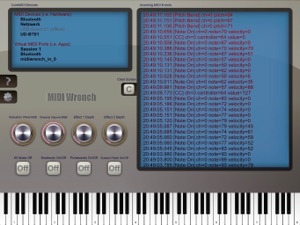
• Lists all CoreMIDI devices (i.e. attached MIDI accessories) and all so called "virtual CoreMIDI ports" (i.e. audio Apps) on your iPad / iPhone / iPod touch.
• Displays incoming MIDI events of external MIDI hardware and local MIDI apps in real-time.
• Send MIDI Note-On, Note-Off and Control Change messages by using the virtual MIDI keyboard, buttons and rotary knobs.
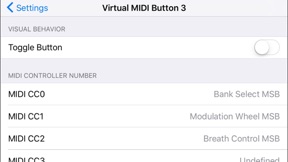
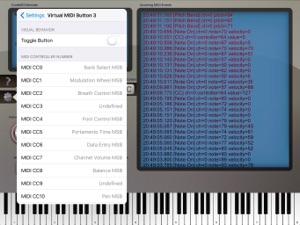
• Virtual on-screen MIDI controls are fully configurable, so you may assign other MIDI controller numbers and more.
• The virtual keyboard keys, rotary knobs and buttons automatically update to the values sent by connected MIDI devices.
• Filter out MIDI events you are not interested in.
• Copy MIDI events with one tap to the iOS clipboard, and paste them as text in another app like Mail.
This app is free, and it does not contain any ads or other annoying things. Really!
Anti-Spy Commitment: We take your privacy very seriously. None of our apps contain so called „spy” behaviors and we committed ourself to a very high privacy standard. MIDI Wrench does not collect any information. For more information about our privacy commitment, read our „Privacy Policy for Mobile Apps”.

What's New in Version 1.4

This update adds the following new features:
• Support for new iPhone models (e.g. iPhone 11 variants).
• MIDI channel for virtual on-screen MIDI controls is now configurable.
• MIDI events monitor may now be paused (either by new pause button or by long-tap context menu).
• Added optional filter for MIDI RT Clock events.
• Added support for sending MIDI Program Change commands.
• Added support for sending MIDI Real-Time Messages (Start, Stop, Continue, Active Sensing, Reset all Receivers).
• Added support for sending MIDI Note Pressure (Polyphonic Aftertouch).
• Added support for sending MIDI Channel Pressure (Monophonic Aftertouch).
• Added option for forcing the app to continue running in the background (i.e. to capture MIDI data on MIDI events monitor while working with another audio / MIDI app in foreground).
• iPhone: MIDI events monitor may now be cleared by long-tap context menu.
This update also fixes thes following issues:
• Fixes issues with the graphical user interface (iOS 13).
• Fixes graphical issues with some older iPhone models.
• MIDI event monitor: MIDI channel numbers are now displayed starting by 1, as commonly expected in MIDI world (not by 0 as actually on technical level which was apparently confusing for many users).
• Fixed some MIDI SysEx messages not being displayed correctly with certain Bluetooth LE MIDI connections.
• Fixed issue with touch events on lower edge of screen (iOS 11 and higher).
**NOTE**: The previous clear button had been replaced by a pause button. You can find the clear function now from the context menu (popup menu) by long tapping onto the MIDI events monitor.
That's it for now, thanks for your feedback and take care!

Seller

Name

Christian Schoenebeck d/b/a Crudebyte

Information

Categories

Version

1.4

Size

22.5 MB

Game Center

No

VPP Device Licensing

Yes

Rating

Rated: 4+

Compatibility

iOS 9.0 or later

Devices

iPhone 4S, iPhone 5, iPhone 5c, iPhone 5s, iPhone 6, iPhone 6 Plus, iPhone 6s, iPhone 6s Plus, iPhone SE, iPhone 7, iPhone 7 Plus, iPhone 8, iPhone 8 Plus, iPhone X, iPhone XR, iPhone XS, iPhone XS Max, iPhone 11, iPhone 11 Pro, iPhone 11 Pro Max, iPhone SE (2nd generation), iPhone 12, iPhone 12 Pro, iPhone 12 Pro Max, iPhone 12 mini, iPhone 13, iPhone 13 Pro, iPhone 13 Pro Max, iPhone 13 mini, iPhone SE (3rd generation), iPhone 14, iPhone 14 Plus, iPhone 14 Pro, iPhone 14 Pro Max, iPhone 15, iPhone 15 Plus, iPhone 15 Pro, iPhone 15 Pro Max, iPhone 16, iPhone 16 Plus, iPhone 16 Pro, iPhone 16 Pro Max, iPhone 16e, iPhone 17, iPhone 17Pro, iPhone 17ProMax, iPhone Air, iPad 2 (Wi-Fi), iPad 2 (3G), iPad (3rd Generation) (Wi-Fi), iPad (3rd Generation) (4G), iPad (4th Generation) (Wi-Fi), iPad (4th Generation) (4G), iPad (5th Generation) Wi-Fi, iPad (5th Generation) Wi-Fi + Cellular, iPad (6th generation) Wi-Fi, iPad (6th generation) Wi-Fi + Cellular, iPad Pro, iPad Pro (Cellular), iPad Pro (9.7-inch), iPad Pro (9.7-inch) (Cellular), iPad Pro 12.9-inch (2nd generation), iPad Pro 12.9-inch (2nd generation) Wi-Fi + Cellular, iPad Pro (10.5-inch), iPad Pro (10.5-inch) Wi-Fi + Cellular, iPad Pro (11-inch), iPad Pro (11-inch) Wi-Fi + Cellular, iPad Pro 12.9-inch (3rd generation), iPad Pro 12.9-inch (3rd generation) Wi-Fi + Cellular, iPad Air, iPad Air (Cellular), iPad Air 2, iPad Air 2 (Cellular), iPad Air (3rd generation), iPad Air (3rd generation) Wi-Fi + Cellular, iPad mini (Wi-Fi), iPad mini (4G), iPad mini Retina, iPad mini Retina (Cellular), iPad mini 3, iPad mini 3 (Cellular), iPad mini 4, iPad mini 4 (Cellular), iPad mini (5th Generation), iPad mini (5th Generation) Wi-Fi + Cellular, iPad (7th generation) Wi-Fi + Cellular, iPad Pro 11-inch (2nd generation), iPad Pro 11-inch (2nd generation) Wi-Fi + Cellular, iPad Pro 12.9-inch (4th generation), iPad Pro 12.9-inch (4th generation) Wi-Fi + Cellular, iPad Air (4th Generation) (Wi-Fi), iPad Air (4th Generation) (Wi-Fi + Cellular), iPad (8th generation) Wi-Fi, iPad (8th generation) Wi-Fi + Cellular, iPad Pro 11-inch (3rd generation), iPad Pro 11-inch (3rd generation) Wi-Fi + Cellular, iPad Pro 12.9-inch (5th Generation), iPad Pro 12.9-inch (5th Generation) Wi-Fi + Cellular, iPad (9th Generation), iPad (9th Generation) Wi-Fi + Cellular, iPad mini (6th Generation), iPad mini (6th Generation) Wi-Fi + Cellular, iPad Air (5th generation), iPad Air (5th generation) Wi-Fi + Cellular, iPad Pro 11-inch (4th generation), iPad Pro 11-inch (4th generation) Wi-Fi + Cellular, iPad Pro 12.9-inch (6th generation), iPad Pro 12.9-inch (6th generation) Wi-Fi + Cellular, iPad (10th generation), iPad (10th generation) Wi-Fi + Cellular, iPad Air 11-inch (M2) Wi-Fi, iPad Air 13-inch (M2) Wi-Fi, iPad Air 13-inch (M2) Wi-Fi + Cellular, iPad Pro 11-inch (M4) Wi-Fi, iPad Pro 11-inch (M4) Wi-Fi + Cellular, iPad Pro 13-inch (M4) Wi-Fi, iPad Pro 13-inch (M4) Wi-Fi + Cellular, iPad mini (A17 Pro) Wi-Fi, iPad mini (A17 Pro) Wi-Fi + Cellular, iPad (A16) Wi-Fi, iPad (A16) Wi-Fi + Cellular, iPad Air 11-inch (M3) Wi-Fi, iPad Air 11-inch (M3) Wi-Fi + Cellular, iPad Air 13-inch (M3) Wi-Fi, iPad Air 13-inch (M3) Wi-Fi + Cellular, iPad Pro11M5, iPad Pro11M5Cellular, iPad Pro13M5, iPad Pro13M5Cellular, iPod touch (5th generation), iPod touch (6th Generation), iPod touch (7th generation)

Languages

English

App Store: Customer Ratings

Ratings & Reviews

4.5 of 5 (11 Ratings)

App Store: Customer Reviews

2025-06-14

Good App

Good app but you can’t import .mid files. Otherwise, it does its job.
RJD (33)
Version 1.4
2022-10-26

Solid!

Good tool for the toolbox.
jwwwt
Version 1.4
2020-04-25

Thanks!

Thanks for the functionality of this app!
My initial purpose is to determine why my iPad apps are suddenly not playing notes sent from my controller: the interface flashes note activity and the DAW recognizes the interface; the synths play via their onscreen keyboards. What the??
Your app instantly and easily showed me my interface and displayed the stream of [Note On] data I was hoping to see!!
Haven’t solved the mystery yet, but this important diagnostic step accomplished courtesy of your offering.
Looking forward to using this app to troubleshoot my rig and better understand the magic of midi! Thanks again.
Don2013+
Version 1.3.7
2014-01-04

Fantastic!!

What a great little app. I'd been trying to wrap my head around how to send NRPN messages from Lemur to a hardware synth for longer than I'd care to admit. I popped open MIDI Wrench and was instantly able to see exactly what data was being sent from the corresponding parameter on my synth. It solved my problem in minutes!
It does exactly as it claims to and extremely well. The only thing I can think of that would make it better is if it supported inter-app MIDI. Jack is currently not compatible with iOS 7, and is kind of redundant now. Still worth 5 stars though. THANK YOU!!!
Puking Pixels
Version 1.1.3