AboutTermsPrivacyContact
 
Updating
Mix Buddy

Mix Buddy

Released: 2012-12-10
© 2017 Rob Swart, Pixonic
Mix Buddy - QR Code
Version 2.0.1
4+
Download on the App Store
Version 2.0.1
4+
Download on the App Store
Released: 2012-12-10
© 2017 Rob Swart, Pixonic

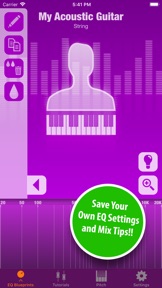
iPhone Screenshots

Screenshot
Screenshot
Screenshot
Screenshot
Screenshot

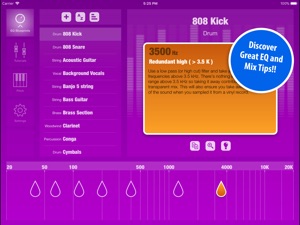
iPad Screenshots

Screenshot
Screenshot
Screenshot
Screenshot
Screenshot

Description

LEARN IMPORTANT FREQUENCIES TO MAKE A BETTER SOUNDING MIX!
Learn frequency characteristics of many instruments and improve your EQ skills.
WATCH GREAT VIDEO TUTORIALS!
Watch videos on pro audio and mix technologies.
STORE YOUR OWN EQ BLUEPRINTS AND MIX TIPS
Whether you are a student or experienced mix engineer, you can now save your own EQ and mix tips and easily recall them whenever you need them.
MANY USES
Mix Buddy can be used during study, in the studio for storing your favorite EQ adjustments or for live sound to recall EQ settings for a band’s instruments or to save venue information like resonance frequencies.
FEATURES
• Learn and browse EQ Blueprints (frequency characteristics) of many instruments
• Learn how to change the sound of many instruments in your mix
• Store custom instruments and store your own EQ info and mix tips
• Read tips on improving your mix
• Watch video tutorials on pro audio and mix technology
• Find Note names, midi note numbers and frequencies
Mix Buddy works on any iPhone or iPad running iOS 9 or higher.
If you like Mix Buddy please support development by rating it in the App Store.

What's New in Version 2.0.1

This app has been updated by Apple to display the Apple Watch app icon.
- Mix Buddy 2 now works on both iPhone and iPad.
- New user interface for iPad
- iOS 11 compatibility
- Bug fixes
Tip: Mix Buddy 2 will retain all your custom EQ Blueprints and mix tips. We still advise you to make a backup of your iPhone using iTunes before updating to Mix Buddy 2. For extra safety, use the backup function in the Mix Buddy settings. This way you can also restore the backup from there if needed.
We know how precious your time is so we will never interrupt your work with popups or notifications to ask you for a rating or a review. We kindly ask you to support the development of new features and content by writing a review or rating. You won't have to leave Mix Buddy for a rating If you use the option on the Mix Buddy Settings page.

Seller

Name

Rob Swart

Information

Developer

Categories

Version

2.0.1

Size

189.6 MB

Game Center

No

VPP Device Licensing

Yes

Rating

Rated: 4+

Compatibility

iOS 9.0 or later

Devices

iPhone 4S, iPhone 5, iPhone 5c, iPhone 5s, iPhone 6, iPhone 6 Plus, iPhone 6s, iPhone 6s Plus, iPhone SE, iPhone 7, iPhone 7 Plus, iPhone 8, iPhone 8 Plus, iPhone X, iPhone XR, iPhone XS, iPhone XS Max, iPhone 11, iPhone 11 Pro, iPhone 11 Pro Max, iPhone SE (2nd generation), iPhone 12, iPhone 12 Pro, iPhone 12 Pro Max, iPhone 12 mini, iPhone 13, iPhone 13 Pro, iPhone 13 Pro Max, iPhone 13 mini, iPhone SE (3rd generation), iPhone 14, iPhone 14 Plus, iPhone 14 Pro, iPhone 14 Pro Max, iPhone 15, iPhone 15 Plus, iPhone 15 Pro, iPhone 15 Pro Max, iPad 2 (Wi-Fi), iPad 2 (3G), iPad (3rd Generation) (Wi-Fi), iPad (3rd Generation) (4G), iPad (4th Generation) (Wi-Fi), iPad (4th Generation) (4G), iPad (5th Generation) Wi-Fi, iPad (5th Generation) Wi-Fi + Cellular, iPad (6th generation) Wi-Fi, iPad (6th generation) Wi-Fi + Cellular, iPad Pro, iPad Pro (Cellular), iPad Pro (9.7-inch), iPad Pro (9.7-inch) (Cellular), iPad Pro 12.9-inch (2nd generation), iPad Pro 12.9-inch (2nd generation) Wi-Fi + Cellular, iPad Pro (10.5-inch), iPad Pro (10.5-inch) Wi-Fi + Cellular, iPad Pro (11-inch), iPad Pro (11-inch) Wi-Fi + Cellular, iPad Pro 12.9-inch (3rd generation), iPad Pro 12.9-inch (3rd generation) Wi-Fi + Cellular, iPad Air, iPad Air (Cellular), iPad Air 2, iPad Air 2 (Cellular), iPad Air (3rd generation), iPad Air (3rd generation) Wi-Fi + Cellular, iPad mini (Wi-Fi), iPad mini (4G), iPad mini Retina, iPad mini Retina (Cellular), iPad mini 3, iPad mini 3 (Cellular), iPad mini 4, iPad mini 4 (Cellular), iPad mini (5th Generation), iPad mini (5th Generation) Wi-Fi + Cellular, iPad (7th generation) Wi-Fi + Cellular, iPad Pro 11-inch (2nd generation), iPad Pro 11-inch (2nd generation) Wi-Fi + Cellular, iPad Pro 12.9-inch (4th generation), iPad Pro 12.9-inch (4th generation) Wi-Fi + Cellular, iPad Air (4th Generation) (Wi-Fi), iPad Air (4th Generation) (Wi-Fi + Cellular), iPad (8th generation) Wi-Fi, iPad (8th generation) Wi-Fi + Cellular, iPad Pro 11-inch (3rd generation), iPad Pro 11-inch (3rd generation) Wi-Fi + Cellular, iPad Pro 12.9-inch (5th Generation), iPad Pro 12.9-inch (5th Generation) Wi-Fi + Cellular, iPad (9th Generation), iPad (9th Generation) Wi-Fi + Cellular, iPad mini (6th Generation), iPad mini (6th Generation) Wi-Fi + Cellular, iPad Air (5th generation), iPad Air (5th generation) Wi-Fi + Cellular, iPad Pro 11-inch (4th generation), iPad Pro 11-inch (4th generation) Wi-Fi + Cellular, iPad Pro 12.9-inch (6th generation), iPad Pro 12.9-inch (6th generation) Wi-Fi + Cellular, iPad (10th generation), iPad (10th generation) Wi-Fi + Cellular, iPod touch (5th generation), iPod touch (6th Generation), iPod touch (7th generation)

Languages

English

App Store: Customer Ratings

Ratings & Reviews

5.0 of 5 (2 Ratings)

App Store: Customer Reviews

2014-04-16

Love this app

This is a great app that I use during the mixing process all the time. It's a great reference for fundamental freqs and has some great mixing tips. This app won't make you any better at mixing, but it is be a useful guide!
Steinbrenner282818
Version 1.2