Updating


iPhone Screenshots




iPad Screenshots


Description
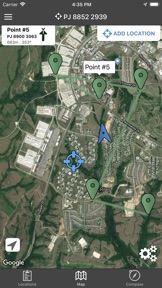
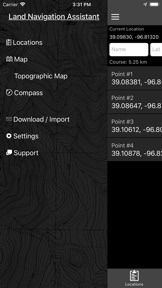
Land Nav Assistant accepts MGRS (Military Grid) or Latitude / Longitude coordinates and visually navigates you to each point.
This app was designed with Army, Marine, and other military personnel in mind. Use it to correct your Land Nav technique by analyzing your pace count and tendency to veer left and right.
Available Input: 8 digit MGRS, 10 digit MGRS, Lat/Lon decimal, Lat/Lon dms, and map input.
Angles: degrees or mils
Distance: meters/km or feet/miles
Speed: kph or mph
Use the simple arrow interface or map to direct you to your locations. Your distance, direction, speed, and bearing are shown as you navigate.
Long-tap anywhere on the map to get the coordinate for that location. Easily add locations via the Map interface.
Plan your course by ordering points, or use the course optimization tool which will help you calculate the shortest path possible!
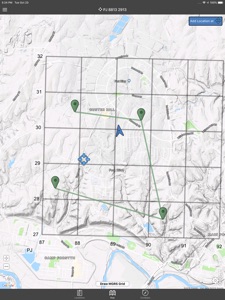
Get distance/direction between two points by tapping the path drawn between them.
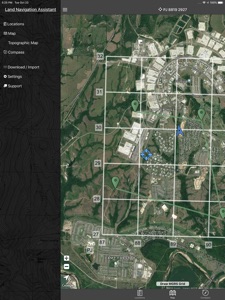
Satellite, Terrain, Road, and basic Topographic maps show you, your locations, and lets you enter in new ones.
Overlay a 1000m or 100m MGRS grid anywhere on the map.
Displays distance/direction from your currentl location to all points, or between any two points.
Download your Locations as a spreadsheet to save anywhere, or to share with anyone you choose.
Import a large set of locations via the web import utility, available at: https://www.gammonapplications.com/land-navigation-services/import
This app uses the Military Grid Reference System (MGRS) and Latitude / Longitude.
Choose to display your locations as MGRS 10-digit, MGRS 8-digit, or LatLon Decimal.
D:M:S can be input in the format DD:MM:SS followed by the appropriate direction (NSWE). Default direction is N, W.
DO NOT use this application while learning Land Navigation. Land Navigation is a valuable skill, and should be mastered before using this application. Do not rely solely on this application for navigation, especially when lost. Always be aware of your surroundings.
What's New in Version 2.2
Draw MGRS Grid Overlays anywhere on the map (1000m, 100m)
iOS 12 Optimization
Screen improvements for iPhone X, XS, and XR
Information
Developer
Categories
Version
2.2
Size
38 MB
Game Center
No
VPP Device Licensing
Yes
Rating
Rated: 4+
Compatibility
iOS 9.0 or later
Devices
iPhone 4S, iPhone 5, iPhone 5c, iPhone 5s, iPhone 6, iPhone 6 Plus, iPhone 6s, iPhone 6s Plus, iPhone SE, iPhone 7, iPhone 7 Plus, iPhone 8, iPhone 8 Plus, iPhone X, iPhone XR, iPhone XS, iPhone XS Max, iPhone 11, iPhone 11 Pro, iPhone 11 Pro Max, iPhone SE (2nd generation), iPhone 12, iPhone 12 Pro, iPhone 12 Pro Max, iPhone 12 mini, iPad 2 (Wi-Fi), iPad 2 (3G), iPad (3rd Generation) (Wi-Fi), iPad (3rd Generation) (4G), iPad (4th Generation) (Wi-Fi), iPad (4th Generation) (4G), iPad (5th Generation) Wi-Fi, iPad (5th Generation) Wi-Fi + Cellular, iPad (6th generation) Wi-Fi, iPad (6th generation) Wi-Fi + Cellular, iPad Pro, iPad Pro (Cellular), iPad Pro (9.7-inch), iPad Pro (9.7-inch) (Cellular), iPad Pro 12.9-inch (2nd generation), iPad Pro 12.9-inch (2nd generation) Wi-Fi + Cellular, iPad Pro (10.5-inch), iPad Pro (10.5-inch) Wi-Fi + Cellular, iPad Pro (11-inch), iPad Pro (11-inch) Wi-Fi + Cellular, iPad Pro 12.9-inch (3rd generation), iPad Pro 12.9-inch (3rd generation) Wi-Fi + Cellular, iPad Air, iPad Air (Cellular), iPad Air 2, iPad Air 2 (Cellular), iPad Air (3rd generation), iPad Air (3rd generation) Wi-Fi + Cellular, iPad mini (Wi-Fi), iPad mini (4G), iPad mini Retina, iPad mini Retina (Cellular), iPad mini 3, iPad mini 3 (Cellular), iPad mini 4, iPad mini 4 (Cellular), iPad mini (5th Generation), iPad mini (5th Generation) Wi-Fi + Cellular, iPad (7th generation) Wi-Fi + Cellular, iPad Pro 11-inch (2nd generation), iPad Pro 11-inch (2nd generation) Wi-Fi + Cellular, iPad Pro 12.9-inch (4th generation), iPad Pro 12.9-inch (4th generation) Wi-Fi + Cellular, iPad Air (4th Generation) (Wi-Fi), iPad Air (4th Generation) (Wi-Fi + Cellular), iPad (8th generation) Wi-Fi, iPad (8th generation) Wi-Fi + Cellular, iPod touch (5th generation), iPod touch (6th Generation), iPod touch (7th generation), Apple Watch Series 4, Apple Watch Series 5, Apple Watch Series 6 (GPS), Apple Watch Series 6 (GPS + Cellular), Apple Watch Series SE (GPS), Apple Watch Series SE (GPS + Cellular)
Languages
English
App Store: Customer Ratings
Ratings & Reviews
0.0 of 5 (No rating)
App Store: Customer Reviews
No Entry