Updating


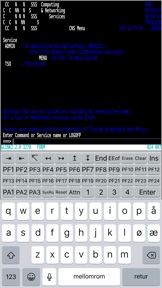
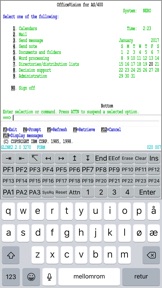
iPhone Screenshots


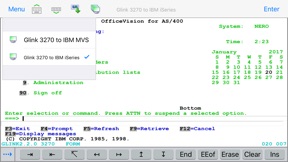
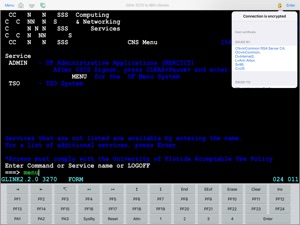
iPad Screenshots
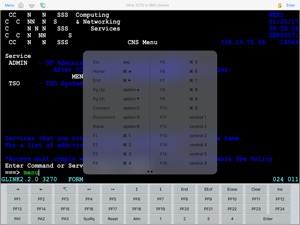


Description
Glink 3270 for iOS is an iOS-version of Gallagher & Robertson's best-selling terminal emulation program, Glink Professional Edition for Microsoft Windows.
Glink 3270 is used to access applications running on IBM host systems. Glink 3270 emulates all IBM 3270 terminals and uses the TN3270 protocol for communication with the host systems.
Glink brings you a high quality and proven emulator for your iPad, iPhone devices and Mac computers with M1/M2 chip.
Glink supports GlinkProxy, a server application designed to provide persistent host connections for Glink clients where the connection from the client device is unreliable. This may be because the device enters sleep mode or goes out of Wi-Fi range.
FEATURES
- IBM 3270 terminal emulation, all models (basic and extended) and screen sizes
- TN3270/Tn3270E communication to host, standard or extended
- IPv6 (Internet Protocol version 6) support
- SSL/TLS support for secure communication
- Multiple concurrent host sessions
- Configurable multi line toolbar with function keys and macros
- Configurable hot spots for function keys, numbers, characters and URLs
- Macro recording for auto-login and for assignment to toolbar
- Pop-up standard keyboard with support of international characters
- Tab/shift-Tab and arrow-keys supported on external Bluetooth keyboard
- All major function keys available as keyboard shortcuts
- Press and hold Command-key on external keyboard to see list of built-in keyboard shortcuts
- Colors can be customized
- Supports GlinkProxy Session Persistence Server
- Multiple host configurations supported
- Export and import of configurations
- Supports Managed App Configuration, which allows users to configure Glink remotely through Mobile Device Management (MDM)
- Optional password to access configurations
- Optional auto-connect and auto-login at startup
- Optional use of double-tap as Enter/Transmit
- Configurable scroll-back buffer contains history of your host session
- Print or e-mail host print data
- Print or e-mail terminal emulation content or scroll-back buffer content
- Zoom and scroll as the Safari browser
- Dynamic zoom to cursor position
- Blinking attribute supported
- Blinking cursor supported
- Two finger swipe gesture to move cursor
- Tap and hold to open Mail with e-mail address on screen
- Supports external Bluetooth keyboards and barcode scanners
What's New in Version 2.5.6
- Correction for shifted function keys on physical keyboard
- Horizontal toolbar / snap to next set of buttons when swiped
- Minor corrections and new features
Seller
Name
Gallagher & Robertson AS
Information
Developer
Categories
Version
2.5.6
Size
53.2 MB
Game Center
No
VPP Device Licensing
Yes
Rating
Rated: 4+
Compatibility
iOS 11.0 or later
Devices
iPhone 5s, iPhone 6, iPhone 6 Plus, iPhone 6s, iPhone 6s Plus, iPhone SE, iPhone 7, iPhone 7 Plus, iPhone 8, iPhone 8 Plus, iPhone X, iPhone XR, iPhone XS, iPhone XS Max, iPhone 11, iPhone 11 Pro, iPhone 11 Pro Max, iPhone SE (2nd generation), iPhone 12, iPhone 12 Pro, iPhone 12 Pro Max, iPhone 12 mini, iPhone 13, iPhone 13 Pro, iPhone 13 Pro Max, iPhone 13 mini, iPhone SE (3rd generation), iPhone 14, iPhone 14 Plus, iPhone 14 Pro, iPhone 14 Pro Max, iPhone 15, iPhone 15 Plus, iPhone 15 Pro, iPhone 15 Pro Max, iPhone 16, iPhone 16 Plus, iPhone 16 Pro, iPhone 16 Pro Max, iPhone 16e, iPad (5th Generation) Wi-Fi, iPad (5th Generation) Wi-Fi + Cellular, iPad (6th generation) Wi-Fi, iPad (6th generation) Wi-Fi + Cellular, iPad Pro, iPad Pro (Cellular), iPad Pro (9.7-inch), iPad Pro (9.7-inch) (Cellular), iPad Pro 12.9-inch (2nd generation), iPad Pro 12.9-inch (2nd generation) Wi-Fi + Cellular, iPad Pro (10.5-inch), iPad Pro (10.5-inch) Wi-Fi + Cellular, iPad Pro (11-inch), iPad Pro (11-inch) Wi-Fi + Cellular, iPad Pro 12.9-inch (3rd generation), iPad Pro 12.9-inch (3rd generation) Wi-Fi + Cellular, iPad Air, iPad Air (Cellular), iPad Air 2, iPad Air 2 (Cellular), iPad Air (3rd generation), iPad Air (3rd generation) Wi-Fi + Cellular, iPad mini Retina, iPad mini Retina (Cellular), iPad mini 3, iPad mini 3 (Cellular), iPad mini 4, iPad mini 4 (Cellular), iPad mini (5th Generation), iPad mini (5th Generation) Wi-Fi + Cellular, iPad (7th generation) Wi-Fi + Cellular, iPad Pro 11-inch (2nd generation), iPad Pro 11-inch (2nd generation) Wi-Fi + Cellular, iPad Pro 12.9-inch (4th generation), iPad Pro 12.9-inch (4th generation) Wi-Fi + Cellular, iPad Air (4th Generation) (Wi-Fi), iPad Air (4th Generation) (Wi-Fi + Cellular), iPad (8th generation) Wi-Fi, iPad (8th generation) Wi-Fi + Cellular, iPad Pro 11-inch (3rd generation), iPad Pro 11-inch (3rd generation) Wi-Fi + Cellular, iPad Pro 12.9-inch (5th Generation), iPad Pro 12.9-inch (5th Generation) Wi-Fi + Cellular, iPad (9th Generation), iPad (9th Generation) Wi-Fi + Cellular, iPad mini (6th Generation), iPad mini (6th Generation) Wi-Fi + Cellular, iPad Air (5th generation), iPad Air (5th generation) Wi-Fi + Cellular, iPad Pro 11-inch (4th generation), iPad Pro 11-inch (4th generation) Wi-Fi + Cellular, iPad Pro 12.9-inch (6th generation), iPad Pro 12.9-inch (6th generation) Wi-Fi + Cellular, iPad (10th generation), iPad (10th generation) Wi-Fi + Cellular, iPad Air 11-inch (M2) Wi-Fi, iPad Air 13-inch (M2) Wi-Fi, iPad Air 13-inch (M2) Wi-Fi + Cellular, iPad Pro 11-inch (M4) Wi-Fi, iPad Pro 11-inch (M4) Wi-Fi + Cellular, iPad Pro 13-inch (M4) Wi-Fi, iPad Pro 13-inch (M4) Wi-Fi + Cellular, iPad mini (A17 Pro) Wi-Fi, iPad mini (A17 Pro) Wi-Fi + Cellular, iPad (A16) Wi-Fi, iPad (A16) Wi-Fi + Cellular, iPad Air 11-inch (M3) Wi-Fi, iPad Air 11-inch (M3) Wi-Fi + Cellular, iPad Air 13-inch (M3) Wi-Fi, iPad Air 13-inch (M3) Wi-Fi + Cellular, iPod touch (6th Generation), iPod touch (7th generation)
Languages
App Store: Customer Ratings
Ratings & Reviews
0.0 of 5 (No rating)
App Store: Customer Reviews
No Entry