AboutTermsPrivacyContact
 
Updating
A+ Spelling Test

A+ Spelling Test

Released: 2012-02-15
© Alligator Apps
A+ Spelling Test - QR Code
Version 5.0
4+
Download on the App Store
Version 5.0
4+
Download on the App Store
Released: 2012-02-15
© Alligator Apps

iPhone Screenshots

Screenshot
Screenshot
Screenshot
Screenshot
Screenshot

iPad Screenshots

Screenshot
Screenshot
Screenshot
Screenshot
Screenshot

Description

"If you want your kid to be a better speller, then download this app now! With this app spelling tests become a fun activity that your kids look forward to each time."
Endorsed by tens of thousands of satisfied parents, teachers, and kids the world over.
WHAT MAKES A+ SPELLING TEST UNIQUE?
- Setup your own spelling tests in minutes
- You decide which words to add and practice
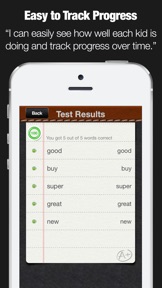
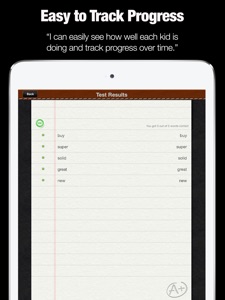
- Track your kids progress and quickly see how they are doing for each test they took as well as which words if any they are struggling with.
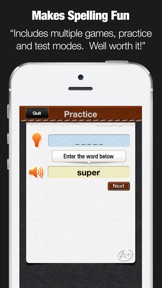
- Multiple play modes keep kids engaged. If you don't want to take a test, you can use the practice mode or let your kids unscramble the words
- Practice spelling on the go. This app is perfect for using no matter where you are.
- HUGE time saver! Finally kids can rapidly boost their spelling test scores without your help.
- Submit homework by email! After taking a spelling test, just click to submit the results instantly to your teacher.
EXCLUSIVE PRO FEATURES (unlocked via in-app-purchase)
● Import spelling lists across devices
● Share Spelling lists with parents, students, and teachers by email
● Easily sort your spelling lists
● Supports landscape and portrait mode
● Create users accounts to backup spelling lists online
● Import existing spelling lists by grade
● Includes over 400 spelling lists in total
● Spelling lists include over 6,300 words
HOW TO USE A+ SPELLING TEST?
1. Create a test
1.1. Choose the list name
1.2. Add words - words are immediately checked for spelling to avoid mistakes
1.3. For each word you add, record your own audio - a kids favorite
2. Take a test
2.1. Listen to the word you need to spell - words appear in random order
2.2. Write the word and click next
2.3. Instantly see if you got it right or wrong
3. Review test scores
3.1 Each time you take a test, you see a detailed report with all the words you got right and wrong.
3.2 Next to each word, you see a green (correct) or red (wrong) indicator so you can quickly see what words kids tend to struggle with repeatedly.
3.3 Next to each Spelling List you see the test results of the last test they took
ADVANCED OPTIONS
Ace it - Instead of taking a regular test, when you click to "Ace it" you have to keep repeating words until you spell them correctly. Since feedback and repetition is the best way to learn, your kids will improve even faster and enjoy it because by the end they will have aced every test!
Practice - The practice mode does not track your score and offers a quick preview of each word when needed with just one click. Its a fun and easy way to get familiar with especially challenging new words.
Unscramble - The unscramble mode activates and develops a completely different part of your brain. Instead of instantly hearing the word and having to spell it, you see a scramble of letters and have to figure out what word they are for. It's fun and another great way to sharpen your kids spelling skills
Review mistakes - With each test you took, you can choose to quickly just retest any / all mistakes. In addition, on the main page, you can always click to review all the words that were misspelled on their last attempt.
Enhanced email submission - Can't remember your kids teachers email? No problem. Enter it only once on the settings page and each time you click to email out the test, the teacher's email address will be pre-filled in the TO field.
Clear Test Scores - at any time, you can delete all previous test scores from the settings page with one click or delete individual test scores one at a time.
HEROIC SUPPORT
Heroic Support is not just what we do. It's really what makes us, well, us. It's that drive to make a difference in your life - no matter how big or small. Really, it's our way of life because we want you to be our customer for a lifetime of fun and learning.
Have questions? We are here to help. Email us at
support@alligatorapps.com

What's New in Version 5.0

This app has been updated by Apple to use the latest Apple signing certificate.
● Added existing spelling lists by grade
● Added over 400 spelling lists in total
● Spelling lists include over 6,300 words

Seller

Name

Innovative Mobile Apps Ltd

Information

Categories

Version

5.0

Size

20.6 MB

Game Center

No

VPP Device Licensing

Yes

Rating

Rated: 4+

Compatibility

iOS 8.0 or later

Devices

iPhone 4S, iPhone 5, iPhone 5c, iPhone 5s, iPhone 6, iPhone 6 Plus, iPhone 6s, iPhone 6s Plus, iPhone SE, iPhone 7, iPhone 7 Plus, iPhone 8, iPhone 8 Plus, iPhone X, iPhone XR, iPhone XS, iPhone XS Max, iPhone 11, iPhone 11 Pro, iPhone 11 Pro Max, iPhone SE (2nd generation), iPhone 12, iPhone 12 Pro, iPhone 12 Pro Max, iPhone 12 mini, iPad 2 (Wi-Fi), iPad 2 (3G), iPad (3rd Generation) (Wi-Fi), iPad (3rd Generation) (4G), iPad (4th Generation) (Wi-Fi), iPad (4th Generation) (4G), iPad (5th Generation) Wi-Fi, iPad (5th Generation) Wi-Fi + Cellular, iPad (6th generation) Wi-Fi, iPad (6th generation) Wi-Fi + Cellular, iPad Pro, iPad Pro (Cellular), iPad Pro (9.7-inch), iPad Pro (9.7-inch) (Cellular), iPad Pro 12.9-inch (2nd generation), iPad Pro 12.9-inch (2nd generation) Wi-Fi + Cellular, iPad Pro (10.5-inch), iPad Pro (10.5-inch) Wi-Fi + Cellular, iPad Pro (11-inch), iPad Pro (11-inch) Wi-Fi + Cellular, iPad Pro 12.9-inch (3rd generation), iPad Pro 12.9-inch (3rd generation) Wi-Fi + Cellular, iPad Air, iPad Air (Cellular), iPad Air 2, iPad Air 2 (Cellular), iPad Air (3rd generation), iPad Air (3rd generation) Wi-Fi + Cellular, iPad mini (Wi-Fi), iPad mini (4G), iPad mini Retina, iPad mini Retina (Cellular), iPad mini 3, iPad mini 3 (Cellular), iPad mini 4, iPad mini 4 (Cellular), iPad mini (5th Generation), iPad mini (5th Generation) Wi-Fi + Cellular, iPad (7th generation) Wi-Fi + Cellular, iPad Pro 11-inch (2nd generation), iPad Pro 11-inch (2nd generation) Wi-Fi + Cellular, iPad Pro 12.9-inch (4th generation), iPad Pro 12.9-inch (4th generation) Wi-Fi + Cellular, iPad Air (4th Generation) (Wi-Fi), iPad Air (4th Generation) (Wi-Fi + Cellular), iPad (8th generation) Wi-Fi, iPad (8th generation) Wi-Fi + Cellular, iPad Pro 11-inch (3rd generation), iPad Pro 11-inch (3rd generation) Wi-Fi + Cellular, iPad Pro 12.9-inch (5th Generation), iPad Pro 12.9-inch (5th Generation) Wi-Fi + Cellular, iPod touch (5th generation), iPod touch (6th Generation), iPod touch (7th generation)

Languages

English

App Store: Customer Ratings

Ratings & Reviews

3.0 of 5 (17 Ratings)

App Store: Customer Reviews

2020-04-19

Super useful but not pretty

It’s very useful and free! But it doesnt look da best!
JKJK10000
Version 5.0
2019-01-18

The app

Oh my gosh I love soooo much
ivkckvkfrgjif
Version 5.0
2018-12-13

🤢🤢BEURK🤮🤮

Ugly
drgnthbdghbffv
Version 5.0
2018-09-28

Helpful

I’ve been having trouble with spelling in grade 7, but this helps me get 90% every time! I don’t understand why people think there’s a bug, I haven’t had any problems. And I highly recommend this app for parents willing to help there kids improve.
pleasedoir
Version 5.0
2018-08-26

Not free false advertising

I wanted a free spelling ap and this came up, as soon as l picked gr 4 list 1 it wanted me to pay $1.39. So l deleted it right away, to downloAd it a waste of time.
Sudzy1
Version 5.0
2017-11-07

Cannot save or email

Bought the paid version, but can no longer save or email my list. Sent messages to support - no answer and I've been waiting a week. Useless.
Flmste
Version 5.0
2017-08-14

Application non fonctionnelle

C'est bizarre, mais l'application n'ouvre plus sur mes appareils... Merci de corriger la situation avant les retours en classe. / The apps cannot open... Please fix bugs before class!
Karickaj
Version 5.0
2016-03-07

Great!

I am using this for my spelling bee competition, and this is great! I wish it had a feature where you could automatically add the pronunciation though. This is a great app, and I had no bugs while using this app. Amazing app.
Sadly though, somehow all 100 of my words deleted itself, please fix.
CookieMaster.Run11
Version 4.0
2015-05-23

Not user friendly

Not for you if you don't want to have to create your own lists
Northapple
Version 4.0
2015-02-13

Quick to learn and very easy to use

This is a fun app for both parents and kids. I add my daughter's weekly spelling list using silly sentences. She is entertained and looks forward to using it. It is so easy to add or delete words from the list. I love that the program automatically generates another practice list of the words that have been the most challenging to learn.
Lalycet
Version 4.0
2014-04-02

Very good

When I use this to study for my spelling test I always gets A or perfect!!!
Cao berry
Version 4.0
2014-03-15

Très bonne application, fun and Easy to use

Really good App, really help children to learn and practice the vocabulary. My little girl really like it and she is also able to enter her vocabulary words by herself. You can enter Any language vocabulary. We use it for french words.
Peter from North
Version 4.0
2013-11-10

Preferred by no one!

What a waste. There is a bug. Can not create new list! How do you import list and from where?
Gizzmo178
Version 4.0
2013-08-28

Upst

This game doesn't make any sense
AdaezeS
Version 3.3
2013-07-12

Superb

Superb
Gur preset
Version 3.1
2013-04-07

Bravo, bravo, bravo!!!

I am even using it so my kids practice their spelling test every week , in french!!! The only app that permits to add your own words (even in another language). Thanks!!!!
Jopetille
Version 3.0
2013-02-07

Good app. 2 suggestions though

I would give it 5 stars if :
1. you had the option to mix up the word order randomly each time my child did the test.
2. After hitting "done", if I notice I missed a word or a typo making the test, I'd like to be able to correct it and keep it's position or add a new word to the test via the edit screen and slot it in wherever I want. This would be helpful for when I want my child to write the test in a specific order (ex. when he is learning to spell the months of the year and I want him to write them in order to help him remember their order) . As it is now, if I make a mistake and want to keep the order, I have to redo the whole test.
Thanks for making studying easier!
vaannaa
Version 2.1
2013-01-21

Mad

I'm not very happy with this app. I was trying to quiz my daughter Velda, for her upcoming spelling bee and the app kept saying that the words she typed were wrong, I checked them over they were all right. I was so angered at this app. Please try to fix it. Great app otherwise.
Taiya D
Version 2.1
2012-04-13

Great for my Autistic 10yr old

This app, lets you add your child's spelling list and record the pronunciation of each word. I let my child record the words in his own voice so he can articulate the words himself and self correct. Good app for spelling tand it's free.
Mahlei
Version 2.0