Updating


iPhone Screenshots


iPad Screenshots


Description
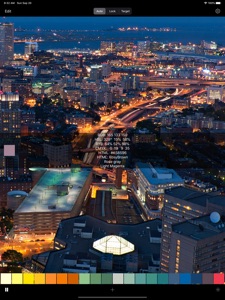
Use the camera to capture RGB values in real-time and convert them to the closest color name from a dictionary of nearly 900 colors. Also available: RYB, HSL and CMYK values, HTML color code, closest HTML color name, and simple color name.
Touch a color square to view the information for that sample at any time.
"Auto" uses the camera's auto focus and auto contrast adjustment feature. "Lock" fixes or locks the current contrast setting. And "Target" allows you to touch any area of the screen to select that spot as the source for the color sample (in cases where moving the device would disrupt the focus/contrast, or where the device is mounted in a fixed position).
Manage named color sample sets on the Edit screen. After organizing a sample set, email the color samples with color chips, with color chips and a selected photo, or as text only.
On the Options screen, select which color conversions to display, and set the spacial and temporal apertures from 1x1 to 50x50 pixels, and 1 to 30 frames.
Touch the "Target" selector then touch the screen to move the sample location without moving the device.
App Store screen shots simulated
Photo copyright E. Huybrechts
https://www.flickr.com/photos/ensh/4769294947/in/album-72157607460583769/
Modified and used under license: Creative Commons Attribution 2.0 Generic
https://creativecommons.org/licenses/by/2.0/
What's New in Version 2.4
+ FIX: Dark Mode UI
Seller
Name
FTLapps, Inc.
Information
Developer
Categories
Version
2.4
Size
17.5 MB
Game Center
No
VPP Device Licensing
Yes
Rating
Rated: 4+
Compatibility
iOS 10.0 or later
Devices
iPhone 5, iPhone 5c, iPhone 5s, iPhone 6, iPhone 6 Plus, iPhone 6s, iPhone 6s Plus, iPhone SE, iPhone 7, iPhone 7 Plus, iPhone 8, iPhone 8 Plus, iPhone X, iPhone XR, iPhone XS, iPhone XS Max, iPhone 11, iPhone 11 Pro, iPhone 11 Pro Max, iPhone SE (2nd generation), iPhone 12, iPhone 12 Pro, iPhone 12 Pro Max, iPhone 12 mini, iPad (4th Generation) (Wi-Fi), iPad (4th Generation) (4G), iPad (5th Generation) Wi-Fi, iPad (5th Generation) Wi-Fi + Cellular, iPad (6th generation) Wi-Fi, iPad (6th generation) Wi-Fi + Cellular, iPad Pro, iPad Pro (Cellular), iPad Pro (9.7-inch), iPad Pro (9.7-inch) (Cellular), iPad Pro 12.9-inch (2nd generation), iPad Pro 12.9-inch (2nd generation) Wi-Fi + Cellular, iPad Pro (10.5-inch), iPad Pro (10.5-inch) Wi-Fi + Cellular, iPad Pro (11-inch), iPad Pro (11-inch) Wi-Fi + Cellular, iPad Pro 12.9-inch (3rd generation), iPad Pro 12.9-inch (3rd generation) Wi-Fi + Cellular, iPad Air, iPad Air (Cellular), iPad Air 2, iPad Air 2 (Cellular), iPad Air (3rd generation), iPad Air (3rd generation) Wi-Fi + Cellular, iPad mini Retina, iPad mini Retina (Cellular), iPad mini 3, iPad mini 3 (Cellular), iPad mini 4, iPad mini 4 (Cellular), iPad mini (5th Generation), iPad mini (5th Generation) Wi-Fi + Cellular, iPad (7th generation) Wi-Fi + Cellular, iPad Pro 11-inch (2nd generation), iPad Pro 11-inch (2nd generation) Wi-Fi + Cellular, iPad Pro 12.9-inch (4th generation), iPad Pro 12.9-inch (4th generation) Wi-Fi + Cellular, iPad Air (4th Generation) (Wi-Fi), iPad Air (4th Generation) (Wi-Fi + Cellular), iPad (8th generation) Wi-Fi, iPad (8th generation) Wi-Fi + Cellular, iPad Pro 11-inch (3rd generation), iPad Pro 11-inch (3rd generation) Wi-Fi + Cellular, iPad Pro 12.9-inch (5th Generation), iPad Pro 12.9-inch (5th Generation) Wi-Fi + Cellular, iPod touch (6th Generation), iPod touch (7th generation)
Languages
English
App Store: Customer Ratings
Ratings & Reviews
5.0 of 5 (1 Rating)
App Store: Customer Reviews
No Entry