AboutTermsPrivacyContact
 
Updating
TV TuneUp 3D

TV TuneUp 3D

Released: 2012-04-02
© PixelSplincher
TV TuneUp 3D - QR Code
Version 2.0.0
4+
Download on the App Store
Version 2.0.0
4+
Download on the App Store
Released: 2012-04-02
© PixelSplincher

iPhone Screenshots

Screenshot
Screenshot
Screenshot
Screenshot
Screenshot

iPad Screenshots

Screenshot
Screenshot
Screenshot
Screenshot
Screenshot

Description

Tune the projector before your presentation in a few easy steps, or compare 3D quality on your next home theater system. Just connect to an HDMI, AirPlay, VGA or other video output and this app will display test patterns and play audio test tones with simple instructions for tuning your system. And there's more...
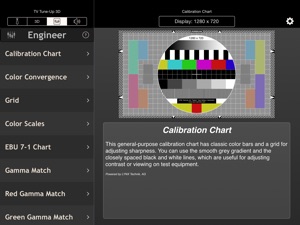
Run TV TuneUp 3D in Executive mode, and take a series of simple steps with clear instructions to perfect the picture on your projector or display.  In 3D mode, the app provides advanced tools for measuring the ghosting or crosstalk for different combinations of displays and 3D glasses, for example. Use engineer mode to view a selection of standard test images matched to the resolution of your display. From NTSC from your iPhone's Analog Video Adapter, to full HD 1080p on your iPad's HDMI  connector, TVTuneUp3D delivers pixel-perfect synthesized test patterns and industry-standard charts provided by top test-equipment manufacturer LYNX Technik AG.
Get the most from 3D TV
Your iPad or iPhone can send a 3D picture to your 3D TV, and TV TuneUp 3D gives you the tools to find the best system, and get the most from it. First check and tune the stereo alignment, both Top-and-Bottom and Side-by-Side stereo modes are supported. Or use the crosstalk test to measure and minimize ghosting. It will help you find the best glasses or compare the systems in the store before you invest. Ghosting cannot be completely eliminated, but now you can reliably compare different systems, and even tune them to reduce the problem.
Tune up the seats!
Use the parallax samples to try different levels of 3D effect. Make sure the seats are not too close or just verify that the 3D is working, no blu-ray DVD required.
Tune the tunes!
With sample audio tests provided, you can optimize the stereo separation of your audio system, verify the speaker wiring polarity, and check for distortion.
Note, to use AirPlay with any app as a separate display, set AirPlay to Mirroring, and the app can use the display. AppleTV with AirPlay presently support a maximum resolution of 1280x720 when mirroring or working as an external display.
Features:
Tune up your TV with a few simple steps
Great with TV, projector, HDTV, 3D glasses
Supports analog video, VGA, or HDMI adapters, and AirPlay video out
Full access to all video modes for connected devices
High-resolution, professional quality test patterns for standard displays
Stereoscopic 3D test patterns for alignment, crosstalk measurement
3D output in Side-by-Side, Top-and-Bottom, and mono formats
Retina-ready universal app, optimized for iPhone and iPad.
Audio Test Signals
Built-in Help

What's New in Version 2.0.0

This app has been updated by Apple to display the Apple Watch app icon.
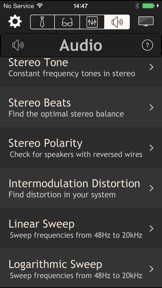
Audio Test Signals - We listened to your requests and added not just a few simple tones but a set of standard audio test signals you can use to test audio equipment for distortion before you buy, or tune your home theater:
Stereo Tones - 8 single-frequency stereo tones including standard A440 and the 'mosquito tone' (17.4kHz)
Stereo Beats - Use ears, physics, and a pair of nearly matched tones to optimize your stereo balance
Stereo Polarity - Check for speakers with reversed wires
Intermodulation Distortion - Test distortion with professional standard test signals from SMPTE, DIN, etc.
Linear and Logarithmic frequency sweeps
White and Pink (1/f) noise
Built-in Help - Gets you connected to your system and tuned up in no time.
Bug Fixes
Visual Improvements
iOS 8 Compatibility

Information

Categories

Version

2.0.0

Size

23.2 MB

Game Center

No

VPP Device Licensing

Yes

Rating

Rated: 4+

Compatibility

iOS 7.1 or later

Devices

iPhone 4, iPhone 4S, iPhone 5, iPhone 5c, iPhone 5s, iPhone 6, iPhone 6 Plus, iPhone 6s, iPhone 6s Plus, iPhone SE, iPhone 7, iPhone 7 Plus, iPhone 8, iPhone 8 Plus, iPhone X, iPhone XR, iPhone XS, iPhone XS Max, iPhone 11, iPhone 11 Pro, iPhone 11 Pro Max, iPhone SE (2nd generation), iPhone 12, iPhone 12 Pro, iPhone 12 Pro Max, iPhone 12 mini, iPhone 13, iPhone 13 Pro, iPhone 13 Pro Max, iPhone 13 mini, iPhone SE (3rd generation), iPhone 14, iPhone 14 Plus, iPhone 14 Pro, iPhone 14 Pro Max, iPhone 15, iPhone 15 Plus, iPhone 15 Pro, iPhone 15 Pro Max, iPhone 16, iPhone 16Plus, iPhone 16Pro, iPhone 16ProMax, iPad 2 (Wi-Fi), iPad 2 (3G), iPad (3rd Generation) (Wi-Fi), iPad (3rd Generation) (4G), iPad (4th Generation) (Wi-Fi), iPad (4th Generation) (4G), iPad (5th Generation) Wi-Fi, iPad (5th Generation) Wi-Fi + Cellular, iPad (6th generation) Wi-Fi, iPad (6th generation) Wi-Fi + Cellular, iPad Pro, iPad Pro (Cellular), iPad Pro (9.7-inch), iPad Pro (9.7-inch) (Cellular), iPad Pro 12.9-inch (2nd generation), iPad Pro 12.9-inch (2nd generation) Wi-Fi + Cellular, iPad Pro (10.5-inch), iPad Pro (10.5-inch) Wi-Fi + Cellular, iPad Pro (11-inch), iPad Pro (11-inch) Wi-Fi + Cellular, iPad Pro 12.9-inch (3rd generation), iPad Pro 12.9-inch (3rd generation) Wi-Fi + Cellular, iPad Air, iPad Air (Cellular), iPad Air 2, iPad Air 2 (Cellular), iPad Air (3rd generation), iPad Air (3rd generation) Wi-Fi + Cellular, iPad mini (Wi-Fi), iPad mini (4G), iPad mini Retina, iPad mini Retina (Cellular), iPad mini 3, iPad mini 3 (Cellular), iPad mini 4, iPad mini 4 (Cellular), iPad mini (5th Generation), iPad mini (5th Generation) Wi-Fi + Cellular, iPad (7th generation) Wi-Fi + Cellular, iPad Pro 11-inch (2nd generation), iPad Pro 11-inch (2nd generation) Wi-Fi + Cellular, iPad Pro 12.9-inch (4th generation), iPad Pro 12.9-inch (4th generation) Wi-Fi + Cellular, iPad Air (4th Generation) (Wi-Fi), iPad Air (4th Generation) (Wi-Fi + Cellular), iPad (8th generation) Wi-Fi, iPad (8th generation) Wi-Fi + Cellular, iPad Pro 11-inch (3rd generation), iPad Pro 11-inch (3rd generation) Wi-Fi + Cellular, iPad Pro 12.9-inch (5th Generation), iPad Pro 12.9-inch (5th Generation) Wi-Fi + Cellular, iPad (9th Generation), iPad (9th Generation) Wi-Fi + Cellular, iPad mini (6th Generation), iPad mini (6th Generation) Wi-Fi + Cellular, iPad Air (5th generation), iPad Air (5th generation) Wi-Fi + Cellular, iPad Pro 11-inch (4th generation), iPad Pro 11-inch (4th generation) Wi-Fi + Cellular, iPad Pro 12.9-inch (6th generation), iPad Pro 12.9-inch (6th generation) Wi-Fi + Cellular, iPad (10th generation), iPad (10th generation) Wi-Fi + Cellular, iPad Air 11-inch (M2) Wi-Fi, iPad Air 13-inch (M2) Wi-Fi, iPad Air 13-inch (M2) Wi-Fi + Cellular, iPad Pro 11-inch (M4) Wi-Fi, iPad Pro 11-inch (M4) Wi-Fi + Cellular, iPad Pro 13-inch (M4) Wi-Fi, iPad Pro 13-inch (M4) Wi-Fi + Cellular, iPad MiniA17Pro, iPad MiniA17ProCellular, iPod touch (5th generation), iPod touch (6th Generation), iPod touch (7th generation)

Languages

English

App Store: Customer Ratings

Ratings & Reviews

1.0 of 5 (1 Rating)

App Store: Customer Reviews

2017-10-08

Not as advertised

I install home theatre and TVs. I was looking for a set of test patterns to send through Apple TVs via AirPlay. This app does not do this as claimed, Very disappointed, app waste of money to me.
I would like to thank you for getting back to me....... Two years after the original review was posted and after wiping all the reviews.
Unfortunately I can no longer evaluate your product to see if it finally works. I have left the home entertainment industry after being fed up with all the hype and bull about product that don’t preform as they are supposed to.
Little hint, actually test your product with all the combinations of gear it is suppose to work with.
Fred
Grumpy Ol'Blue
Version 2.0.0