AboutTermsPrivacyContact
 
Updating
Enpass Password Manager

Enpass Password Manager

Released: 2011-08-13
© Sinew Software Systems Pvt Ltd
Enpass Password Manager - QR Code
Version 6.5.2
4+
Download on the App Store
Version 6.5.2
4+
Download on the App Store
Released: 2011-08-13
© Sinew Software Systems Pvt Ltd

iPhone Screenshots

Screenshot
Screenshot
Screenshot
Screenshot
Screenshot
Screenshot
Screenshot

iPad Screenshots

Screenshot
Screenshot
Screenshot
Screenshot
Screenshot
Screenshot
Screenshot
Screenshot
Screenshot

Description

Our everyday life is filled with too many passwords and various types of credentials, right? So, what are you doing to manage it?
- Using the same password everywhere? … Stop it NOW!
- Writing them in notes or encrypted excel? … Copy/paste is lethargic.
- Saving them in browsers? … Sorry, no attachments!
- Using an online password manager? … Are they safe from hackers??
Use Enpass to securely organize everything at one place. And the best thing, none of your Enpass data is stored on our servers, instead, it is stored locally on your device and you can sync through your own trusted cloud account, all ENCRYPTED!!
Don’t forget to evaluate Enpass using the FULL-FEATURED desktop version. IT’S ABSOLUTELY FREE.
HIGHLIGHTS OF ENPASS
◆ Offline- No data on our servers.
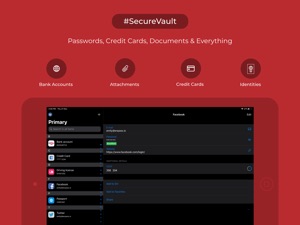
◆ Stores Everything- Secure vault for your logins, credit cards, bank accounts, licenses, attachments or any other sort of information.
◆ Data Synchronization- Syncs data through iCloud, Dropbox, WebDAV, Google Drive, OneDrive and Box.
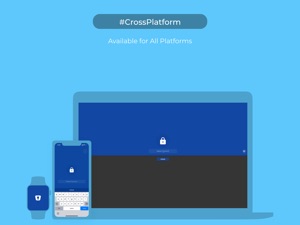
◆ Cross-platform- Consistently designed for all mobile and desktop platforms.
◆ Multiple-vaults- Separate your personal, family and work data in different vaults.
◆ Password Auto-filling- Autofills into the apps, Safari and other supported browsers with just one tap from keyboard.
◆ Biometric authentication- Supports use of Face ID/Touch ID for quick unlock to access information.
◆ Siri Shortcuts- Define and ask Siri to open an item using the recorded phrase.
◆ Strong Password Generation- Built-in password generator for unique and strong passwords.
◆ Password Audit- Keeps a check on your weak, old and pwned passwords.
◆ Dark Mode: Turn your device to a darker appearance, making it easy on your eyes.
◆ 80+ Templates- Save any kind of information through well-organized templates.
◆ Import from others- Import your passwords saved in some other software, using the free desktop version.
FOR ENPASS, SECURITY IS PARAMOUNT
• Military-grade encryption- We use SQLCIPHER, a transparent, widely accepted and open-source SQLite extension for 100% encryption of your data using AES-256 with a key derived from 100,000 iterations of PBKDF2-HMAC-SHA256.
• Zero-Knowledge security architecture- None of your data is stored on our servers, so as a developer, we have no knowledge about your passwords or data.
• Keyfile as a second factor- Along with master password you can also use a keyfile to encrypt your data.
• Password Audit- Stay safe with the built-in password auditor that keeps a regular check on your pwned, weak and old passwords.
SIMPLIFYING DIGITAL LIFE
• Securely autofills Credit card details while shopping online.
• Multiple-vaults- Collaborate with Family and Team members using Multiple-vaults.
• Super easy to use. With a simple yet intuitive design, Enpass delivers you a one-of-a-kind experience in using the app.
• Works with Siri and Spotlight to swiftly access the required information.
• Not just for passwords. Enpass locks your confidential files, photos, and documents in a secure encrypted vault.
BACKUP & RESTORE
• Encrypted Backup: Backup your database over Wi-Fi or save a local copy to restore later.
PRICING
• Desktops- Free.
• Mobiles- Evaluate for free with limit up to 25 items and single vault. You can subscribe to Premium plans of 6 and 12 months anytime using the in-app purchase.
** Payment will be charged to iTunes Account at confirmation of purchase and auto-renews unless disabled in iTunes Account Settings at least 24 hours before the end of the subscribed period. Your subscription can be managed from your iTunes Account Settings.
• Privacy policy: https://www.enpass.io/legal/privacy
• Terms of Use: https://www.enpass.io/legal/terms
PREMIUM SUPPORT
A dedicated support team is active to resolve your queries through
Email- support@enpass.io
Twitter- @EnpassApp
Facebook- facebook.com/EnpassApp
Forums- https://discussion.enpass.io.

What's New in Version 6.5.2

Quick! Today's update contains a fix for crash faced by customers signing up for Enpass Premium.

Seller

Name

Sinew Software Systems Private Limited

Information

Categories

Version

6.5.2

Size

84.3 MB

Game Center

No

VPP Device Licensing

Yes

Rating

Rated: 4+

Compatibility

iOS 9.3 or later

Devices

iPhone 4S, iPhone 5, iPhone 5c, iPhone 5s, iPhone 6, iPhone 6 Plus, iPhone 6s, iPhone 6s Plus, iPhone SE, iPhone 7, iPhone 7 Plus, iPhone 8, iPhone 8 Plus, iPhone X, iPhone XR, iPhone XS, iPhone XS Max, iPhone 11, iPhone 11 Pro, iPhone 11 Pro Max, iPhone SE (2nd generation), iPhone 12, iPhone 12 Pro, iPhone 12 Pro Max, iPhone 12 mini, iPad 2 (Wi-Fi), iPad 2 (3G), iPad (3rd Generation) (Wi-Fi), iPad (3rd Generation) (4G), iPad (4th Generation) (Wi-Fi), iPad (4th Generation) (4G), iPad (5th Generation) Wi-Fi, iPad (5th Generation) Wi-Fi + Cellular, iPad (6th generation) Wi-Fi, iPad (6th generation) Wi-Fi + Cellular, iPad Pro, iPad Pro (Cellular), iPad Pro (9.7-inch), iPad Pro (9.7-inch) (Cellular), iPad Pro 12.9-inch (2nd generation), iPad Pro 12.9-inch (2nd generation) Wi-Fi + Cellular, iPad Pro (10.5-inch), iPad Pro (10.5-inch) Wi-Fi + Cellular, iPad Pro (11-inch), iPad Pro (11-inch) Wi-Fi + Cellular, iPad Pro 12.9-inch (3rd generation), iPad Pro 12.9-inch (3rd generation) Wi-Fi + Cellular, iPad Air, iPad Air (Cellular), iPad Air 2, iPad Air 2 (Cellular), iPad Air (3rd generation), iPad Air (3rd generation) Wi-Fi + Cellular, iPad mini (Wi-Fi), iPad mini (4G), iPad mini Retina, iPad mini Retina (Cellular), iPad mini 3, iPad mini 3 (Cellular), iPad mini 4, iPad mini 4 (Cellular), iPad mini (5th Generation), iPad mini (5th Generation) Wi-Fi + Cellular, iPad (7th generation) Wi-Fi + Cellular, iPad Pro 11-inch (2nd generation), iPad Pro 11-inch (2nd generation) Wi-Fi + Cellular, iPad Pro 12.9-inch (4th generation), iPad Pro 12.9-inch (4th generation) Wi-Fi + Cellular, iPad Air (4th Generation) (Wi-Fi), iPad Air (4th Generation) (Wi-Fi + Cellular), iPad (8th generation) Wi-Fi, iPad (8th generation) Wi-Fi + Cellular, iPod touch (5th generation), iPod touch (6th Generation), iPod touch (7th generation), Apple Watch Series 4

Languages

English, Afrikaans, Arabic, Catalan, Chinese, Croatian, Czech, Danish, Dutch, Finnish, French, German, Greek, Hebrew, Hungarian, Indonesian, Italian, Japanese, Korean, Malay, Norwegian Bokmål, Polish, Portuguese, Romanian, Russian, Slovak, Spanish, Swedish, Thai, Turkish, Ukrainian, Vietnamese

App Store: Customer Ratings

Ratings & Reviews

4.5 of 5 (170 Ratings)

App Store: Customer Reviews

2020-07-12

Well...

I have been using this app and there is 1 thing I wish you can change. I want an unlimited amount of passwords, for free. Otherwise than that, it’s great!
tekouiyt
Version 6.4.5
2020-06-25

No complains

Very well design I m happy using this App, easy, intuitive, friendly, neat, simple and affordable .............
Bottom line ( worth to buy )
farzia
Version 6.4.5
2020-03-31

My favorite password manager

I used many free and paid password managers until now, and I discovered this one only recently. I always try to use what works better for me, without being too expensive.
With Enpass, I like to be able to synch my passwords with my own cloud, and I also like to use the same software on all my playforms.
gtechblues
Version 6.4.1
2020-03-13

No longer good

This was a great app until they changed it so you can only see 22 passwords. Now it is useless. You can’t even choose which 22. I had 120 and only the first 22 I put in now show. This is awful. I am looking for a new one.
AdmDHtr
Version 6.4.0
2020-03-04

Feeling ripped off

I’m an existing Enpass Pro customer. The latest update doesn’t recognize me and prompts me to pay a subscription fee. The only way to access my passwords was to register and pay. Have reached out to Enpass support for help but so far unsuccessful in restoring Pro status. Beware any Existing Pro Customers.
Sailormannn
Version 6.4.0
2020-02-23

Perfect

Finally a good one-time-purchased password manager that is actually good! Thank you soooo much! 👌
Bob Martel
Version 6.3.2
2020-02-14

It works so ridiculously well

I’m a developer and use a lot of different devices (iPhone, Windows, Linux, Mac). It works on all of them so seamlessly. I’ve loved using it for years!
What’s more, I feel so much more secure knowing where my vault is getting stored, since I got to choose. I know the password for the vault location account, and a separate password for the vault itself. That’s one more layer between potential thieves and my passwords. Other password managers bank on their own security, and you don’t get to be in on that process.
Once you’re set up, the keyboard shortcuts and iPhone passwords features make it so easy to use! Thanks, Enpass team!
skimps752
Version 6.3.2
2020-02-02

Suggestion

Would be very useful to have an alert function. For instance, to alert one to an item expiry date passport for instance)
tcartist
Version 6.3.2
2020-01-26

THE BEST!!!!

I literally tried about 6 different password apps and this is the best one because it has a one time payment option and because it is stored on my phone... not in a crashable cloud.
Christie Lynn 4
Version 6.3.2
2020-01-20

Used to be outstanding.No incredibly complicated

I recently bought the premium application fr multiple devices. On my iPhone I still get messages to subscribe.I click on restore purchase and am told this was successful. Nothing has changed. I still get a request to subscribe
Publisher1254
Version 6.3.2
2020-01-06

Suddenly holding my passwords hostage

I paid for premium upgrade when it wasn’t a subscription and now it’s moved to subscription so all my passwords are suddenly locked without warning.
help27464738
Version 6.3.2
2020-01-03

Great Product.

Great Product! Used it now for years. No issues.
Tz 68
Version 6.3.2
2020-01-01

Awesome

Been using it for years. Always updating the app.
Stubetcha!
Version 6.3.2
2019-12-24

Enpass

LOVE this app......it’s my 2nd brain!
Readerbug
Version 6.3.2
2019-12-24

Best Password Manager

After trying so many Password manager apps, Enpass end up to be my favourite. Been using for almost a year now & have no plan of abandoning it. Please keep it safe & secure. Kudos to all.
Odnid Nahilam
Version 6.3.2
2019-11-21

Excellent

More than just a password manager - can store just about any data you want and hold in different vaults so that different devices can be customized to just hold the data they need. Data not stored in cloud and now with full version free cross platform with purchase of 1 license, great value.
Urgic
Version 6.3.0
2019-11-19

The beat password manager at the best price

Love this company. Switched from 1Password that charges an obscene price for a password manager and they royally hosed their customers who bought a full licence.
Enpass works great across my iPhone and Mac. Super simple to use, has all the features I want.
ehMax
Version 6.3.0
2019-11-12

Excellent app

I been using it for years and the app is only getting better!
bluecapricorn
Version 6.2.1
2019-09-13

Still like it but problem

Just lately unable to back up Enpass. I am getting errors in Firefox and chrome with “unknown address” that will not allow the backup to occur. Can you guys fix this?
x1111111
Version 6.1.0
2019-08-31

Good, but then....

I’ve use enpass for over year great. But when I changed phones from iPhone 6 to iPhone XR it deleted over half of my entries
wharebr
Version 6.1.0
2019-08-18

Great app. Lots of customization

I use Enpass heavily and one feature that I haven’t seen in others is that you can create your own custom fields and sections for each entry. This allows you to store much more than straight passwords in it.
martindsouza
Version 6.1.0
2019-04-24

Bien

Fonctionne très bien et j’ai pu restaurer mon achat dans l’application.
Client satisfait👍🏻
Éric Gingras
Version 6.0.6
2019-04-04

Would be great I synch works

Good replacement of 1Passw… custom fields, TOPS, etc. iOS, Mac and Windows version. Price is ok compare to competitors with subscriptions. But synchronisation is still an issue :
* only one account per cloud service
* frequent synch error that could only resolve by uninstalling to force the cloud copy the overwrite local data. I lost bank account information because of it.
I strongly recommend for local use. If you need to synchronise multiple devices, now you know...
micrond
Version 6.0.6
2019-03-12

Awesome

App works great, lets you put data wherever I choose and one time price beats paying monthly. I love it.
chrisw 03
Version 6.0.4
2019-02-06

Way too expensive for Premium

I use the free version on my Mac and it's great. Just got an ipad and was happy to see there's a mobile version. Turns out I can only access 20 of my logins without paying $17. That's completely unreasonable. I feel like I'm being held hostage for $17. I'd be happy to pay a couple of bucks, but $17 is way out there for this.
Madrigal77
Version 6.0.4
2019-02-01

v6 Upgrade Broke Cloud Sync

Was running this app on an iPhone, ipad and my windows pc on version 5 OK. Post upgrade my iPhone is the only device that will sync anymore. Tried manually loading my backup from Onedrive on both my ipad and pc and after taking my master password it will refuse to sync. Trying to restore from my cloud account directly also will not take my master password.
striker_256
Version 6.0.3
2019-01-17

2 improvements to make it even better

I’ve had these options in a previous password app unfortunately they didn’t keep up with technology and died:
Possibility to change the icon related to a password. Like a partial screen capture to tag their logo or name.
Category grouping. There should be pre-defined categories already existing for standard stuff (personal info, bank, credit cards, login info) so we don’t have to browse through all the names or create our own categories.
Rockandroll6
Version 6.0.2
2019-01-06

Worked great

I transferred my encrypted info off my old BBerry password program to this app and then to my PC, Mac and my iOS devices (iPhone & iPad).
I can sync them individually without putting data in the cloud or web. Cloud would be easier and automatic but I just don't trust that yet.
Totally awesome and worth the price.
Jan 2019: it’s been a few years now and I still find this app indispensable for my passwords, logons and personal info that I need on the go across my platforms. 5+ stars!
123456789scroll
Version 6.0.1
2019-01-03

Sync Option

Finally syncs with iCloud!!! Love it
jabbott51
Version 6.0.1
2019-01-01

Very good application

Have been using it for several years to remember important information and keep it secure.
Cdn Owner
Version 6.0.1
2018-12-30

“biggest update ever” = biggest Piece O $&%t ever

to the Enpass publishers - what did you do? You had clean fast code. Now you have glacially slow buggy crap ... and you call that an update? I’m looking at alternatives already.
Fun Fun Fun in the Sun
Version 6.0.0
2018-12-30

I was good u til they removed the browser

The ap has a built in browser but in the latest update they removed it it in favor to use local browsers. This is a deal breaker for me.
MacGeek83
Version 6.0.0
2018-10-09

Meilleur gestionnaire de mots de passe

Je l’utilise sur mon iPhone et mon PC, et l’intégration avec Face ID est super.
Mélanie Messier
Version 5.6.1
2018-09-30

Fantastic!

The best I’ve tried, on all my devices and well synced. Fantastic app. Thank you!!
rabonzai
Version 5.6.1
2018-09-28

Reliable, it does what it says it does.

I have been using this app for many years now. I am content with the many features that come with it and I like it.
lsjsauve
Version 5.6.1
2018-09-22

Crashes on latest update.

It was a great app that I used every day. Worth every penny. Latest update crashes on open on both iPad and iPhone. Left
feedback and no response. Suddenly a great app is not. Hopefully this will be fixed soon and I can leave a better review.
gusgus140
Version 5.6.0
2018-09-19

Best value and best app for this category

Nuff said.
Xeak57
Version 5.6.0
2018-07-19

Best place to keep it all.

Great app. The place to keep all of the information that I cannot forget. Can be adapted to your own needs. Accessible from iPhone, iPads, Macs. Would be lost without it.
RBCPlat
Version 5.5.8
2018-07-14

Great app!

Great
Downs Hurd
Version 5.5.8
2018-06-21

Goood

This app is the only app that I have on all my phones
Khanjeed
Version 5.5.8
2018-06-19

Face ID stopped working two weeks ago

Face ID stopped working two weeks ago. Master password no longer works. What a waste of time this app has been.
Office Cyborg
Version 5.5.8
2018-06-14

Great app with a one time fee

All the other apps require a monthly or annual fee. This is a great app with a one time fee.
Hail goon
Version 5.5.8
2018-06-06

Bye bye 1Password

This app is awesome.
jumpin'mack
Version 5.5.8
2018-05-27

Excellent

Excellent password management app ... full stop!!
RWL1950
Version 5.5.8
2018-05-23

Across many device

I love Enpass, I have been using it for a few months now and I have zero regret. I can use it across all my device and various operating system. Works great with no BS.
Highly recommended.
wisevisitor
Version 5.5.8
2018-05-22

Super useful

Simple and easy to use. Works great
elgranchamp
Version 5.5.8
2018-03-27

Convivial, fiable et efficace

Bonne capacité d’importation de données d’autres logiciels.
TechnoJouisseur
Version 5.5.7
2018-03-24

Love this app but. ......

Love the app but the desktop version needs some help to work as an extension in the browser. Needs a lot of help. Every time I click the extension it tells me how to activate it.
Jerry Wollman
Version 5.5.7
2018-01-14

Highly recommended

I like using enpass. It just seems to fit the bill. Have been using it now for more than a year and have not had any problems with it.
Janbeckman
Version 5.5.6