AboutTermsPrivacyContact
 
Updating
Mocha WOL

Mocha WOL

Released: 2011-03-07
© MochaSoft Aps
Mocha WOL - QR Code
Version 2.4
4+
Download on the App Store
Version 2.4
4+
Download on the App Store
Released: 2011-03-07
© MochaSoft Aps

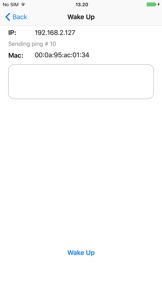
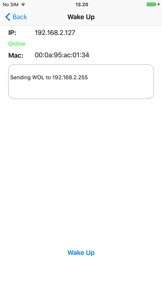
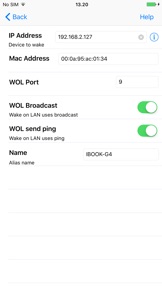
iPhone Screenshots

Screenshot
Screenshot
Screenshot
Screenshot

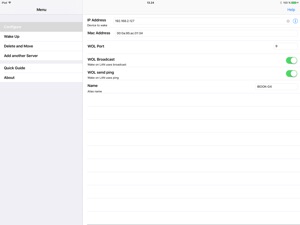
iPad Screenshots

Screenshot
Screenshot
Screenshot
Screenshot

Description

Wake-on-LAN for easy wake up calls. Use your iPhone or iPad to power up a sleeping Mac or PC on your network.
FEATURES:
- Easy detection of local computers with Bonjour and NETBIOS lookup.
- Can ping your computer to check, when it it is ready.
- Broadcast on a LAN.
- Works from other networks as 3G and WIFI.
- Can keep 30 configurations for computers to WOL.
- Build in help guides.
HOW IT WORKS:
When you select a computer to wake, a special UDP data frame is broadcast on the LAN. When the sleeping computer see the data frame, it will wake up. If the iPhone or iPad is on another network, such as 3G, you must first configure the HOME router to forward the special UDP package.

What's New in Version 2.4

Solved problem with the function: menu - configure - help

Seller

Name

Jan Frydendal

URL

Information

Developer

Categories

Version

2.4

Size

0.8 MB

Game Center

No

VPP Device Licensing

Yes

Rating

Rated: 4+

Compatibility

iOS 12.0 or later

Devices

iPhone 5s, iPhone 6, iPhone 6 Plus, iPhone 6s, iPhone 6s Plus, iPhone SE, iPhone 7, iPhone 7 Plus, iPhone 8, iPhone 8 Plus, iPhone X, iPhone XR, iPhone XS, iPhone XS Max, iPhone 11, iPhone 11 Pro, iPhone 11 Pro Max, iPhone SE (2nd generation), iPhone 12, iPhone 12 Pro, iPhone 12 Pro Max, iPhone 12 mini, iPhone 13, iPhone 13 Pro, iPhone 13 Pro Max, iPhone 13 mini, iPhone SE (3rd generation), iPhone 14, iPhone 14 Plus, iPhone 14 Pro, iPhone 14 Pro Max, iPhone 15, iPhone 15 Plus, iPhone 15 Pro, iPhone 15 Pro Max, iPhone 16, iPhone 16 Plus, iPhone 16 Pro, iPhone 16 Pro Max, iPhone 16e, iPad (5th Generation) Wi-Fi, iPad (5th Generation) Wi-Fi + Cellular, iPad (6th generation) Wi-Fi, iPad (6th generation) Wi-Fi + Cellular, iPad Pro, iPad Pro (Cellular), iPad Pro (9.7-inch), iPad Pro (9.7-inch) (Cellular), iPad Pro 12.9-inch (2nd generation), iPad Pro 12.9-inch (2nd generation) Wi-Fi + Cellular, iPad Pro (10.5-inch), iPad Pro (10.5-inch) Wi-Fi + Cellular, iPad Pro (11-inch), iPad Pro (11-inch) Wi-Fi + Cellular, iPad Pro 12.9-inch (3rd generation), iPad Pro 12.9-inch (3rd generation) Wi-Fi + Cellular, iPad Air, iPad Air (Cellular), iPad Air 2, iPad Air 2 (Cellular), iPad Air (3rd generation), iPad Air (3rd generation) Wi-Fi + Cellular, iPad mini Retina, iPad mini Retina (Cellular), iPad mini 3, iPad mini 3 (Cellular), iPad mini 4, iPad mini 4 (Cellular), iPad mini (5th Generation), iPad mini (5th Generation) Wi-Fi + Cellular, iPad (7th generation) Wi-Fi + Cellular, iPad Pro 11-inch (2nd generation), iPad Pro 11-inch (2nd generation) Wi-Fi + Cellular, iPad Pro 12.9-inch (4th generation), iPad Pro 12.9-inch (4th generation) Wi-Fi + Cellular, iPad Air (4th Generation) (Wi-Fi), iPad Air (4th Generation) (Wi-Fi + Cellular), iPad (8th generation) Wi-Fi, iPad (8th generation) Wi-Fi + Cellular, iPad Pro 11-inch (3rd generation), iPad Pro 11-inch (3rd generation) Wi-Fi + Cellular, iPad Pro 12.9-inch (5th Generation), iPad Pro 12.9-inch (5th Generation) Wi-Fi + Cellular, iPad (9th Generation), iPad (9th Generation) Wi-Fi + Cellular, iPad mini (6th Generation), iPad mini (6th Generation) Wi-Fi + Cellular, iPad Air (5th generation), iPad Air (5th generation) Wi-Fi + Cellular, iPad Pro 11-inch (4th generation), iPad Pro 11-inch (4th generation) Wi-Fi + Cellular, iPad Pro 12.9-inch (6th generation), iPad Pro 12.9-inch (6th generation) Wi-Fi + Cellular, iPad (10th generation), iPad (10th generation) Wi-Fi + Cellular, iPad Air 11-inch (M2) Wi-Fi, iPad Air 13-inch (M2) Wi-Fi, iPad Air 13-inch (M2) Wi-Fi + Cellular, iPad Pro 11-inch (M4) Wi-Fi, iPad Pro 11-inch (M4) Wi-Fi + Cellular, iPad Pro 13-inch (M4) Wi-Fi, iPad Pro 13-inch (M4) Wi-Fi + Cellular, iPad mini (A17 Pro) Wi-Fi, iPad mini (A17 Pro) Wi-Fi + Cellular, iPad (A16) Wi-Fi, iPad (A16) Wi-Fi + Cellular, iPad Air 11-inch (M3) Wi-Fi, iPad Air 11-inch (M3) Wi-Fi + Cellular, iPad Air 13-inch (M3) Wi-Fi, iPad Air 13-inch (M3) Wi-Fi + Cellular, iPod touch (6th Generation), iPod touch (7th generation)

Languages

English

App Store: Customer Ratings

Ratings & Reviews

4.5 of 5 (8 Ratings)

App Store: Customer Reviews

2024-12-28

The Best

Port Forwarding Rule Is The Best following this app. You can start your pc from anywhere.
Leopardz117
Version 2.4
2023-08-14

Simple, easy, works

All of the above plus I’ve been using it for years and years and never had issues with it
Zashtys
Version 2.3
2022-01-03

It actually works

and you can’t take that for granted…
Leafblade0930
Version 2.2
2020-04-23

Great app

Works as expected.
Turtle_free
Version 2.2
2016-05-01

A lovely little app that does exactly what I wanted

A little lazy UI but hey... It does what its supposed to do :) Thank you app developers 😊
Rohan_nyk
Version 1.1
2016-02-26

The best WoL app

Easy to setup, allow you to see if a computer is online, easy classic iphone interface.
kimeraltz
Version 1.1
2014-12-10

Works great

Works as planned. Can wake up my ubuntu server. No prob. Quick and easy
Russ--s55
Version 1.1
2014-09-19

Ça fonctionne

Je croyais au départ qu'il ne fonctionnait pas ,mais c'était la configuration de mon bios.
Kizo3
Version 1.1
2014-09-17

It just works!

Great App! Remotely turn your PC on from anywhere.
Iconfat
Version 1.1
2013-04-16

Fantastic

Works as it should and easy to setup. Thanks!
XtacySWAT
Version 1.1
2013-03-02

Awesome!

Great app! Works well!
Ishan B
Version 1.1
2012-01-08

Works over 3G!

Works as advertised. Forward the udp port to your Mac address and works fine via 3G iPhone4!
Jezzy514
Version 1.0
2011-11-30

Good

Nice, easy, simple. Suits my purpose. Thanks for being free.
ShadToronto
Version 1.0
2011-03-10

Works well

Simple and easy, don't see any reason to even consider the other apps which cost money. Thanks for making it free
PUPTITZ
Version 1.0