AboutTermsPrivacyContact
 
Updating
iTouchStats Basketball

iTouchStats Basketball

Released: 2010-12-14
© 2015 iTouchStats.com
iTouchStats Basketball - QR Code
Version 4.15
12+
Download on the App Store
Version 4.15
12+
Download on the App Store
Released: 2010-12-14
© 2015 iTouchStats.com

iPhone Screenshots

Screenshot
Screenshot
Screenshot
Screenshot
Screenshot

iPad Screenshots

Screenshot
Screenshot
Screenshot
Screenshot
Screenshot

Description

An extensive overhaul of the app is now complete, making a 4.5/5 star app even better! This upgrade is packed with lots of new features and a new interface that supports both portrait and landscape modes.
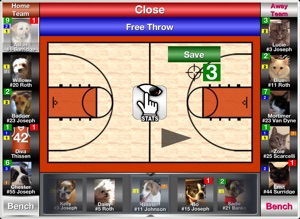
With iTouchStats Basketball, you are in control over how much data you want to track. The most popular method is to track individual player stats for one team while tracking just the opponent's team stats, as shown in the 1st screen shot. Or you can track individual player stats for both teams, as shown in the 2nd screen shot. Which stats you track for each team is up to you. Even the use of the game clock and shot location tracking are optional.
A unique feature of iTouchStats Basketball is the quick stat icons that appear next to a player's photo or jersey. These icons coordinate with the stat button colors, giving you an easy way to see a player's key stats without needing to leave the main scoring screen. Icons include: Points (Green), Fouls (Red), Turnovers (Orange), Assists (Yellow), Steals (Gray), and Blocks (Brown). By double-tapping on a player, you can get even more stat details including shot charts and shooting percentages.
NEW ▸▸ One of the coolest features added in v4.0 is the team bench that appears at the bottom of the score keeping screen. The bench greatly improves player subbing and also gives you easy access to viewing the stats of the players not in the game. You can even register a stat to a player on the bench if a sub-in was missed.
NEW ▸▸ User Definable Rating System (This system has the ability to give individual values to each stat, allowing a quick easy way for a coach or parent to see how a player performed in a game based on these values.)
NEW ▸▸ User Definable Stat Button (This definable stat button can also be turned off in the game reports.)
NEW ▸▸ Team quick stats are displayed in the scoreboard.
NEW ▸▸ iCloud Data Backups
NEW ▸▸ Half Timeouts have been added as an option.
NEW ▸▸ Running Clock is an added Rules option.
IMPROVED ▸▸ Game and season PDF reports. Not only has the look improved, but you can now choose which stats are displayed on PDF reports. For example, if the game clock is not used and deflections are not tracked, then you can turn these fields off in PDF reports.
IMPROVED ▸▸ Stat viewing options. You can now view a team or player(s) stats by periods. For example, you could use this to compare how your starters did in the 2nd half vs. the 1st half. You could even do this over multiple games!
IMPROVED ▸▸ Season, Team, and Player management. For users who track multiple seasons, you will now only see data relating to your "Default" season, but changing between seasons can be done easily.
▸▸▸▸▸▸▸▸▸▸▸▸▸▸▸▸▸▸▸▸
DETAILED STAT LIST
▸▸▸▸▸▸▸▸▸▸▸▸▸▸▸▸▸▸▸▸
▸ 2-Point, 3-Point, Free Throws, Field Goals (Made, Attempts, and % for each)

▸ Rebounds (Offensive, Defensive, Dead Ball) 

▸ Assists 

▸ Blocks 

▸ Steals 

▸ Turnovers (optional Forced or Unforced: Out of Bounds, Lost Ball, Ball Handling, Bad Pass, Back Court, 3 Sec, 5 Sec, 10 Sec, Shot Clock, Other) 

▸ Fouls (optional: Offensive, Defensive, Flagrant, Team Technical, Player Technical) 

▸ Charges Taken

▸ Deflections 

▸ Forced Jump Balls

▸ Efficiency (Stat formula taken from http://www.nba.com/statistics/efficiency.html)

▸ Rating (User Definable Rating System)

▸ Minutes Played 

▸ Games (Started, Played) 

▸ User Definable Stat Button
▸▸▸▸▸▸▸▸▸▸▸▸▸▸▸▸▸▸▸▸▸▸▸▸▸▸▸▸▸▸▸▸▸▸▸▸▸▸▸▸▸▸▸▸▸▸▸▸▸▸▸▸▸▸▸▸▸▸▸▸▸
View app videos and download sample PDF reports at iTouchStats.com
▸▸▸▸▸▸▸▸▸▸▸▸▸▸▸▸▸▸▸▸▸▸▸▸▸▸▸▸▸▸▸▸▸▸▸▸▸▸▸▸▸▸▸▸▸▸▸▸▸▸▸▸▸▸▸▸▸▸▸▸▸
What's New in Version 4.15

This app has been updated by Apple to use the latest Apple signing certificate.
Fixed an iPhone display bug

Seller

Name

Travis Surridge

Information

Categories

Version

4.15

Size

10.3 MB

Game Center

No

VPP Device Licensing

Yes

Rating

Rated 12+ for the following:
Infrequent/Mild Medical/Treatment Information

Compatibility

iOS 5.1.1 or later

Devices

iPhone 3GS, iPhone 4, iPhone 4S, iPhone 5, iPhone 5c, iPhone 5s, iPhone 6, iPhone 6 Plus, iPhone 6s, iPhone 6s Plus, iPhone SE, iPhone 7, iPhone 7 Plus, iPhone 8, iPhone 8 Plus, iPhone X, iPhone XR, iPhone XS, iPhone XS Max, iPhone 11, iPhone 11 Pro, iPhone 11 Pro Max, iPhone SE (2nd generation), iPad (Wi-Fi), iPad (3G), iPad 2 (Wi-Fi), iPad 2 (3G), iPad (3rd Generation) (Wi-Fi), iPad (3rd Generation) (4G), iPad (4th Generation) (Wi-Fi), iPad (4th Generation) (4G), iPad (5th Generation) Wi-Fi, iPad (5th Generation) Wi-Fi + Cellular, iPad (6th generation) Wi-Fi, iPad (6th generation) Wi-Fi + Cellular, iPad Pro, iPad Pro (Cellular), iPad Pro (9.7-inch), iPad Pro (9.7-inch) (Cellular), iPad Pro 12.9-inch (2nd generation), iPad Pro 12.9-inch (2nd generation) Wi-Fi + Cellular, iPad Pro (10.5-inch), iPad Pro (10.5-inch) Wi-Fi + Cellular, iPad Pro (11-inch), iPad Pro (11-inch) Wi-Fi + Cellular, iPad Pro 12.9-inch (3rd generation), iPad Pro 12.9-inch (3rd generation) Wi-Fi + Cellular, iPad Air, iPad Air (Cellular), iPad Air 2, iPad Air 2 (Cellular), iPad Air (3rd generation), iPad Air (3rd generation) Wi-Fi + Cellular, iPad mini (Wi-Fi), iPad mini (4G), iPad mini Retina, iPad mini Retina (Cellular), iPad mini 3, iPad mini 3 (Cellular), iPad mini 4, iPad mini 4 (Cellular), iPad mini (5th Generation), iPad mini (5th Generation) Wi-Fi + Cellular, iPad (7th generation) Wi-Fi, iPad Pro 11-inch (2nd generation), iPad Pro 11-inch (2nd generation) Wi-Fi + Cellular, iPad Pro 12.9-inch (4th generation), iPad Pro 12.9-inch (4th generation) Wi-Fi + Cellular, iPod touch (3rd generation), iPod touch (4th generation), iPod touch (5th generation), iPod touch (6th Generation), iPod touch (7th generation), Apple Watch Series 4, Apple Watch Series 5

Languages

English

App Store: Customer Ratings

Ratings & Reviews

4.0 of 5 (1 Rating)

App Store: Customer Reviews

2012-10-30

Great App

This is one of the best apps I've bought.
I did the stats for son's 1st game on an app that shall remain nameless. Looked great, worked ok. Cost the coach $20. I decided to look around. Found this.
The price is unbelievable considering how good it works.The color scheme and font leaves something to be desired and I wish I could sync with my iPhone (there is a work) but aside from those three minor things, 2 being ascetic, this app is damn near perfect for scoring games from what I can tell. The layout and customizable options are great. I can't imagine what they can do to make it better. I've done a few tests and it seems to flow smoothly. I'll be using it in a game this week and will update my review.
iZrEAL Media Arts
Version 3.4.0
2012-01-16

Worth The Price

It's a bit pricey, but it's worth it. You can make the stat-keeping as thorough and in-depth as you want, or turn off some of the features to make it simpler to use on the fly. My team and I have found the button layout very intuitive, which makes it easy to use on the bench during a game. Adding pictures to players is worth doing. Auto rebound/assist/turnover are great.
I would like to be able to send the game report to Dropbox, or even have the ability to open it in a PDF viewer app. Also, the report should be part of the Facebook/Twitter link.
Overall, great app for stat keeping.
ScooterMcRabbit
Version 3.4.0
2011-12-03

Very good

Worth the money I think. Will see how it works in game next weekend for my teams first game. Will update review. Only thing so far is the font is kinda old school.
Wilhelmthe1st
Version 3.03