AboutTermsPrivacyContact
 
Updating
Anchor Watch

Anchor Watch

Released: 2010-09-17
© 2020 Luky Soft
Anchor Watch - QR Code
Version 2.10.0
4+
Download on the App Store
Version 2.10.0
4+
Download on the App Store
Released: 2010-09-17
© 2020 Luky Soft

iPhone Screenshots

Screenshot
Screenshot
Screenshot
Screenshot
Screenshot

Description

Yachting Magazine: "probably the best dollar you've ever spent"
Description:
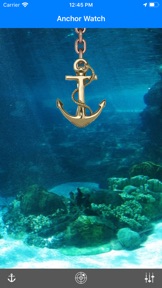
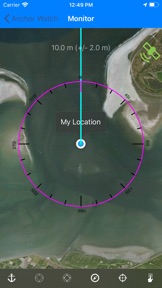
"Anchor Watch" uses the GPS on your smartphone to monitor your boat's position. If the boat moves outside of set limits, the program will alert you immediately. Alerts include phone calls, sound, vibration alerts, popups, email or SMS (through a third party).
There are no more sleepless nights when you worry about weather your boat is dragging or not. Keep the phone next to where you are sleeping and a quick glance will assure you that all is ok.
If the boat drags out of the predefined area (no limit on radius), it will alert you in any way you decide. Flashing text, sounding alarm or even call to another phone.
As only anchor guard app for iOS, Anchor Watch allows for the manual adjustment of your anchor position, by touch of a finger or manual entry. So if you were busy with other things then setting the alarm, you can adjust for the drift.
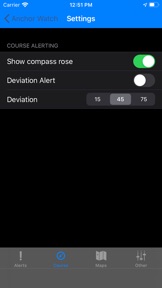
And if you anchored both stern and bow, Anchor Watch offers an unique course alert when a minor drift can still mean your boat is turned from the pier.
Anchor Watch sophisticated filtering allows for GPS errors, which can occur every now and then. The settings panel is fully customized allowing a number of different alarm types.
Of course it runs in the background too, which allows you to pursue other activities on your phone while Anchor Watch is on guard. Continued use of GPS running in the background can dramatically decrease battery life. Fortunately you can tell Anchor Watch to conserve battery and update only in foreground.
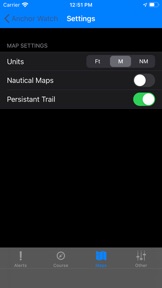
Available as an in-app purchase are advanced nautical maps as well as the functionality to download and show offline maps which you can use when you don't have a data connection (or don't want to use it due to roaming charges. The maps available are based on the http://www.openseamap.org data. Check for quality and availability on their website, it is under rapid community development. You can also send in your maps and they will be added to the server for the benefit of all.
Anchor Watch is under constant development, so if you have any remarks just drop an email or write a feature request in the comment section and we will get straight to it.
Known issue: enable Alerts in iPhone->Settings->Notifications to receive audio alerts in the background

What's New in Version 2.10.0

[Fix] Tested on iOS 13 64 bits
Support for LaunchBoard
Native Icons for all screen sizes
Stopped support for offline maps
Support for dark mode
[Fix] done button for manual position entry is in a hard to reach place

Seller

Name

Chris Lukassen

URL

Information

Developer

Categories

Version

2.10.0

Size

53 MB

Game Center

No

VPP Device Licensing

Yes

Rating

Rated: 4+

Compatibility

iOS 12.0 or later

Devices

iPhone 5s, iPhone 6, iPhone 6 Plus, iPhone 6s, iPhone 6s Plus, iPhone SE, iPhone 7, iPhone 7 Plus, iPhone 8, iPhone 8 Plus, iPhone X, iPhone XR, iPhone XS, iPhone XS Max, iPhone 11, iPhone 11 Pro, iPhone 11 Pro Max, iPhone SE (2nd generation), iPad (5th Generation) Wi-Fi, iPad (5th Generation) Wi-Fi + Cellular, iPad (6th generation) Wi-Fi, iPad (6th generation) Wi-Fi + Cellular, iPad Pro, iPad Pro (Cellular), iPad Pro (9.7-inch), iPad Pro (9.7-inch) (Cellular), iPad Pro 12.9-inch (2nd generation), iPad Pro 12.9-inch (2nd generation) Wi-Fi + Cellular, iPad Pro (10.5-inch), iPad Pro (10.5-inch) Wi-Fi + Cellular, iPad Pro (11-inch), iPad Pro (11-inch) Wi-Fi + Cellular, iPad Pro 12.9-inch (3rd generation), iPad Pro 12.9-inch (3rd generation) Wi-Fi + Cellular, iPad Air, iPad Air (Cellular), iPad Air 2, iPad Air 2 (Cellular), iPad Air (3rd generation), iPad Air (3rd generation) Wi-Fi + Cellular, iPad mini Retina, iPad mini Retina (Cellular), iPad mini 3, iPad mini 3 (Cellular), iPad mini 4, iPad mini 4 (Cellular), iPad mini (5th Generation), iPad mini (5th Generation) Wi-Fi + Cellular, iPad (7th generation) Wi-Fi, iPad Pro 11-inch (2nd generation), iPad Pro 11-inch (2nd generation) Wi-Fi + Cellular, iPad Pro 12.9-inch (4th generation), iPad Pro 12.9-inch (4th generation) Wi-Fi + Cellular, iPod touch (6th Generation), iPod touch (7th generation)

Languages

English, Arabic, Catalan, Chinese, Czech, Danish, Dutch, Finnish, French, German, Greek, Hebrew, Hungarian, Indonesian, Italian, Japanese, Korean, Malay, Norwegian Bokmål, Polish, Portuguese, Romanian, Russian, Slovak, Spanish, Swedish, Thai, Turkish, Vietnamese

App Store: Customer Ratings

Ratings & Reviews

2.0 of 5 (2 Ratings)

App Store: Customer Reviews

2018-08-04

Total garbage

Didn’t work at all. Alarms start sounding the second you’re not actively looking at the app and we weren’t dragging anchor at all. Fix your gps positioning running in the background.
Don’t waste your money.
ainstin
Version 2.8.1
2015-04-08

Anchor Watch

Good idea, looks great but unless you want to be up several times in the night with false alarms don't bother. Paid extra for the offline maps to find they're coverage is limited. Useless in the Caribbean.
Caribbean Live-aboard
Version 2.7.5