Description
With SensorLog you can read out sensor data of your iPhone, iPad and Apple Watch.
The sensor data (csv or JSON format) can be saved to file, streamed via TCP/UDP, or send as HTTP GET/POST request.
iPhone und iPad Logging:
- Sensor data can be sampled with up to 100Hz (depending on the version of your iOS device and fore or background mode).
- Sensor data can be streamed in server or client mode supporting TCP and UDP protocol. Streaming is supported up to 100Hz depending on the network speed and the receiving client or server configuration.
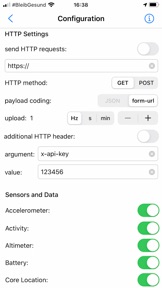
- Via HTTP(S) GET/POST request sensor data can be sent in JSON (POST) or form-url encoded (GET and POST) format to a REST API. Up to 20Hz upload rate is supported depending on the network speed and receiving server configuration.
Apple Watch Logging:
- Logging Option 1: Logging duration up to 1 hour
Supports logging of all selectable sensor data with up to 50Hz in background. Higher sampling rates up to 100 Hz are possible by selecting less sensors. Streaming (only client modus, TCP) and HTTP requests are supported.
- Logging Option 2: Logging duration greater 1 hour
While in background only logging of accelerometer data with up to 50Hz is supported. In foreground logging of all sensors with up to 100Hz is supported. Streaming and HTTP requests are only supported in foreground.
- Streaming is supported up to 100Hz depending on the network speed, the receiving server configuration, and chosen logging option. A coupled iPhone with LAN/WAN access is required
- Via HTTP(S) GET/POST request sensor data can be sent in JSON (POST) or form-url encoded (GET and POST) format to a REST API. Up to 10Hz upload rate is supported depending on the network speed and receiving server.
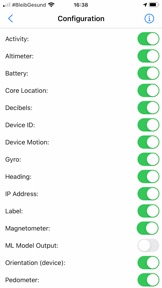
The following data of the iOS framework (iPhone, iPad) is provided by SensorLog (depending on the device version):
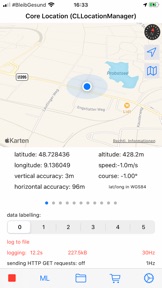
- CLLocation: latitude, longitude, altitude, speed, course, verticalAccuracy, horizontalAccuracy, floor (please note: this is not GPS raw data!)
- CLHeading: heading.x, heading.y, heading.z, trueHeading, magneticHeading, headingAccuracy
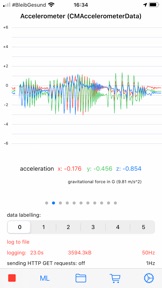
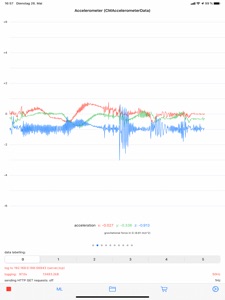
- CMAccelerometer: acceleration.x, acceleration.y, acceleration.z
- CMGyroData: rotationRate.x, rotationRate.y, rotationRate.z
- CMMagnetometerData: raw magneticField.x, magneticField.z, magneticField.z
- CMDeviceMotion: yaw, roll, pitch, rotationRate, userAcceleration, attitudeReferenceFrame, quaternions, gravity, magneticField, magneticField.accuracy
- AVAudioRecorder: peakPower, averagePower (decibels)
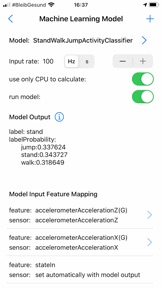
- Core ML Model output (supported type int, double, string, dictionary)
- CMMotionActivity: Activity, activity.startDate, activity.confidence
- CMPedometer: numberOfSteps, startDate, distance, endDate, pedometerAverageActivePace, pedometerCurrentPace, pedometerCurrentCadence,
floorsAscended, floorsDescended
- CMAltimeter: relativeAltitude, pressure
- logging of WIFI and network carrier IP addresses
- logging of the device orientation
- logging of battery level
- tagging of the logged data with numerical values
On the Apple Watch SensorLog supports logging of the following data:
- CLLocation: latitude, longitude, altitude, speed, course, verticalAccuracy, horizontalAccuracy, floor
- CMAccelerometer: acceleration.x, acceleration.y, acceleration.z
- CMDeviceMotion: yaw, roll, pitch, rotationRate, userAcceleration, attitudeReferenceFrame, quaternions, gravity, magneticField, magneticField.accuracy
- CMMotionActivity: Activity, activity.startDate, activity.confidence
- CMPedometer: numberOfSteps, startDate, distance, endDate, floorsAscended, floorsDescended
- CMAltimeter: relativeAltitude, pressure
- Battery information
Machine Learning:
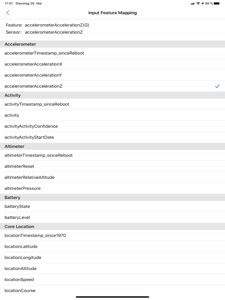
SensorLog supports Core ML models created with Apple's Create ML app. Simply log data with SensorLog, train a model on the data in Create ML, load the exported model in SensorLog, and log its prediction with SensorLog. Supported Create ML models are: Activity Classifier, Tabular Regressor, and Tabular Classifier.