AboutTermsPrivacyContact
 
Updating
MovieToImage

MovieToImage

Released: 2010-08-04
© 2010-2025 DreamOnline, Inc.
MovieToImage - QR Code
Version 2.6.0
4+
Download on the App Store
Version 2.6.0
4+
Download on the App Store
Released: 2010-08-04
© 2010-2025 DreamOnline, Inc.

iPhone Screenshots

Screenshot
Screenshot
Screenshot
Screenshot
Screenshot

iPad Screenshots

Screenshot
Screenshot
Screenshot
Screenshot
Screenshot

Description

You will cut of Memories from the movie.
Retrieve memories from the movie.
Memories are extracted from the video.
Memories can beCut of The scene is later! Video shooting to first.
Clip the favorite moment from movie.
To the image of a scene movies and anime.
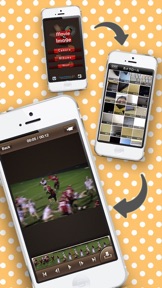
MovieToimage is a great app enabling you to capture great images from your movies.
Simply take a movie, or choose an existing movie, and then scan through each frame, millisecond by millisecond, freezing at any moment, giving you the creative freedom to choose the best possible shot or selection of shots.
Ideal for Capturing great natural shots, rather than static looking staged poses. Exhilarating action shots, without being a second or even a millisecond too late, or just for exposing the countless funny expressions your friends pull.
Capture everything!! Never worry about snapping a picture at the right moment again, simply take a video and then at your leisure pinpoint the perfect moment and turn it into a great photograph. Or why not share your great moments or even those embarrassing mishaps in a succession of "how it happened" great looking still shots.
Have fun with this easy to use application, capture the moment and start producing great quality photos.
Functions
*VIDEO - Take a video or choose and existing video. Videos are automatically saved to your camera roll.
*FRAME ANALYSIS - scan through video footage frame by frame.
*INDIVIDUAL FRAME ANALYSIS - scan through the timeline of each frame to find the best possible moment.
*SAVE - Save any image to your camera roll.
*All images have the same resolutions as the video.
*All videos and selected images are saved to your camera roll, giving you easy access and the ability to email them to friends or upload them to your PC.
Update
*Compatible with new iPod touch (4th generation) (V111)

What's New in Version 2.6.0

We sincerely apologize for the long wait.
We have fixed a crash issue that occurred when selecting a video.
- Live Photo support
- Bug fixes
- UI optimizations

Seller

Name

Dreamonline,inc.

Information

Categories

Version

2.6.0

Size

7.3 MB

Game Center

No

VPP Device Licensing

Yes

Rating

Rated: 4+

Compatibility

iOS 15.0 or later

Devices

iPhone 5s, iPhone 6, iPhone 6 Plus, iPhone 6s, iPhone 6s Plus, iPhone SE, iPhone 7, iPhone 7 Plus, iPhone 8, iPhone 8 Plus, iPhone X, iPhone XR, iPhone XS, iPhone XS Max, iPhone 11, iPhone 11 Pro, iPhone 11 Pro Max, iPhone SE (2nd generation), iPhone 12, iPhone 12 Pro, iPhone 12 Pro Max, iPhone 12 mini, iPhone 13, iPhone 13 Pro, iPhone 13 Pro Max, iPhone 13 mini, iPhone SE (3rd generation), iPhone 14, iPhone 14 Plus, iPhone 14 Pro, iPhone 14 Pro Max, iPhone 15, iPhone 15 Plus, iPhone 15 Pro, iPhone 15 Pro Max, iPhone 16, iPhone 16 Plus, iPhone 16 Pro, iPhone 16 Pro Max, iPhone 16e, iPhone 17, iPhone 17 Pro, iPhone 17 Pro Max, iPhone Air, iPhone 17e, iPad (5th Generation) Wi-Fi, iPad (5th Generation) Wi-Fi + Cellular, iPad (6th generation) Wi-Fi, iPad (6th generation) Wi-Fi + Cellular, iPad Pro, iPad Pro (Cellular), iPad Pro (9.7-inch), iPad Pro (9.7-inch) (Cellular), iPad Pro 12.9-inch (2nd generation), iPad Pro 12.9-inch (2nd generation) Wi-Fi + Cellular, iPad Pro (10.5-inch), iPad Pro (10.5-inch) Wi-Fi + Cellular, iPad Pro (11-inch), iPad Pro (11-inch) Wi-Fi + Cellular, iPad Pro 12.9-inch (3rd generation), iPad Pro 12.9-inch (3rd generation) Wi-Fi + Cellular, iPad Air, iPad Air (Cellular), iPad Air 2, iPad Air 2 (Cellular), iPad Air (3rd generation), iPad Air (3rd generation) Wi-Fi + Cellular, iPad mini Retina, iPad mini Retina (Cellular), iPad mini 3, iPad mini 3 (Cellular), iPad mini 4, iPad mini 4 (Cellular), iPad mini (5th Generation), iPad mini (5th Generation) Wi-Fi + Cellular, iPad (7th generation) Wi-Fi + Cellular, iPad Pro 11-inch (2nd generation), iPad Pro 11-inch (2nd generation) Wi-Fi + Cellular, iPad Pro 12.9-inch (4th generation), iPad Pro 12.9-inch (4th generation) Wi-Fi + Cellular, iPad Air (4th Generation) (Wi-Fi), iPad Air (4th Generation) (Wi-Fi + Cellular), iPad (8th generation) Wi-Fi, iPad (8th generation) Wi-Fi + Cellular, iPad Pro 11-inch (3rd generation), iPad Pro 11-inch (3rd generation) Wi-Fi + Cellular, iPad Pro 12.9-inch (5th Generation), iPad Pro 12.9-inch (5th Generation) Wi-Fi + Cellular, iPad (9th Generation), iPad (9th Generation) Wi-Fi + Cellular, iPad mini (6th Generation), iPad mini (6th Generation) Wi-Fi + Cellular, iPad Air (5th generation), iPad Air (5th generation) Wi-Fi + Cellular, iPad Pro 11-inch (4th generation), iPad Pro 11-inch (4th generation) Wi-Fi + Cellular, iPad Pro 12.9-inch (6th generation), iPad Pro 12.9-inch (6th generation) Wi-Fi + Cellular, iPad (10th generation), iPad (10th generation) Wi-Fi + Cellular, iPad Air 11-inch (M2) Wi-Fi, iPad Air 13-inch (M2) Wi-Fi, iPad Air 13-inch (M2) Wi-Fi + Cellular, iPad Pro 11-inch (M4) Wi-Fi, iPad Pro 11-inch (M4) Wi-Fi + Cellular, iPad Pro 13-inch (M4) Wi-Fi, iPad Pro 13-inch (M4) Wi-Fi + Cellular, iPad mini (A17 Pro) Wi-Fi, iPad mini (A17 Pro) Wi-Fi + Cellular, iPad (A16) Wi-Fi, iPad (A16) Wi-Fi + Cellular, iPad Air 11-inch (M3) Wi-Fi, iPad Air 11-inch (M3) Wi-Fi + Cellular, iPad Air 13-inch (M3) Wi-Fi, iPad Air 13-inch (M3) Wi-Fi + Cellular, iPad Pro 11-inch (M5) Wi-Fi, iPad Pro 11-inch (M5) Wi-Fi + Cellular, iPad Pro 13-inch (M5) Wi-Fi, iPad Pro 13-inch (M5) Wi-Fi + Cellular, iPad Air11M4, iPad Air11M4Cellular, iPad Air13M4, iPad Air13M4Cellular, iPod touch (6th Generation), iPod touch (7th generation)

Languages

English, Japanese

App Store: Customer Ratings

Ratings & Reviews

5.0 of 5 (1 Rating)

App Store: Customer Reviews

2012-06-05

Exactly what I wanted

It extracted a picture out of a video on my iPhone exactly as I needed. Thank you!!!
leardk01
Version 2.1.2
2011-07-31

Crap! I want my $ back

As mentioned, support is ONLY Japanese!!! Come on Apple!?! That is the crap you allow?? BOOO!
Extracted stills are compressed; grainy and not good to print / use!!
It does work, it has frame advance, etc --- so close to a good app... But just is not!
MerkleyTheCanadian
Version 1.1.2
2011-07-10

Superb!

A very solid app to say the least. Smooth operation, simple and user-friendly. Does exactly as described.
Only request is to provide option to enable or disable video compression :)
Zurom
Version 1.1.2
2010-09-21

Crap!!!

Minus 5 stars! Installed on 4th gen iPod Touch. Warning dialogue says "Device Not Supported".
For "support" I was sent to a page in Japanese!!!
Utter crap!
Top-Toto