AboutTermsPrivacyContact
 
Updating
AirTrack

AirTrack

Released: 2010-08-03
© Haversine Ltd
AirTrack - QR Code
Version 3.15
4+
Download on the App Store
Version 3.15
4+
Download on the App Store
Released: 2010-08-03
© Haversine Ltd

iPhone Screenshots

Screenshot
Screenshot
Screenshot
Screenshot
Screenshot

Description

AirTrack integrates with multiple data sources in order to report flight and navigation data wirelessly and in real time. Designed to be used with a Flight Simulator, with the aid of a plugin this application allows you to track your virtual flights in real-time in the palm of your hand, as well as to remotely control your simulated flights.
You no longer need to stay glued to the computer in order to know if you're still flying at 39,000 feet, if you're still heading to the right waypoint, how long you've got left or what the weather is going to be like at your destination airport; you can now relax and do it in the garden or anywhere within WiFi reach really and control your flight with your thumb.
But if this isn't enough, AirTrack can also use your device's built-in GPS, Accelerometer and Gyro to determine your current movements and attitude and the Internet to download real weather to simulate an aircraft's sensors.
Turn your car trip into a flight experience by getting information about your instant position, heading and surrounding waypoints. See yourself in an EFIS style navigation display / primary flight display or plan your multi-leg trip with the built in route planner FMC which gives you real-time information about your waypoints, how far they are and how long it will take you to reach them.
With its built-in database of FIX, VOR, NDB and Airports, AirTrack can also be used as a flight companion allowing you to plan and monitor your trip, target a VOR or even perform a full IFR approach without ever needing to look at the screen.
The AirTrack features include:
- A full Primary Flight Display with speed, altitude, vertical speed, barometric pressure
- Also in the PFD, compass, AI with roll/pitch, auto-pilot status and settings.
- Instant GS, IAS, MACH, TAS and VS when available.
- An MFD with APP, VOR, MAP and PLN mode with centered and expanded views.
- The whole world as a map of geo contours in the MFD.
- NAV / ADF and ILS / Approach guidance in the PFD and MFD.
- An MCP panel to control the Aircraft's Auto-Pilot.
- Wind speed and direction indicators.
- Next waypoint reporting on the MFD.
- Electronic Flight Bag style interface for iPad,
- An advanced multimode navigation display.
- A multi-leg FMC style route planner.
- Enroute Airways decoder.
- SID, STAR and Approach procedures decoder.
- Bi-directional radio stack.
- AutoTransponder Mode.
- Customizable waypoints.
- Saved waypoints and Nearby waypoints.
- Real-Time weather information for airports.
- Detailed airport information including runways.
- A database of over 100k + localities worlwide.
- Built-in database of intersections, VORs and NDBs.
- Support for NAVIGRAPH FMS AIRAC cycles.
- Tracking of VATSIM / IVAO/ PilotEdge surrounding air traffic on the MFD.
- Tracking of which controllers are online in VATSIM/IVAO.
- Auto-tuning of ATC frequencies to COM1/COM2.
- Automatic position report generation for oceanic.
- Enhanced graphics with high-res Retina Display.
- Remote Yoke/Joystick/Rudder for flight simulator.
- Support for X-Plane
- Support for Flight Simulator 2020
- Support for FS9 and FSX(*)
- Support for ELITE 8.6 US
- Cloud Services flight plan and waypoint sync.
- Cloud based auto-sync advanced flight planner
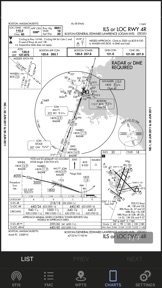
- Cloud based Approach plate / charts viewer with user charts.
- And much more ...
(*) Support for the old FS9 and FSX simulators is limited and provided by a third party plugin which is no longer actively supported.

What's New in Version 3.15

This version adds support for the plugin for Flight Simulator 2020.

Seller

Name

Haversine Ltd

Information

Developer

Categories

Version

3.15

Size

160.6 MB

Game Center

No

VPP Device Licensing

Yes

Rating

Rated: 4+

Compatibility

iOS 9.0 or later

Devices

iPhone 4S, iPhone 5, iPhone 5c, iPhone 5s, iPhone 6, iPhone 6 Plus, iPhone 6s, iPhone 6s Plus, iPhone SE, iPhone 7, iPhone 7 Plus, iPhone 8, iPhone 8 Plus, iPhone X, iPhone XR, iPhone XS, iPhone XS Max, iPhone 11, iPhone 11 Pro, iPhone 11 Pro Max, iPhone SE (2nd generation), iPad 2 (Wi-Fi), iPad 2 (3G), iPad (3rd Generation) (Wi-Fi), iPad (3rd Generation) (4G), iPad (4th Generation) (Wi-Fi), iPad (4th Generation) (4G), iPad (5th Generation) Wi-Fi, iPad (5th Generation) Wi-Fi + Cellular, iPad (6th generation) Wi-Fi, iPad (6th generation) Wi-Fi + Cellular, iPad Pro, iPad Pro (Cellular), iPad Pro (9.7-inch), iPad Pro (9.7-inch) (Cellular), iPad Pro 12.9-inch (2nd generation), iPad Pro 12.9-inch (2nd generation) Wi-Fi + Cellular, iPad Pro (10.5-inch), iPad Pro (10.5-inch) Wi-Fi + Cellular, iPad Pro (11-inch), iPad Pro (11-inch) Wi-Fi + Cellular, iPad Pro 12.9-inch (3rd generation), iPad Pro 12.9-inch (3rd generation) Wi-Fi + Cellular, iPad Air, iPad Air (Cellular), iPad Air 2, iPad Air 2 (Cellular), iPad Air (3rd generation), iPad Air (3rd generation) Wi-Fi + Cellular, iPad mini (Wi-Fi), iPad mini (4G), iPad mini Retina, iPad mini Retina (Cellular), iPad mini 3, iPad mini 3 (Cellular), iPad mini 4, iPad mini 4 (Cellular), iPad mini (5th Generation), iPad mini (5th Generation) Wi-Fi + Cellular, iPad (7th generation) Wi-Fi, iPad Pro 11-inch (2nd generation), iPad Pro 11-inch (2nd generation) Wi-Fi + Cellular, iPad Pro 12.9-inch (4th generation), iPad Pro 12.9-inch (4th generation) Wi-Fi + Cellular, iPod touch (5th generation), iPod touch (6th Generation), iPod touch (7th generation)

Languages

English

App Store: Customer Ratings

Ratings & Reviews

5.0 of 5 (3 Ratings)

App Store: Customer Reviews

2012-12-25

Must have

Simply awesome !
louismg
Version 3.4
2012-07-01

What EFIS-App should have been

Brilliant! This is the best app for building a home sim with X-Plane!
It's more difficult to fall off a chair than to connect this app with the X-Plane flight sim.
Turn on computer, load X-Plane. Turn on idevice, load AirTrack.
Fly!!!
CSMcleod
Version 3.2
2011-08-12

Awesome App for Sim Builders

If you have an iPod, iPhone or iPad and are a sim builder this is money well spent! Instant panel / FMC
Grantday2000
Version 2.3.1
2010-09-06

1st Class Support

First of all, let’s talk about support. I had an issue where I have both an iPad and iPhone; when I updated the iPhone the iPad wouldn’t update. I contacted support with this issue and immediately received a pompt and courteous response with a genuine apology. Next a solution to my problem was quick to follow.
Now about the app; it does exactly what the developer says it does. I haven’t used it enough to find any bugs yet. I have used it in the air and found the accuracy to be fairly good. It did take me to my destination airport and the database did have accurate information to my home airport. (Funny thing, after I updated the database through a separate service, there were errors in the data. However, you can post requests to a forum to have corrections made or appended.) A word of warning, do not use as a primary navigation device.
I did find the interface fairly intuitive and easy to use.
My wish list for this program is to see it ported to Microsoft’s Flight Sim X and updates to the GPS portion of the program to improve accuracy, response and functionality for actual flight ( to be able to use it as a backup device).
Overall, I think this app has great potential. Keep the development and improvements coming.
Flying_F