AboutTermsPrivacyContact
 
Updating
Hang-a-Pic

Hang-a-Pic

Released: 2010-07-08
© John Lullie - 2012 - 2020
Hang-a-Pic - QR Code
Version 2.50
4+
Download on the App Store
Version 2.50
4+
Download on the App Store
Released: 2010-07-08
© John Lullie - 2012 - 2020

iPhone Screenshots

Screenshot
Screenshot
Screenshot
Screenshot
Screenshot

iPad Screenshots

Screenshot
Screenshot
Screenshot

Description

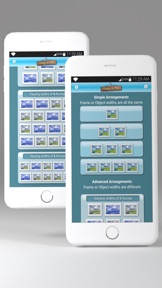
Hang-a-Pic greatly simplifies the tedious and sometimes difficult task of hanging multiple, equally aligned pictures, mirrors, decorative plates, candles or any other wall mounted ornaments. Of course, hanging one picture is simple. But if you have three or four pictures, each with two hooks on the back, and you want them exactly 6 inches apart, and aligned correctly across your wall? Hang-a-Pic will do just that!
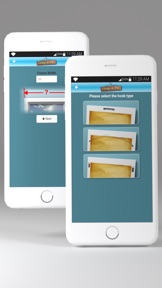
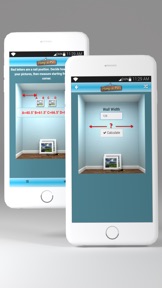
Using a very friendly walk-through interface, Hang-a-Pic can tell you exactly where to put your nails (or wall-plugs, etc.) in the wall for each picture or ornament. No more headaches or extra holes in the wall from guessing where the nails should go... All you need is a tape measure and Hang-a-Pic will figure out the rest!
It's so easy that a 12 year old child could take four pictures, each with two hooks on the back, and hang them precisely and evenly across a wall the first time! No extra holes, no "oops!!".
- New Features added to support hanging a group of pictures (or anything else) with different frame widths, evenly spaced across a wall. For example, say you're hanging 3 pictures and the center picture is wider than the other 2, Hang-a-Pic will now make this an easy task to pinpoint exactly where your nails need to be for each picture!
- Now supports as many as 5 pictures (or any thing else you're hanging), and each can be a different width. And they do *not* need to be hung symmetrically!
- Send measurements to your Email address.
- Print the measurements to your AirPrint compatible Printer.
- Performance enhancements.

What's New in Version 2.50

Added a Print feature on the Results screen for AirPrint compatible printers.

Seller

Name

John Lullie

Information

Developer

Categories

Version

2.50

Size

11.7 MB

Game Center

No

VPP Device Licensing

Yes

Rating

Rated: 4+

Compatibility

iOS 10.0 or later

Devices

iPhone 5, iPhone 5c, iPhone 5s, iPhone 6, iPhone 6 Plus, iPhone 6s, iPhone 6s Plus, iPhone SE, iPhone 7, iPhone 7 Plus, iPhone 8, iPhone 8 Plus, iPhone X, iPhone XR, iPhone XS, iPhone XS Max, iPhone 11, iPhone 11 Pro, iPhone 11 Pro Max, iPhone SE (2nd generation), iPad (4th Generation) (Wi-Fi), iPad (4th Generation) (4G), iPad (5th Generation) Wi-Fi, iPad (5th Generation) Wi-Fi + Cellular, iPad (6th generation) Wi-Fi, iPad (6th generation) Wi-Fi + Cellular, iPad Pro, iPad Pro (Cellular), iPad Pro (9.7-inch), iPad Pro (9.7-inch) (Cellular), iPad Pro 12.9-inch (2nd generation), iPad Pro 12.9-inch (2nd generation) Wi-Fi + Cellular, iPad Pro (10.5-inch), iPad Pro (10.5-inch) Wi-Fi + Cellular, iPad Pro (11-inch), iPad Pro (11-inch) Wi-Fi + Cellular, iPad Pro 12.9-inch (3rd generation), iPad Pro 12.9-inch (3rd generation) Wi-Fi + Cellular, iPad Air, iPad Air (Cellular), iPad Air 2, iPad Air 2 (Cellular), iPad Air (3rd generation), iPad Air (3rd generation) Wi-Fi + Cellular, iPad mini Retina, iPad mini Retina (Cellular), iPad mini 3, iPad mini 3 (Cellular), iPad mini 4, iPad mini 4 (Cellular), iPad mini (5th Generation), iPad mini (5th Generation) Wi-Fi + Cellular, iPad (7th generation) Wi-Fi + Cellular, iPad Pro 11-inch (2nd generation), iPad Pro 11-inch (2nd generation) Wi-Fi + Cellular, iPad Pro 12.9-inch (4th generation), iPad Pro 12.9-inch (4th generation) Wi-Fi + Cellular, iPad Air (4th Generation) (Wi-Fi), iPad Air (4th Generation) (Wi-Fi + Cellular), iPad (8th generation) Wi-Fi, iPad (8th generation) Wi-Fi + Cellular, iPod touch (6th Generation), iPod touch (7th generation), Apple Watch Series 4, Apple Watch Series 5, Apple Watch Series 6 (GPS), Apple Watch Series 6 (GPS + Cellular), Apple Watch Series SE (GPS), Apple Watch Series SE (GPS + Cellular)

Languages

English

App Store: Customer Ratings

Ratings & Reviews

2.5 of 5 (2 Ratings)

App Store: Customer Reviews

2016-02-20

not good

this app doesn't factor in height. It also doesn't work well for one piece of art if the two hooks are not directly on the side of artwork such as if they are a couple inches in from the sides.
CherThe
Version 1.3
2012-01-16

It's okay

It's not bad but what I would like to see is a way to tell it the size of my frames, the size of wall, and how many pics I have and it work out where my hooks should go to space them evenly in that space. It was a pain to to today especially since each pic had 2 hooks on the back of each frame
Telnets
Version 1.1