AboutTermsPrivacyContact
 
Updating
WingX

WingX

Released: 2010-06-30
© 2009-2019 Hilton Software
WingX - QR Code
Version 9.2.1.38
4+
Download on the App Store
Version 9.2.1.38
4+
Download on the App Store
Released: 2010-06-30
© 2009-2019 Hilton Software

iPhone Screenshots

Screenshot
Screenshot
Screenshot
Screenshot
Screenshot

iPad Screenshots

Screenshot
Screenshot
Screenshot
Screenshot
Screenshot
Screenshot
Screenshot

Description

WingX Pro7's simple subscription model:
● VFR Free!, CFI Free!, and MilitaryFree! - only VFR flying, CFI, or Active or Retired Military? Subscription is free.
● $74.95 annual subscription (or $199.95 for 3 years)
● $74.95 for Advanced IFR Subscription
● Free: 30-day Free Period
● Free: Synthetic Vision and Fuel Prices (with current subscription)
Annual Subscription
Includes VFR Sectionals, IFR Enroute Low and High, TACs, Flyway, Helicopter, Grand Canyon, and IFR Area charts plus APDs (geo-referenced), IAPs, etc
Advanced IFR Subscription
IAP geo-referencing, IAP Routing and ChartTouch
New!
Features:
● Display Instrument Approach Procedures on the Moving Map.
● Minimum Vectoring Altitude Overlays on the Moving Map.
● New Advanced Moving Map with significant performance and stability improvements
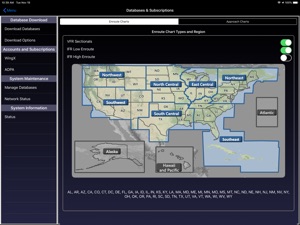
● Visual region-based moving map data download selection. Faster downloads by downloading only what you need.
● Improved weather display - better animation, faster downloading, and vastly less network bandwidth usage
● Reworked data dissemination process to enable earlier release of cycle data, improved dual-cycle data management, dynamic real-time system configuration.
● Winner of many awards including multiple Stevie Awards, Appy Awards, and Aviation Consumer.
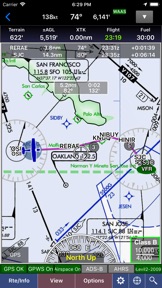
GPS-Enabled Moving Map
● VFR Sectionals, IFR Enroute Low and High, TACs, Flyways, Helicopter, Grand Canyon, and IFR Area charts
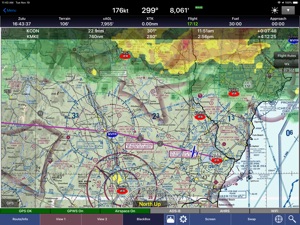
● Wx Overlays including NEXRAD composite and many other weather overlay types with animation, transparency, and low-bandwidth option (e.g. hotel rooms)
● DP, STAR, and IAP Routing (iPad only)
● North Up or Track Up
● Split Screen
● Business locations on Airport Diagrams
● ADS-B In-Flight Weather and Traffic
● X-Plane and MS Flight Sim compatible
● Ground Proximity Warning System (GPWS) - terrain and obstacles
● SmartTaxi™ - advanced taxi warning system
● FlightShare™ - share routes on the ground or in the air!
● traca™ Technology - simply draw the route
● WingX Rewind™ - record and playback flights including GPS, AHRS, and Pitot-Static.
● Auto switch to Airport Diagram
● Class B Transitions
● Search And Rescue Grids and Patterns (old/new) - Parallel, Square, Sector, and Auto Fill Grid - supports MGRS
● Overlay terrain and obstacles (terrain up to 60N)
● State Lines
● Airspace overlays
● Airspace Notifications
● Passive RADAR Altimeter - Terrain Elevation or AGL
● Terrain Profile View - with climb angle and 500fpm descent lines
● AHRS-driven Attitude Indicator
● Built-in Simulator
● Extra dimming for night operations
● Rubber-Banding
● User-Defined Waypoints
● Multi-Page Notepad with Undo
● Runway Extensions and Traffic Patterns
● Easy GPS Calibration - tap on moving map's altitude
● Count-Up/Down timers
● Numerous aircraft icons
● Stadium TFRs
Approach Charts
● Print charts wirelessly
● Rotate DPs and STARs
● Draw on approach charts
Wx Text
● Color-coded and decoded METARs, TAFs, winds/temps aloft
● METAR Density Altitude and Freezing Levels
Route Planning
● Victor Airways, Jetways, DPs, STARs, and even IAPs!
● Total and Longer Than Direct distances
● Flight Log shows Headings, GS, ETE, Fuel Burn using winds aloft
● Optimize Altitude for winds aloft
Flight Service
● Flight Plans and Weather Briefings with Leidos. Can be reused for fast filing
● File, Close, and Cancel flight plans
● Route and Area Weather Briefings
● Aircraft Manager for auto-fill
E6B
● TAS
● Conversions
● Distance-Speed-Time
● Pressure/Density Altitude
● Winds Aloft
● Runway Winds
● IFR Climb
● Descent Rate
Documents
● ACS and PTS
● Parts of the AIM
● AC61-65H - Including Endorsements
● AC61-67C - Stall and Spin Awarenes
● Pilot/Controller Glossary
● Aeronautical Contractions
● User-Documents
Integrated Help System
● Built-in mini-manual
Note: Continued use of GPS running in the background can dramatically decrease battery life.
Follow Us!
Twitter: @hiltonsoftware
Facebook: @hiltonsoftware
Instagram: @hilton.software

What's New in Version 9.2.1.38

Improvements
● Supports 56-day VFR Sectional publication cycle.
● Improved app stability and performance.

Seller

Name

Hilton Software LLC

Information

Categories

Version

9.2.1.38

Size

67.3 MB

Game Center

No

VPP Device Licensing

Yes

Rating

Rated: 4+

Compatibility

iOS 12.0 or later

Devices

iPhone 5s, iPhone 6, iPhone 6 Plus, iPhone 6s, iPhone 6s Plus, iPhone SE, iPhone 7, iPhone 7 Plus, iPhone 8, iPhone 8 Plus, iPhone X, iPhone XR, iPhone XS, iPhone XS Max, iPhone 11, iPhone 11 Pro, iPhone 11 Pro Max, iPhone SE (2nd generation), iPhone 12, iPhone 12 Pro, iPhone 12 Pro Max, iPhone 12 mini, iPhone 13, iPhone 13 Pro, iPhone 13 Pro Max, iPhone 13 mini, iPhone SEThirdGen, iPad (5th Generation) Wi-Fi, iPad (5th Generation) Wi-Fi + Cellular, iPad (6th generation) Wi-Fi, iPad (6th generation) Wi-Fi + Cellular, iPad Pro, iPad Pro (Cellular), iPad Pro (9.7-inch), iPad Pro (9.7-inch) (Cellular), iPad Pro 12.9-inch (2nd generation), iPad Pro 12.9-inch (2nd generation) Wi-Fi + Cellular, iPad Pro (10.5-inch), iPad Pro (10.5-inch) Wi-Fi + Cellular, iPad Pro (11-inch), iPad Pro (11-inch) Wi-Fi + Cellular, iPad Pro 12.9-inch (3rd generation), iPad Pro 12.9-inch (3rd generation) Wi-Fi + Cellular, iPad Air, iPad Air (Cellular), iPad Air 2, iPad Air 2 (Cellular), iPad Air (3rd generation), iPad Air (3rd generation) Wi-Fi + Cellular, iPad mini Retina, iPad mini Retina (Cellular), iPad mini 3, iPad mini 3 (Cellular), iPad mini 4, iPad mini 4 (Cellular), iPad mini (5th Generation), iPad mini (5th Generation) Wi-Fi + Cellular, iPad (7th generation) Wi-Fi + Cellular, iPad Pro 11-inch (2nd generation), iPad Pro 11-inch (2nd generation) Wi-Fi + Cellular, iPad Pro 12.9-inch (4th generation), iPad Pro 12.9-inch (4th generation) Wi-Fi + Cellular, iPad Air (4th Generation) (Wi-Fi), iPad Air (4th Generation) (Wi-Fi + Cellular), iPad (8th generation) Wi-Fi, iPad (8th generation) Wi-Fi + Cellular, iPad Pro 11-inch (3rd generation), iPad Pro 11-inch (3rd generation) Wi-Fi + Cellular, iPad Pro 12.9-inch (5th Generation), iPad Pro 12.9-inch (5th Generation) Wi-Fi + Cellular, iPad (9th Generation), iPad (9th Generation) Wi-Fi + Cellular, iPad mini (6th Generation), iPad mini (6th Generation) Wi-Fi + Cellular, iPad AirFifthGen, iPad AirFifthGenCellular, iPod touch (6th Generation), iPod touch (7th generation)

Languages

English

App Store: Customer Ratings

Ratings & Reviews

3.5 of 5 (2 Ratings)

App Store: Customer Reviews

2012-11-11

brilliant software

This is brilliant software for the active, knowledgeable pilot: it's enjoyable to use, cleverly designed, intuitively ergonomic, and amazingly useful. There is the odd small snag, but I've found Hilton Software to be quick to address them and keen to improve. I've gladly switched from mountains of paper charts and approach plates to this nifty piece of programming. I use WingX both on my iPhone and on my iPad, and have even found the iPhone version sufficient for cross-country IFR trips. The route planner is far easier to use than Foreflight's, and the split map view is fantastic for switching between enroute charts and approach plates. -R. Rosenkranz, Victoria, BC, Canada
Triple Romeo
Version 6.8.2.0
2011-12-24

Why the hate for Canadians?

What's with the lack of Canadian coverage? Good thing I got a free 30 day trail otherwise I would have felt pretty ripped off.
It's not just Canadian pilots asking for Canadian coverage, US pilots fly to Canada by the hundreds each day. This might be a good program for non professional Private pilots who don't travel much. But true professional pilots will want an app that works at all north american airports. Time to get on the ball WingX or it's back to ForeFlight for me and a lot of other pilots.
Kevinsky18
Version 6.1
2010-07-09

Wingx

I was thoroughly disappointed with software as it has absolutely zero Canadian coverage. No airspace, maps, airports (other than a very few major ones on the border but no info on them). I was even more disappointed with their customer support. After a week not a peep. My recommendation is to save your bucks an purchase the $39.95 Air Nav Pro. Less expensive, better coverage, and certainly better customer service. I really feel as if I wasted $99.
SpikeTheShark