Updating

HVAC Psychrometric Plus
Released: 2010-01-15
© 2020 Carmel Software Corporation. All Rights Reserved.


iPhone Screenshots




iPad Screenshots


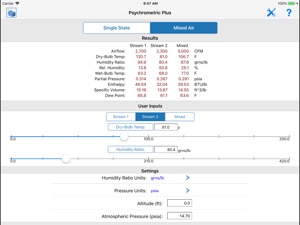

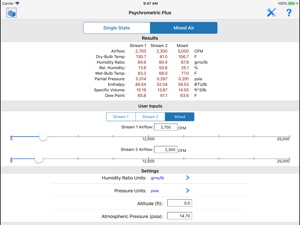


Description
The "HVAC Psychrometric Plus" app is the #1 selling psychrometric application for the Apple iPhone and iPad. Thousands of happy users have downloaded this useful application for performing quick and simple psychrometric analysis. Just a few reasons why you should buy this application:
1. The Psych Plus is a universal app that it is optimized for the iPhone and iPad.
2. This app was developed by Carmel Software, a company that has been developing software for 20+ years. We are experts in software design and HVAC analysis.
3. It allows you to easily perform single-state and mixed-air HVAC psychrometric calculations.
4. Select and update all input parameters and view the calculated results all in the same screen without switching from one screen to another.
5. Select from 23 different combinations of any 2 input parameters such as "Humidity Ratio / Dewpoint Temperature" and much more.
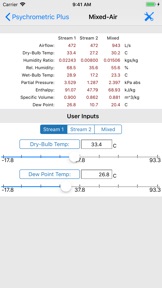
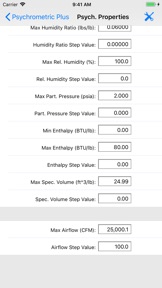
6. Immediately view updated results as you change the input values using the on-screen slider control. You can specify how much to increase or decrease values as you slide the indicator along the slider mechanism.
7. Send an HTML email and a spreadsheet attachment of all of the single-state and mixed-air inputs and results
8. This app now includes the HVAC Equipment Locator. Click here for details: http://bit.ly/1yTq539
This application contains two separate input modes. The 1st input mode is the "Single-State" mode that allows you to specify 2 psychrometric parameters for a single stream of air and view the remaining 6 calculated values. You can quickly toggle through 23 different combinations of the 2 input parameters and instantly view the calculated results, all on the same screen.
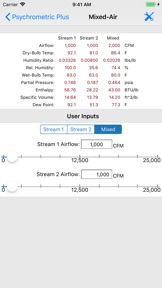
The 2nd input mode is the "Mixed-Air" mode that allows you to specify 2 psychrometric parameters for each of two air streams to calculate the mixed air psychrometric conditions. Once again, you can toggle through 23 combinations of the 2 input parameters and view all results in one screen.
The following input and output value-types are displayed:
1. Dry-bulb temperature
2. Humidity ratio
3. Relative Humidity
4. Wet-bulb temperature
5. Partial pressure
6. Enthalpy
7. Specific volume
8. Dewpoint temperature
9. Total airflow or mass flow (for mixed-air calcs, only)
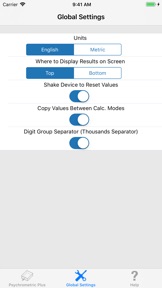
You can specify additional parameters such as the altitude of the air being analyzed, the atmospheric pressure, different types of units such as degrees F or R, and English or Metric units.
The "HVAC Psychrometric Plus" application was designed by Carmel Software Corporation, a leader in HVAC design software since 1995. In fact, Autodesk (the makers of AutoCAD) acquired our analysis software and incorporated it into their leading Autodesk Revit software product. In addition, ASHRAE has hired Carmel Software to develop custom mobile apps to accompany their various standards.
We also offer the following apps for the iPhone/iPad:
1. HVAC Residential Load Calcs
2. HVAC Load Plus
3. HVAC Duct Sizer
4. HVAC Pipe Sizer – Gas Low Pressure
5. HVAC Pipe Sizer - Gas High Pressure
6. HVAC Pipe Sizer – Liquid
7. HVAC Pipe Sizer – Steam
8. Steam Tables
9. HVAC Toolkit
10. Psychrometric LT
11. HVAC Pipe Sizer Plus
12. HVAC Pipe Sizer Gas Plus
13. HVAC Quick Load
14. HVAC ResLoad-J
15. HVAC Equipment Locator
16. HVAC Psych HD
What's New in Version 4.95
1. Fixed issue where email icon was not displaying in iPad version
Seller
Name
Carmel Software Corporation
Information
Developer
Categories
Version
4.95
Size
17.8 MB
Game Center
No
VPP Device Licensing
Yes
Rating
Rated: 4+
Compatibility
iOS 11.0 or later
Devices
iPhone 5s, iPhone 6, iPhone 6 Plus, iPhone 6s, iPhone 6s Plus, iPhone SE, iPhone 7, iPhone 7 Plus, iPhone 8, iPhone 8 Plus, iPhone X, iPhone XR, iPhone XS, iPhone XS Max, iPhone 11, iPhone 11 Pro, iPhone 11 Pro Max, iPhone SE (2nd generation), iPad (5th Generation) Wi-Fi, iPad (5th Generation) Wi-Fi + Cellular, iPad (6th generation) Wi-Fi, iPad (6th generation) Wi-Fi + Cellular, iPad Pro, iPad Pro (Cellular), iPad Pro (9.7-inch), iPad Pro (9.7-inch) (Cellular), iPad Pro 12.9-inch (2nd generation), iPad Pro 12.9-inch (2nd generation) Wi-Fi + Cellular, iPad Pro (10.5-inch), iPad Pro (10.5-inch) Wi-Fi + Cellular, iPad Pro (11-inch), iPad Pro (11-inch) Wi-Fi + Cellular, iPad Pro 12.9-inch (3rd generation), iPad Pro 12.9-inch (3rd generation) Wi-Fi + Cellular, iPad Air, iPad Air (Cellular), iPad Air 2, iPad Air 2 (Cellular), iPad Air (3rd generation), iPad Air (3rd generation) Wi-Fi + Cellular, iPad mini Retina, iPad mini Retina (Cellular), iPad mini 3, iPad mini 3 (Cellular), iPad mini 4, iPad mini 4 (Cellular), iPad mini (5th Generation), iPad mini (5th Generation) Wi-Fi + Cellular, iPad (7th generation) Wi-Fi, iPad Pro 11-inch (2nd generation), iPad Pro 11-inch (2nd generation) Wi-Fi + Cellular, iPad Pro 12.9-inch (4th generation), iPad Pro 12.9-inch (4th generation) Wi-Fi + Cellular, iPad Air4, iPad Air4Cellular, iPad EighthGen, iPad EighthGenCellular, iPod touch (6th Generation), iPod touch (7th generation)
Languages
English
App Store: Customer Ratings
Ratings & Reviews
1.0 of 5 (1 Rating)
App Store: Customer Reviews
No Entry