Description
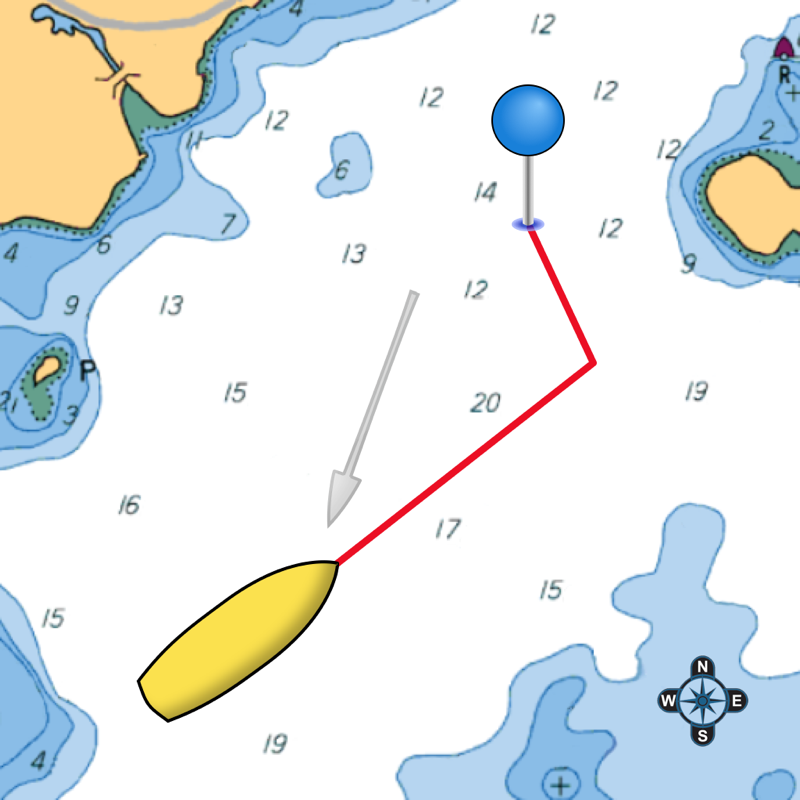
Display your optimal tacks on a chart, and the exact distance and time on each tack. Standard GPS chartplotters do not account for tacking distances. But if they do not know the distance you will travel, how can they calculate your correct ETA? SailTimer gives you a quick and easy display of your optimal tacks and TTD™ (Tacking Time to Destination).
Whether for cruising or racing, it is important to be able to determine the best heading on all points of sail. Sailing off the wind increases boat speed but lengthens the distance. Heading too far upwind shortens the distance but reduces speed. To help you select the best heading, SailTimer continuously updates your optimal tacks.
Operating Instructions and Unique Features:
● Save waypoints on the map. Rename them. Then easily display the optimal tacks, tacking distances, headings and times to get to a waypoint.
● If you have our wireless anemometer (www.SailTimerWind.com), the wind direction and speed arrives magically through the air. To see the optimal tacks, there is then only one step: Just enter the waypoint or direction to the waypoint. It is that simple.
● Worldwide vector charts: If you have the Navionics Boating app, you can also use the same charts here with a yearly subscription. Navionics terms of use: SailTimerApp.com/vectorcharts.html . Payment will be charged to iTunes Account at confirmation of purchase. Subscription automatically renews unless auto-renew is turned off in iTunes Account Settings at least 24-hours before the end of the current period. Account will be charged for renewal within 24-hours prior to the end of the current period, with the same cost for renewing the subscription again.
● Marine charts (raster) based on the paper charts are also available as low-cost in-app purchases for USA, UK, Canada, New Zealand, US Virgin Islands, Puerto Rico, and large-scale charts of The Bahamas and Cuba. Aerial photos and road maps worldwide are available free. All can be used offline.
● The white crosshair icon in the top left is the “Follow-Me” button. If clicked, it turns blue and keeps your location in the center of the screen as you move. Unselect when not moving to look around the map, and when you want to zoom in and out.
● If using an anemometer, you can enlarge the Wind Speedometer to keep an eye on wind gusts. Click the Graph button and you can save or share a graph showing your boat speed and wind speed. The graph saves these for up to 24 hours as long as the device is not rebooted.
● Your device will not go to sleep when the app is open, to allow you to continue to monitor your progress on the chart. You can also continue to track your tacking results with the app running in the background or when the device is asleep (unless you hard-quit).
● ActiveCaptain: Click on flags on the chart for comments and reviews about anchorages, marinas and hazards. It is like a cruising guide that never goes out of date.
● Click on the pin at the end of a pair of tacks to see the distances, heading and time on each tack.
● Custom polar plots: The app can learn your unique sailboat's speed profile on all points of sail, for the most accurate tacking results.
● Switch to the port or starboard tack to avoid obstructions, or let the app automatically display the tack nearest to your current heading.
● Overlay under Options for crowd-sourced Live Wind & Race Maps. You only need to log in once, and your login is retained for offline use. Try it out with the demo replay under Options > Events, of AC45 catamarans and wind conditions from the lead-up to the 2013 America's Cup.
● Save, import or email your GPS track.
● Convert from Apparent to True wind speed & direction.
Continued use of GPS running in the background can dramatically decrease battery life. This app may use your location even when it isn’t open, which can decrease device battery life.
What's New in Version 5.9.1
• The optimal tacks to the next waypoint are now automated. When you open the app, your list of waypoints/routes is shown. Just tap one and your optimal tacks are automatically displayed. If you have the wireless Wind Instrument, the wireless connection is also already turned on in Input\Set-Up.
• Bug fixed for exporting a polar plot to edit and re-import it.
• Audio Navigation added for the wireless Wind Instrument so you can hear wind conditions or boat speed when they change by more than a set amount. You can put your iPhone/iPad away safe and dry, and use a Bluetooth speaker or earbuds. Keep your hands and eyes free for sailing — no screen required. You can even shut off the screen, to reduce heat and power consumption, and the audio will still happen.
• Bug corrected for opening panel with iPhone display.