AboutTermsPrivacyContact
 
Updating
FreezingBlue Flashcards

FreezingBlue Flashcards

Released: 2009-09-01
© David Skelly
FreezingBlue Flashcards - QR Code
Version 4.9.3
4+
Download on the App Store
Version 4.9.3
4+
Download on the App Store
Released: 2009-09-01
© David Skelly

iPhone Screenshots

Screenshot
Screenshot
Screenshot
Screenshot
Screenshot

iPad Screenshots

Screenshot
Screenshot
Screenshot
Screenshot
Screenshot

Description

Create your flashcards and carry them around in convenient digital format. Perfect for studying on the go! This application has powerful features made for the student who's serious about studying.
SHARE your cards and study with friends!
Please visit https://freezingblue.com/flashcards/ for screenshots, tutorials, and more information.
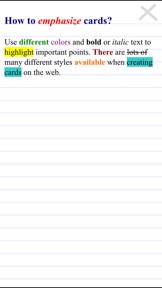
Easy card creation on the web, including colors, font styles, images and more! See the examples page for study ideas.
Features-
* Create and edit flashcards directly on your iOS device.
* Create cards using the free web interface at https://freezingblue.com/flashcards/ and download directly to your phone.
* Images supported through the web interface.
* Landscape or portrait mode for viewing cards.
* Full screen, easy to read layout.
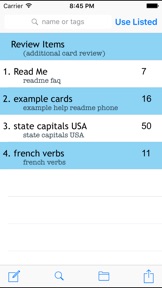
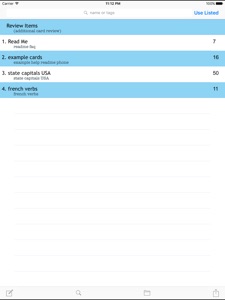
* Tag your card files with keywords. Then search cards according to keywords.
* Mix and match your card sets. Eg: study all cards with the keyword 'french', or study all cards with the keyword 'vocab', or study all cards with the keywords 'french vocab'.
* Unicode support for multiple languages.
* Multiple choice questions automatically scrambled.
* 5 study modes:
# Preview - preview all cards at once
# Skim - flips through cards
# Medium - repeats cards you get wrong
# Thorough - repeats problem cards more often
# Test - runs through the cards once and tells you how you did
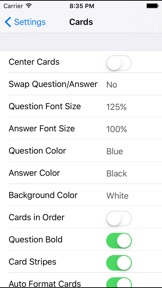
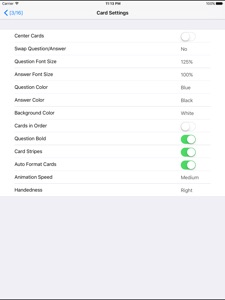
* 14 customizable options so you can study your cards the way you want
# Swap Question/Answer
# Question Font Size
# Answer Font Size
# Question Color
# Answer Color
# Question Font
# Answer Font
# Show Cards In Order
# Card Stripes
# Background color
# Autoformat Cards
# Right or Left Handed
# Animation Speed
# Center Cards

What's New in Version 4.9.3

Fixes for iOS 17.

Information

Developer

Categories

Version

4.9.3

Size

3.5 MB

Game Center

No

VPP Device Licensing

Yes

Rating

Rated: 4+

Compatibility

iOS 12.0 or later

Devices

iPhone 5s, iPhone 6, iPhone 6 Plus, iPhone 6s, iPhone 6s Plus, iPhone SE, iPhone 7, iPhone 7 Plus, iPhone 8, iPhone 8 Plus, iPhone X, iPhone XR, iPhone XS, iPhone XS Max, iPhone 11, iPhone 11 Pro, iPhone 11 Pro Max, iPhone SE (2nd generation), iPhone 12, iPhone 12 Pro, iPhone 12 Pro Max, iPhone 12 mini, iPhone 13, iPhone 13 Pro, iPhone 13 Pro Max, iPhone 13 mini, iPhone SE (3rd generation), iPhone 14, iPhone 14 Plus, iPhone 14 Pro, iPhone 14 Pro Max, iPhone 15, iPhone 15 Plus, iPhone 15 Pro, iPhone 15 Pro Max, iPad (5th Generation) Wi-Fi, iPad (5th Generation) Wi-Fi + Cellular, iPad (6th generation) Wi-Fi, iPad (6th generation) Wi-Fi + Cellular, iPad Pro, iPad Pro (Cellular), iPad Pro (9.7-inch), iPad Pro (9.7-inch) (Cellular), iPad Pro 12.9-inch (2nd generation), iPad Pro 12.9-inch (2nd generation) Wi-Fi + Cellular, iPad Pro (10.5-inch), iPad Pro (10.5-inch) Wi-Fi + Cellular, iPad Pro (11-inch), iPad Pro (11-inch) Wi-Fi + Cellular, iPad Pro 12.9-inch (3rd generation), iPad Pro 12.9-inch (3rd generation) Wi-Fi + Cellular, iPad Air, iPad Air (Cellular), iPad Air 2, iPad Air 2 (Cellular), iPad Air (3rd generation), iPad Air (3rd generation) Wi-Fi + Cellular, iPad mini Retina, iPad mini Retina (Cellular), iPad mini 3, iPad mini 3 (Cellular), iPad mini 4, iPad mini 4 (Cellular), iPad mini (5th Generation), iPad mini (5th Generation) Wi-Fi + Cellular, iPad (7th generation) Wi-Fi + Cellular, iPad Pro 11-inch (2nd generation), iPad Pro 11-inch (2nd generation) Wi-Fi + Cellular, iPad Pro 12.9-inch (4th generation), iPad Pro 12.9-inch (4th generation) Wi-Fi + Cellular, iPad Air (4th Generation) (Wi-Fi), iPad Air (4th Generation) (Wi-Fi + Cellular), iPad (8th generation) Wi-Fi, iPad (8th generation) Wi-Fi + Cellular, iPad Pro 11-inch (3rd generation), iPad Pro 11-inch (3rd generation) Wi-Fi + Cellular, iPad Pro 12.9-inch (5th Generation), iPad Pro 12.9-inch (5th Generation) Wi-Fi + Cellular, iPad (9th Generation), iPad (9th Generation) Wi-Fi + Cellular, iPad mini (6th Generation), iPad mini (6th Generation) Wi-Fi + Cellular, iPad Air (5th generation), iPad Air (5th generation) Wi-Fi + Cellular, iPad Pro 11-inch (4th generation), iPad Pro 11-inch (4th generation) Wi-Fi + Cellular, iPad Pro 12.9-inch (6th generation), iPad Pro 12.9-inch (6th generation) Wi-Fi + Cellular, iPad (10th generation), iPad (10th generation) Wi-Fi + Cellular, iPod touch (6th Generation), iPod touch (7th generation)

Languages

English

App Store: Customer Ratings

Ratings & Reviews

3.0 of 5 (2 Ratings)

App Store: Customer Reviews

2016-01-01

Wonderful!

Really helps you to study, best application ever!
Mike-the-champ
Version 3.7.1
2015-09-04

Donot buy

Useless app. You cannot do search inside it
I want my money back
Cpribrahim
Version 3.7.1
2011-12-16

Great app

Great app just please add spellcheck
Vanillia11
Version 2.5.2
2010-07-19

Great application

Very useful for studying keypoints for exams.
munnacanada
2010-03-23

Best flashcard app

this app is great and simple.
You just make your cards online, and then add them to your itouch/iphone. or view your flashcards in a slideshow online. images are simple to add.
This little program has made my studying simpler since I can carry all my flashcards on one little device and study anywhere. I take a lot the metro and bus so this is super useful. I find the medium mode of studying the best, it repeats missed cards and gives you a grade.
So I think this app is the best flashcard yet.
||C||
2010-03-11

Very easy to use - I'm impressed!

I prepared cards online, which I find easier than typing on my iPhone. The import from web to my phone was simple and the on phone instructions were short and complete, which I value. I was able to make my cards private with a single check box in each file (in fact, the summary of my files indicated I had NOT made a file private, so I only had to open it and click on a check box to correct my oversight). I think you may need to open a free account to create a password to make your cards private. While working on the web site, backups to my pc were made with a single mouse click. Last, but not least IMHO, I easily back up the cards created on my phone to my pc with the integrated FTP (I have the paid version on my phone).
The only suggestion I can make is to include a spell checker with the online text editor. My workaround was to spell check the text files on my pc and then make the corrections to the flash card files and then update the text files. No big deal.
Nothing to learn, nothing to remember. This is my kind of software!
kentho57