AboutTermsPrivacyContact
 
Updating
Play On Cue

Play On Cue

Released: 2009-07-30
© 2009 - 2018 Giebler Enterprises
Play On Cue - QR Code
Version 2.0.6
4+
Download on the App Store
Version 2.0.6
4+
Download on the App Store
Released: 2009-07-30
© 2009 - 2018 Giebler Enterprises

iPhone Screenshots

Screenshot
Screenshot
Screenshot
Screenshot

iPad Screenshots

Screenshot
Screenshot
Screenshot
Screenshot
Screenshot

Description

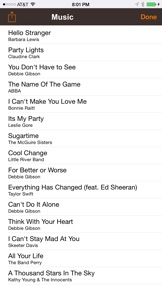
Play On Cue is a music player which cues and plays individual sounds and songs when the Play button is tapped. When each song has finished, the next song is displayed and ready to play. Play On Cue intentionally stops automatically after each song.
Play On Cue is intended for theater groups, talent shows, concerts, karaoke, musicians, DJ's, sound engineers - anyone who needs to start each song on a specific cue. Users can add additional songs, playlists or empty the cue without interrupting playback of the current song. Song title and artist are displayed in large easy to read text along with album artwork (when available).
Use iTunes to create your playlists. Select the playlists in Play On Cue and tap "Load all songs" for each set or scene. Sounds or songs will be in the order saved in the playlist. Songs can be added, removed or reordered while playing.
Play On Cue is a simple way to start sounds or songs ONE SONG AT A TIME when needed in a live performance.
** Play On Cue intentionally stops automatically after each song. **
Support for AirTurn and other BlueTooth remotes can be enabled /disabled in system settings along with support for rotating the display upside down so that the audio cable is out of the way.
Support for AirTurn is DISABLED by default - you MUST ENABLE it in system settings if you want to use it. Some remote devices should select a different mode to properly control the transport.
When the iPod music player is playing (intermission or before a show), Play On Cue continues to play and monitor the iPod's playlist. When you are ready to start your show, tap the NEXT or PREVIOUS button to stop the iPod's playback and queue your song list.
Although Play On Cue will stream songs in the cloud from iTunes Match, for best performance, and to prevent a glitch during a performance due to unforeseen network issues, we recommend only playing songs stored locally on your device.

What's New in Version 2.0.6

Updated for iOS 12

Seller

Name

Giebler Enterprises

Information

Categories

Version

2.0.6

Size

10.1 MB

Game Center

No

VPP Device Licensing

Yes

Rating

Rated: 4+

Compatibility

iOS 8.0 or later

Devices

iPhone 4S, iPhone 5, iPhone 5c, iPhone 5s, iPhone 6, iPhone 6 Plus, iPhone 6s, iPhone 6s Plus, iPhone SE, iPhone 7, iPhone 7 Plus, iPhone 8, iPhone 8 Plus, iPhone X, iPhone XR, iPhone XS, iPhone XS Max, iPhone 11, iPhone 11 Pro, iPhone 11 Pro Max, iPhone SE (2nd generation), iPhone 12, iPhone 12 Pro, iPhone 12 Pro Max, iPhone 12 mini, iPhone 13, iPhone 13 Pro, iPhone 13 Pro Max, iPhone 13 mini, iPhone SEThirdGen, iPad 2 (Wi-Fi), iPad 2 (3G), iPad (3rd Generation) (Wi-Fi), iPad (3rd Generation) (4G), iPad (4th Generation) (Wi-Fi), iPad (4th Generation) (4G), iPad (5th Generation) Wi-Fi, iPad (5th Generation) Wi-Fi + Cellular, iPad (6th generation) Wi-Fi, iPad (6th generation) Wi-Fi + Cellular, iPad Pro, iPad Pro (Cellular), iPad Pro (9.7-inch), iPad Pro (9.7-inch) (Cellular), iPad Pro 12.9-inch (2nd generation), iPad Pro 12.9-inch (2nd generation) Wi-Fi + Cellular, iPad Pro (10.5-inch), iPad Pro (10.5-inch) Wi-Fi + Cellular, iPad Pro (11-inch), iPad Pro (11-inch) Wi-Fi + Cellular, iPad Pro 12.9-inch (3rd generation), iPad Pro 12.9-inch (3rd generation) Wi-Fi + Cellular, iPad Air, iPad Air (Cellular), iPad Air 2, iPad Air 2 (Cellular), iPad Air (3rd generation), iPad Air (3rd generation) Wi-Fi + Cellular, iPad mini (Wi-Fi), iPad mini (4G), iPad mini Retina, iPad mini Retina (Cellular), iPad mini 3, iPad mini 3 (Cellular), iPad mini 4, iPad mini 4 (Cellular), iPad mini (5th Generation), iPad mini (5th Generation) Wi-Fi + Cellular, iPad (7th generation) Wi-Fi + Cellular, iPad Pro 11-inch (2nd generation), iPad Pro 11-inch (2nd generation) Wi-Fi + Cellular, iPad Pro 12.9-inch (4th generation), iPad Pro 12.9-inch (4th generation) Wi-Fi + Cellular, iPad Air (4th Generation) (Wi-Fi), iPad Air (4th Generation) (Wi-Fi + Cellular), iPad (8th generation) Wi-Fi, iPad (8th generation) Wi-Fi + Cellular, iPad Pro 11-inch (3rd generation), iPad Pro 11-inch (3rd generation) Wi-Fi + Cellular, iPad Pro 12.9-inch (5th Generation), iPad Pro 12.9-inch (5th Generation) Wi-Fi + Cellular, iPad (9th Generation), iPad (9th Generation) Wi-Fi + Cellular, iPad mini (6th Generation), iPad mini (6th Generation) Wi-Fi + Cellular, iPad AirFifthGen, iPad AirFifthGenCellular, iPod touch (5th generation), iPod touch (6th Generation), iPod touch (7th generation), Apple Watch Series 4, Apple Watch Series 5, Apple Watch Series 6 (GPS), Apple Watch Series 6 (GPS + Cellular), Apple Watch Series SE (GPS), Apple Watch Series SE (GPS + Cellular), Apple Watch Series 7 (GPS), Apple Watch Series 7 (GPS + Cellular)

Languages

English

App Store: Customer Ratings

Ratings & Reviews

3.0 of 5 (2 Ratings)

App Store: Customer Reviews

2021-03-06

Cue doesn’t work

A total waste of money.
bvjipuds do hi io
Version 2.0.6
2017-11-26

Excellent!

Have a small theatre with drama productions. Run all our sound cues. Best program ever for inexperienced operators. Needs update for newest iOS
Cranberry8
Version 1.8
2014-10-08

Work’s fine

Easy to use. Does the job. Works well with external wireless keyboard. If you need to play songs or soundtrack one at the time, to stop at the end and not play automatically the next one in list, this is the app you need.
Maisonneuve2017
Version 1.2
2012-04-03

On Cue????Where is the cue?

How can you say this is useful for those that need to start a song on a specific cue when there is no place to enter the "CUE"? A waste of money.
Comedyillusions
Version 1.2
2010-04-27

Does not do anything useful!

Crap.
Do not buy this.
2009-11-04

I want my money back!

Rubbish
Is this a joke??