Updating



iPhone Screenshots


Description
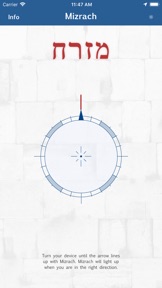
The Mizrach compass is designed to help you know in which direction Jewish people pray. Technically, it plots the location of the Kodesh Hakodashim (31° 46' 40.8" N, 35° 14' 7.44" E), which is near the Kotel (Western Wall) in Jerusalem. It then uses your current longitude, latitude plus the built in digital compass to point you in that direction.
When you are in the vicinity of the right location, the word "Mizrach," which means east, will light up. You know you are getting close to pointing towards Mizrach when the blue arrow is facing the word Mizrach.
Hold iPhone level to the ground. If the iPhone has a hard time figuring out the direction, move away from any magnetic interference and/or wave the iPhone in a figure eight.
It is important to note that compass reliability may be affected by usage conditions such as nearby magnetic fields. The accuracy of digital compass headings may be negatively affected by magnetic or other environmental interference, including interference caused by the close proximity of the magnets contained in the iPhone earbuds. The digital compass should only be used for basic navigation assistance and should not be solely relied on to determine precise locations, proximity, distance, or direction.
What's New in Version 2.0
New look and feel
Seller
Name
RustyBrick, Inc.
Information
Developer
Categories
Version
2.0
Size
17.5 MB
Game Center
No
VPP Device Licensing
Yes
Rating
Rated: 4+
Compatibility
iOS 10.0 or later
Devices
iPhone 5, iPhone 5c, iPhone 5s, iPhone 6, iPhone 6 Plus, iPhone 6s, iPhone 6s Plus, iPhone SE, iPhone 7, iPhone 7 Plus, iPhone 8, iPhone 8 Plus, iPhone X, iPhone XR, iPhone XS, iPhone XS Max, iPhone 11, iPhone 11 Pro, iPhone 11 Pro Max, iPhone SE (2nd generation), iPad (4th Generation) (Wi-Fi), iPad (4th Generation) (4G), iPad (5th Generation) Wi-Fi, iPad (5th Generation) Wi-Fi + Cellular, iPad (6th generation) Wi-Fi, iPad (6th generation) Wi-Fi + Cellular, iPad Pro, iPad Pro (Cellular), iPad Pro (9.7-inch), iPad Pro (9.7-inch) (Cellular), iPad Pro 12.9-inch (2nd generation), iPad Pro 12.9-inch (2nd generation) Wi-Fi + Cellular, iPad Pro (10.5-inch), iPad Pro (10.5-inch) Wi-Fi + Cellular, iPad Pro (11-inch), iPad Pro (11-inch) Wi-Fi + Cellular, iPad Pro 12.9-inch (3rd generation), iPad Pro 12.9-inch (3rd generation) Wi-Fi + Cellular, iPad Air, iPad Air (Cellular), iPad Air 2, iPad Air 2 (Cellular), iPad Air (3rd generation), iPad Air (3rd generation) Wi-Fi + Cellular, iPad mini Retina, iPad mini Retina (Cellular), iPad mini 3, iPad mini 3 (Cellular), iPad mini 4, iPad mini 4 (Cellular), iPad mini (5th Generation), iPad mini (5th Generation) Wi-Fi + Cellular, iPad (7th generation) Wi-Fi, iPad Pro 11-inch (2nd generation), iPad Pro 11-inch (2nd generation) Wi-Fi + Cellular, iPad Pro 12.9-inch (4th generation), iPad Pro 12.9-inch (4th generation) Wi-Fi + Cellular, iPad Air (4th Generation) (Wi-Fi), iPad Air (4th Generation) (Wi-Fi + Cellular), iPad (8th generation) Wi-Fi, iPad (8th generation) Wi-Fi + Cellular, iPod touch (6th Generation), iPod touch (7th generation)
Languages
English
App Store: Customer Ratings
Ratings & Reviews
1.0 of 5 (1 Rating)
App Store: Customer Reviews
No Entry