AboutTermsPrivacyContact
 
Updating
HVAC Duct Sizer

HVAC Duct Sizer

Released: 2009-06-02
© 2022 Carmel Software Corporation. All Rights Reserved.
HVAC Duct Sizer - QR Code
Version 6.0
4+
Download on the App Store
Version 6.0
4+
Download on the App Store
Released: 2009-06-02
© 2022 Carmel Software Corporation. All Rights Reserved.

iPhone Screenshots

Screenshot
Screenshot
Screenshot
Screenshot
Screenshot
Screenshot
Screenshot
Screenshot
Screenshot
Screenshot

iPad Screenshots

Screenshot
Screenshot
Screenshot
Screenshot
Screenshot
Screenshot
Screenshot
Screenshot
Screenshot
Screenshot

Description

HVAC Duct Sizer voted favorite mobile app by readers of Contracting Business magazine.
The HVAC Duct Sizer app is the #1 selling duct sizing application for the Apple iPhone and iPad. Tens of thousands of happy users have downloaded this useful application for performing quick and simple duct sizing analysis.
The HVAC Duct Sizer is a universal duct sizing app so that it works on both the iPhone and iPad and adjusts its screen size accordingly.
This app includes the HVAC Equipment Locator. Click here for details: http://bit.ly/1BPl1Nr
Just a couple of comments from our users:
"I'll be presenting your iPhone program to my HVAC class as an easy compact tool to have in hand when making sales and service calls." - R. Black
"I like this app and use it daily" - V. Joe
The Duct Sizer application allows you to quickly size one HVAC duct run or a range of duct sizes using the constant friction method. Think of this application as a digital version of the classic Trane Ductulator.
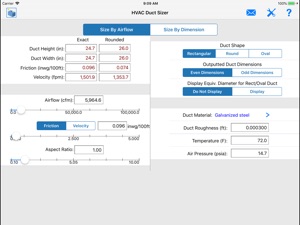
In the "Size by Airflow" mode, you can specify the total airflow in CFM (or L/s), the aspect ratio and one of either the velocity of air or the friction loss per 100 feet (30 meters). The results include both the exact and rounded height and width (or diameter) dimensions and the calculated velocity and friction loss.
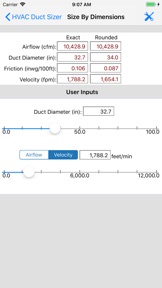
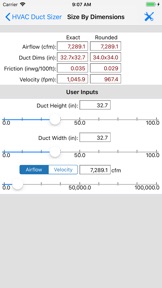
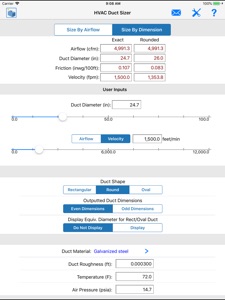
In the "Size by Dimensions" mode, you can analyze an existing duct system. There are options to input the existing duct dimensions and one of either the airflow or velocity values to derive the calculated duct friction loss.
In the "Range of Duct Sizes" mode, you can specify minimum and maximum friction loss and airflow values to display a range of duct sizes that fall in between the friction loss bounds.
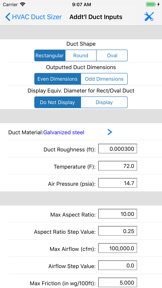
You can specify additional parameters such as the duct shape (rectangular, round, or oval), the air temperature and the air pressure. You can also choose to display values in either English (IP) or Metric (SI) units.
This application uses slider controls that allow you to quickly increment or decrement the input values and immediately observe the calculated results.
This app now works on your iPhone and iPad and adjusts its screen size accordingly.
Finally, you can email all of the inputs and results from all 3 input modes to perform further analysis using your desktop computer. The email includes HTML text and a .CSV attachment that can be imported into any popular spreadsheet.
The "HVAC Duct Sizer" application was designed by Carmel Software Corporation, a leader in HVAC design software since 1995. In fact, Autodesk (the makers of AutoCAD) acquired our load calculation software and incorporated it into their leading 3D modeling software called Revit. In addition, we developed a number of customized apps for ASHRAE, DNV GL, and other organizations.
This app now includes the HVAC Equipment Locator which allows you to keep track of all of your equipment and store it in the cloud. Click here for details: http://bit.ly/1yTq539
We also offer the following additional apps for the iPhone and iPad:
1. HVAC Residential Load Calcs for iPhone and iPad
2. HVAC Quick Load Plus
3. HVAC Quick Load
4. HVAC Toolkit
5. HVAC Pipe Sizer – Gas Low Pressure
6. HVAC Pipe Sizer - Gas High Pressure
7. HVAC Pipe Sizer – Liquid
8. HVAC Pipe Sizer – Steam
9. Steam Tables
10. Psychrometric Plus
11. Psychrometric LT
12. HVAC Pipe Sizer Plus
13. HVAC Pipe Sizer Gas Plus
14. HVAC Toolkit Ultimate
15. HVAC Equipment Locator
16. HVAC ResLoad-J
17. HVAC Psych HD

What's New in Version 6.0

Updated help

Seller

Name

Carmel Software Corporation

Information

Categories

Version

6.0

Size

18.3 MB

Game Center

No

VPP Device Licensing

Yes

Rating

Rated: 4+

Compatibility

iOS 11.0 or later

Devices

iPhone 5s, iPhone 6, iPhone 6 Plus, iPhone 6s, iPhone 6s Plus, iPhone SE, iPhone 7, iPhone 7 Plus, iPhone 8, iPhone 8 Plus, iPhone X, iPhone XR, iPhone XS, iPhone XS Max, iPhone 11, iPhone 11 Pro, iPhone 11 Pro Max, iPhone SE (2nd generation), iPhone 12, iPhone 12 Pro, iPhone 12 Pro Max, iPhone 12 mini, iPhone 13, iPhone 13 Pro, iPhone 13 Pro Max, iPhone 13 mini, iPhone SEThirdGen, iPad (5th Generation) Wi-Fi, iPad (5th Generation) Wi-Fi + Cellular, iPad (6th generation) Wi-Fi, iPad (6th generation) Wi-Fi + Cellular, iPad Pro, iPad Pro (Cellular), iPad Pro (9.7-inch), iPad Pro (9.7-inch) (Cellular), iPad Pro 12.9-inch (2nd generation), iPad Pro 12.9-inch (2nd generation) Wi-Fi + Cellular, iPad Pro (10.5-inch), iPad Pro (10.5-inch) Wi-Fi + Cellular, iPad Pro (11-inch), iPad Pro (11-inch) Wi-Fi + Cellular, iPad Pro 12.9-inch (3rd generation), iPad Pro 12.9-inch (3rd generation) Wi-Fi + Cellular, iPad Air, iPad Air (Cellular), iPad Air 2, iPad Air 2 (Cellular), iPad Air (3rd generation), iPad Air (3rd generation) Wi-Fi + Cellular, iPad mini Retina, iPad mini Retina (Cellular), iPad mini 3, iPad mini 3 (Cellular), iPad mini 4, iPad mini 4 (Cellular), iPad mini (5th Generation), iPad mini (5th Generation) Wi-Fi + Cellular, iPad (7th generation) Wi-Fi + Cellular, iPad Pro 11-inch (2nd generation), iPad Pro 11-inch (2nd generation) Wi-Fi + Cellular, iPad Pro 12.9-inch (4th generation), iPad Pro 12.9-inch (4th generation) Wi-Fi + Cellular, iPad Air (4th Generation) (Wi-Fi), iPad Air (4th Generation) (Wi-Fi + Cellular), iPad (8th generation) Wi-Fi, iPad (8th generation) Wi-Fi + Cellular, iPad Pro 11-inch (3rd generation), iPad Pro 11-inch (3rd generation) Wi-Fi + Cellular, iPad Pro 12.9-inch (5th Generation), iPad Pro 12.9-inch (5th Generation) Wi-Fi + Cellular, iPad (9th Generation), iPad (9th Generation) Wi-Fi + Cellular, iPad mini (6th Generation), iPad mini (6th Generation) Wi-Fi + Cellular, iPad AirFifthGen, iPad AirFifthGenCellular, iPod touch (6th Generation), iPod touch (7th generation)

Languages

English

App Store: Customer Ratings

Ratings & Reviews

1.0 of 5 (3 Ratings)

App Store: Customer Reviews

2011-07-15

Piece of crap

Nothing more than a slide rule. I want
My money back!!!!!!!
Geo tech mechanical
Version 1.7
2011-02-01

It is a simple toys , not professional

Not a good value,if you try cook you will see a big difference
ipme
Version 1.7
2010-10-06

Not worth the money

Not good
Spyro85
2009-12-23

Big Bugs

If you set the max limit and increment for data in the duct inputs window and you come back in the user input windows, the rules bars indicate different limits.
I'm not able to reset the limits values and the conclusion!!! I can not use this tool. I'm comfused !!
RAM2009