AboutTermsPrivacyContact
 
Updating
Kalkulilo (Calculator)

Kalkulilo (Calculator)

Released: 2019-02-11
© 2020, Alexander Clauss
Kalkulilo (Calculator) - QR Code
Version 4.9
4+
Download on the App Store
Version 4.9
4+
Download on the App Store
Released: 2019-02-11
© 2020, Alexander Clauss

iPhone Screenshots

Screenshot
Screenshot
Screenshot
Screenshot
Screenshot

iPad Screenshots

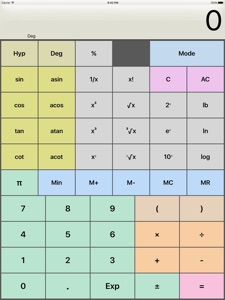
Screenshot
Screenshot
Screenshot

Description

Kalkulilo is a comfortable calculator program and offers several different modes.
- The scientific mode offers all the usual functions and operations like the basic arithmetical operations, power, logarithm, roots, trigonometry etc.
- The bit/integer mode offers logical operations (AND, OR, XOR, >>, etc.) on bit level. All values can be displayed as binary, octal, decimal or hexadecimal numbers. Calculations can be done in 8, 16 32 or 64 bits.
- In the statistics mode you can create a sample by adding several values and then calculate mean, median, quantil values, variance, standard deviation, range etc.
- Trigonometry mode provides lots of trigonometric functions
- The base/radix mode allows you to do calculations with numbers of base 2 to base 36
- The Time mode lets you directly work with time values (hours, minutes seconds)
- A simple calculator is also included, with just the basic operators and large buttons.
Colorized keys will help to distinguish between the different categories of the functions and operations. The user interface (design, colors) can be customized.
The App also includes a calculator widget for the notification center and a calculator App for the Apple Watch.
Note: This app uses ads to generate revenue to cover the costs for developement and support, and to be able to provide the App for free. But you can get rid of the ads permanently for a small fee via In-App purchase.

What's New in Version 4.9

Fixes an issue with unreadable buttons under iOS 14

Seller

Information

Categories

Version

4.9

Size

3.7 MB

Game Center

No

VPP Device Licensing

Yes

Rating

Rated: 4+

Compatibility

iOS 9.0 or later

Devices

iPhone 4S, iPhone 5, iPhone 5c, iPhone 5s, iPhone 6, iPhone 6 Plus, iPhone 6s, iPhone 6s Plus, iPhone SE, iPhone 7, iPhone 7 Plus, iPhone 8, iPhone 8 Plus, iPhone X, iPhone XR, iPhone XS, iPhone XS Max, iPhone 11, iPhone 11 Pro, iPhone 11 Pro Max, iPhone SE (2nd generation), iPhone 12, iPhone 12 Pro, iPhone 12 Pro Max, iPhone 12 mini, iPad 2 (Wi-Fi), iPad 2 (3G), iPad (3rd Generation) (Wi-Fi), iPad (3rd Generation) (4G), iPad (4th Generation) (Wi-Fi), iPad (4th Generation) (4G), iPad (5th Generation) Wi-Fi, iPad (5th Generation) Wi-Fi + Cellular, iPad (6th generation) Wi-Fi, iPad (6th generation) Wi-Fi + Cellular, iPad Pro, iPad Pro (Cellular), iPad Pro (9.7-inch), iPad Pro (9.7-inch) (Cellular), iPad Pro 12.9-inch (2nd generation), iPad Pro 12.9-inch (2nd generation) Wi-Fi + Cellular, iPad Pro (10.5-inch), iPad Pro (10.5-inch) Wi-Fi + Cellular, iPad Pro (11-inch), iPad Pro (11-inch) Wi-Fi + Cellular, iPad Pro 12.9-inch (3rd generation), iPad Pro 12.9-inch (3rd generation) Wi-Fi + Cellular, iPad Air, iPad Air (Cellular), iPad Air 2, iPad Air 2 (Cellular), iPad Air (3rd generation), iPad Air (3rd generation) Wi-Fi + Cellular, iPad mini (Wi-Fi), iPad mini (4G), iPad mini Retina, iPad mini Retina (Cellular), iPad mini 3, iPad mini 3 (Cellular), iPad mini 4, iPad mini 4 (Cellular), iPad mini (5th Generation), iPad mini (5th Generation) Wi-Fi + Cellular, iPad (7th generation) Wi-Fi + Cellular, iPad Pro 11-inch (2nd generation), iPad Pro 11-inch (2nd generation) Wi-Fi + Cellular, iPad Pro 12.9-inch (4th generation), iPad Pro 12.9-inch (4th generation) Wi-Fi + Cellular, iPad Air (4th Generation) (Wi-Fi), iPad Air (4th Generation) (Wi-Fi + Cellular), iPad (8th generation) Wi-Fi, iPad (8th generation) Wi-Fi + Cellular, iPod touch (5th generation), iPod touch (6th Generation), iPod touch (7th generation), Apple Watch Series 4, Apple Watch Series 5, Apple Watch Series 6 (GPS), Apple Watch Series 6 (GPS + Cellular), Apple Watch Series SE (GPS), Apple Watch Series SE (GPS + Cellular)
Languages

English, German

App Store: Customer Ratings

Ratings & Reviews

2.0 of 5 (1 Rating)

App Store: Customer Reviews

2013-10-20

Good, but.....

Works good. But I paid to remove add's and they keep pushing USLESS annoying add's. Makes me wonder what for I paid ???
WakeMaster2011
Version 3.0.1
2013-01-27

Tasteless

I would gladly support you, but ads are tasteless and super anoying.
Vitulano
Version 3.0
2012-11-13

Now contains ads and poor colour scheme!

Was a great app, now just ok - colours are bad for those of us with colour-blindness. Maybe an option to set the colour scheme should be considered.
lysynski
Version 3.0
2011-04-17

Most Complete Yet

This is the most complete and most useful professional calculator yet. I keep trying others and coming back to it!
One thing that I would love to see is a mode (signed decimal) where negative numbers are displayed with a minus sign.
BrunoP1
Version 2.0
2011-02-10

Simple and useful

Maybe an update for better compatibility with iOS 4?
Miles_Zhang
Version 2.0
2011-01-30

Pretty good, buttons are too small

The overall is good, but the buttons are small, and when switching from degree, radient, and gradient, it is very hard to see which one I selected. Also, the colour is dull.
calculator expert
Version 2.0
2010-12-27

Mostly all you need

I'm tutoring someone in Grade 11 math.. One problem I'm finding is that the calculators are WAY too complicated these days. And I'm thinking most students cannot use anything more than the basic math stuff, because they've lost the manual and there is absolutely no way to figure it out.
This calculator would do so much of what a high school math student would do.. Now you can't do complex math and linear algebra.. you might need another calculator for that.. but this does virtually all the basics.
I especially like the statistics section. Very easy.. Create a list with D+/D- and then use a function on it.
So while some might think this is not powerful enough.. no 2-var stats, complex math, or linear algebra, for instance.. At least students will use the functions on it.
I really like this app. I've bought 3 other apps.. and for some stuff, this is better.
DaveCr
Version 2.0
2010-11-04

Needs backspace

This app needs a backspace button to correct frequent typing errors on the iPhone.
Andrewpmk
2010-10-28

Very good calculator

It's a scientific calculator. And it works. The inclusion of bit/integer and statistics modes makes it even more powerful than you'd expect at first glance. The interface is easy to use and the help glossary is nice.
This is an excellent replacement for the default calculator for anyone looking for more functionality.
Edmund Ong
2010-02-06

Simply the best free scientific calc in app store

I use it all the time for hexadecimal calculations and conversions from hex to decimal (took a while to notice the configuration setting to change it from the default 16 to my needed 32 bits though). The C key clears the corrently entered number only so I can fix a typo without re-doing the whole calculation, and the option to use engineering notation makes working with large numbers much easier. My thanks to the author for putting so much functionality into a free app!
cwm100
2010-01-19

Near Perfect

This is a near perfect calculator, espescially since it is free. Now if they could just implement the application to work in landscape mode it would have me rate it as *****.
1136
2009-12-13

No need

I thought the iPhones native calculator was too lmtd, but turn it sideways and it basically does everything. So deleting this one now
OhheyitsBradley
2009-09-20

Just great

I think this is one of the best apps i have on my ipod touch, i even dont have a calc like that by myself and im gonna use this for a lot of things, best of all is, it is free!! You should really get that....
Mathfans
2009-09-16

Very nice.

I have other calculators are are about as good, but that doesn't detract fron the fact that this is a really nice application. We executed and has a rich feature set. The color scheme is not for me, but that's a very trivial detail.
plasmaclark
2009-07-10

Great calculator

Ability to delete last number would be nice. Thanks for the great calculator.
James6479
2009-04-28

3 stars

Decent app but it didn't turn side ways and the buttons seems a bit cramed
Professional reviewer
2009-03-10

Usefull

Good design. No missing buttons and no useless ones either
Thx for this program
Morphlin
2009-02-27

Review

So sik i give this a borat HIGH FIVE lol
Understyles
2009-02-20

it great!

I use this is math.. it great!
Jillian Peddle
2008-08-27

Best Free (Maybe Even better than ones for sale)

a free calculator which has all features of a scientific calc. many of the other apps which have lots features for a calc cost money and as some wit no money i cant afford 2 bucks :)
Cheema360
2008-08-08

Great app!

This is an excellent app. Thanks for making it free.
Mjguy
2008-08-05

In

Looks AWSOME but I can't open it. When I tap it it says 'cannot be opened'
??????
aucoinadam
2008-07-31

Nice app!

This is certainly much more featureful than the Apple calculator. My only gripe is that hitting the 'mode' button to see the instructions wipes out the Stat data; it would be better if this wasn't wiped unless you change modes.
Sovetskysoyuz
2008-07-30

Excellent!

Perfect replacement for the Apple app. Key sizes are just right.
Toddalopolis