Updating


-2
#13 in Top Paid iPad Apps > Photo & Video
iPhone Screenshots




iPad Screenshots



Description
Video Master Pro allows you to add high quality background music. You can record the music using the keyboard, or use an existing background music from your collection. You can manage and edit files, playback, or upload them. Video Master Pro is the one app you need before uploading your videos online.
Features
- Record your music
- Unlimited file exports
- High quality sounds
- High speed scrubbing
- Import videos from Camera roll
- Download videos from cloud services
- Insert Background music to your videos
- Convert video to audio
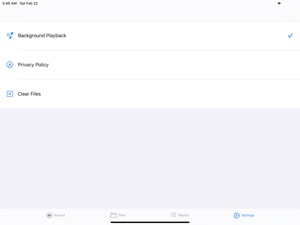
- Background Playback
- Play videos in a playlist
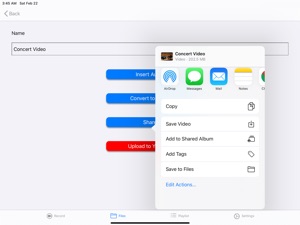
- Save your videos to Files or Camera roll
- Upload your video to Youtube
How to record music and upload:
1. Record your music on the Record tab
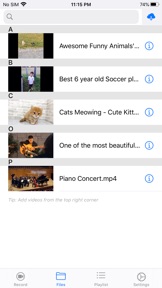
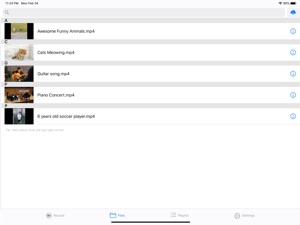
2. Go to the Files tab
3. Tap the cloud button on the top right corner
4. Select an option: Import from cloud services (via Files), or import from camera roll
5. Tap on the "i" button on the video
6. Select "Insert audio" and select your new recording
7. A new video is created
8. Tap on the "i" button on the new video
9. Select "Upload to Youtube"
----
How to convert video to audio:
1. Go to the Files tab
2. Tap on the cloud button on the top right corner
3. Select an option: Import from cloud services (via Files), or import from camera roll
4. Tap on the "i" button on the video
5. Select "Convert to audio"
6. A new audio file is created. You may use this for another video upload.
----
How to play videos or audios in a playlist:
1. Go to the Playlist tab
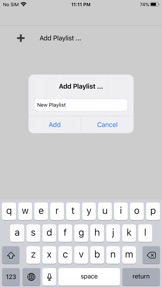
2. Select "Add playlist"
3. Type a name and press enter
4. Select "Add videos"
5. A list of current files will be available for selection
6. Press "back" button
7. Play
Seller
Name
Haruki Daunrodo
Information
Developer
Categories
Version
1.0
Size
13.6 MB
Game Center
No
VPP Device Licensing
Yes
Rating
Rated: 4+
Compatibility
iOS 11.0 or later
Devices
iPhone 5s, iPhone 6, iPhone 6 Plus, iPhone 6s, iPhone 6s Plus, iPhone SE, iPhone 7, iPhone 7 Plus, iPhone 8, iPhone 8 Plus, iPhone X, iPhone XR, iPhone XS, iPhone XS Max, iPhone 11, iPhone 11 Pro, iPhone 11 Pro Max, iPhone SE (2nd generation), iPhone 12, iPhone 12 Pro, iPhone 12 Pro Max, iPhone 12 mini, iPad (5th Generation) Wi-Fi, iPad (5th Generation) Wi-Fi + Cellular, iPad (6th generation) Wi-Fi, iPad (6th generation) Wi-Fi + Cellular, iPad Pro, iPad Pro (Cellular), iPad Pro (9.7-inch), iPad Pro (9.7-inch) (Cellular), iPad Pro 12.9-inch (2nd generation), iPad Pro 12.9-inch (2nd generation) Wi-Fi + Cellular, iPad Pro (10.5-inch), iPad Pro (10.5-inch) Wi-Fi + Cellular, iPad Pro (11-inch), iPad Pro (11-inch) Wi-Fi + Cellular, iPad Pro 12.9-inch (3rd generation), iPad Pro 12.9-inch (3rd generation) Wi-Fi + Cellular, iPad Air, iPad Air (Cellular), iPad Air 2, iPad Air 2 (Cellular), iPad Air (3rd generation), iPad Air (3rd generation) Wi-Fi + Cellular, iPad mini Retina, iPad mini Retina (Cellular), iPad mini 3, iPad mini 3 (Cellular), iPad mini 4, iPad mini 4 (Cellular), iPad mini (5th Generation), iPad mini (5th Generation) Wi-Fi + Cellular, iPad (7th generation) Wi-Fi, iPad Pro 11-inch (2nd generation), iPad Pro 11-inch (2nd generation) Wi-Fi + Cellular, iPad Pro 12.9-inch (4th generation), iPad Pro 12.9-inch (4th generation) Wi-Fi + Cellular, iPad Air (4th Generation) (Wi-Fi), iPad Air (4th Generation) (Wi-Fi + Cellular), iPad (8th generation) Wi-Fi, iPad (8th generation) Wi-Fi + Cellular, iPod touch (6th Generation), iPod touch (7th generation)
Languages
English, Arabic, Catalan, Chinese, Croatian, Czech, Danish, Dutch, Finnish, French, German, Greek, Hebrew, Hindi, Hungarian, Indonesian, Italian, Japanese, Korean, Malay, Norwegian Bokmål, Polish, Portuguese, Romanian, Russian, Slovak, Spanish, Swedish, Thai, Turkish, Ukrainian, Vietnamese
App Store: Customer Ratings
Ratings & Reviews
0.0 of 5 (No rating)
App Store: Customer Reviews
No Entry