AboutTermsPrivacyContact
 
Updating
Visual Multi-Band Compressor

Visual Multi-Band Compressor

Released: 2019-08-13
Copyright © 2019 - 4Pockets.com
Visual Multi-Band Compressor - QR Code
Version 1.02
4+
Download on the App Store
Version 1.02
4+
Download on the App Store
Released: 2019-08-13
Copyright © 2019 - 4Pockets.com

iPhone Screenshots

Screenshot
Screenshot
Screenshot
Screenshot
Screenshot

iPad Screenshots

Screenshot
Screenshot
Screenshot
Screenshot
Screenshot
Screenshot
Screenshot
Screenshot

Description

This is an AUv3 compatible visual effect plugin which is intended for use inside your favourite DAW such as Cubasis, Auria, Meteor, AUM etc. It will not function as a standalone app.
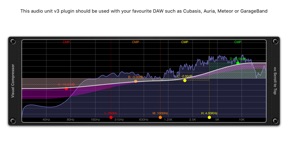
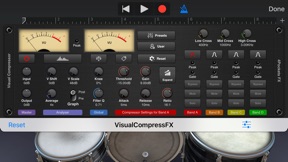
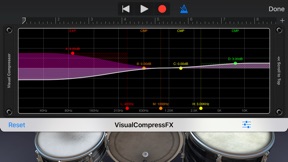
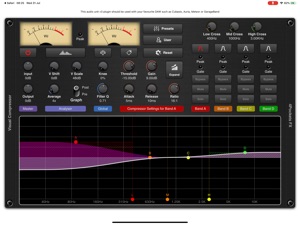
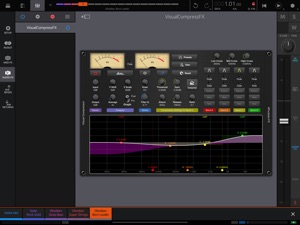
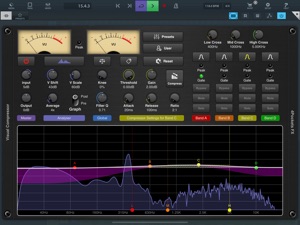
Visual Compressor is a 4 band compressor/expander which has the ability to analyse audio in real time giving an accurate and reliable spectrum representation of your signal as well as visual feedback of compression or expansion levels. It's uses range from final mastering of songs to dynamic manipulation and EQing of drum tracks.
What makes this different from a normal compressor is the ability to compress or expand frequency ranges rather than the whole mix, with up to 4 bands available. This allows you to say tighten up a wayward snare drum while adding that extra punch to the bass drum while leaving the rest of the track intact.
Each of the 4 configurable frequency bands can be modified using drag and drop operations directly on the graph making it easy to understand and quick to configure. Turn on the labelling option for colour coded details. Each band can function as an EQ allowing raising and lowering the bands gain by +/-24dB. You can assign either a compressor or expander to each of the bands.
The compressor allows you to compress excessively loud sounds that exceed a specified threshold. Each band has configurable attack, release and ratio settings.
The expander can be used to expand sound exceeding the threshold while compressing anything below it. This makes it useful for adding dynamics or even for noise reduction of a specific band.
Each band has mute and solo buttons so you can audition what is coming through a certain band, great for use during band frequency setup. There is also a bypass option which removes a band from use and reduces CPU load.
You can load and save custom presets as well as copy and paste settngs between instances. This is great if you need to setup multiple instances with the same settings.
One of the cool features is the ability to save up to 3 mixes and switch between them for comparision. These mixes are actually saved as part of custom presets and as the saved state in your DAW.
This is the third of three products which will make up part of the 'visual' range of effects.
Main Features:
○ 4 distinct frequency bands.
○ Assignable Compressor or Expander.
○ +/-24dB gain per band.
○ Assignable Q to control precise crossovers.
○ Spectrum Analyser with 'Pre' and 'Post' monitoring.
○ Vertical shift and scale options for the spectrum.
○ Mute and Solo buttons for each band.
○ Save & Compare up to 3 separate mixes.
○ Bypass option to remove a band and reduce CPU load.
○ Create and save custom presets.
○ Copy / Paste presets between instances.
○ Compressor / Limiter with Auto Makup Gain.
○ Twin VU meters with RMS/Peak display as well as peak and gate lights per band.
○ Brick wall limiter.
○ Quick Reset options for each section of the effect.

What's New in Version 1.02

v1.02 B5
Updated to ensure compatability with future iOS versions.

Seller

Name

Limelight Software

URL

Information

Developer

Categories

Version

1.02

Size

6.7 MB

Game Center

No

VPP Device Licensing

Yes

Rating

Rated: 4+

Compatibility

iOS 14 or later

Devices

iPhone 5s, iPhone 6, iPhone 6 Plus, iPhone 6s, iPhone 6s Plus, iPhone SE, iPhone 7, iPhone 7 Plus, iPhone 8, iPhone 8 Plus, iPhone X, iPhone XR, iPhone XS, iPhone XS Max, iPhone 11, iPhone 11 Pro, iPhone 11 Pro Max, iPhone SE (2nd generation), iPhone 12, iPhone 12 Pro, iPhone 12 Pro Max, iPhone 12 mini, iPhone 13, iPhone 13 Pro, iPhone 13 Pro Max, iPhone 13 mini, iPhone SE (3rd generation), iPhone 14, iPhone 14 Plus, iPhone 14 Pro, iPhone 14 Pro Max, iPhone 15, iPhone 15 Plus, iPhone 15 Pro, iPhone 15 Pro Max, iPhone 16, iPhone 16 Plus, iPhone 16 Pro, iPhone 16 Pro Max, iPhone 16e, iPhone 17, iPhone 17 Pro, iPhone 17 Pro Max, iPhone Air, iPad (5th Generation) Wi-Fi, iPad (5th Generation) Wi-Fi + Cellular, iPad (6th generation) Wi-Fi, iPad (6th generation) Wi-Fi + Cellular, iPad Pro, iPad Pro (Cellular), iPad Pro (9.7-inch), iPad Pro (9.7-inch) (Cellular), iPad Pro 12.9-inch (2nd generation), iPad Pro 12.9-inch (2nd generation) Wi-Fi + Cellular, iPad Pro (10.5-inch), iPad Pro (10.5-inch) Wi-Fi + Cellular, iPad Pro (11-inch), iPad Pro (11-inch) Wi-Fi + Cellular, iPad Pro 12.9-inch (3rd generation), iPad Pro 12.9-inch (3rd generation) Wi-Fi + Cellular, iPad Air, iPad Air (Cellular), iPad Air 2, iPad Air 2 (Cellular), iPad Air (3rd generation), iPad Air (3rd generation) Wi-Fi + Cellular, iPad mini Retina, iPad mini Retina (Cellular), iPad mini 3, iPad mini 3 (Cellular), iPad mini 4, iPad mini 4 (Cellular), iPad mini (5th Generation), iPad mini (5th Generation) Wi-Fi + Cellular, iPad (7th generation) Wi-Fi + Cellular, iPad Pro 11-inch (2nd generation), iPad Pro 11-inch (2nd generation) Wi-Fi + Cellular, iPad Pro 12.9-inch (4th generation), iPad Pro 12.9-inch (4th generation) Wi-Fi + Cellular, iPad Air (4th Generation) (Wi-Fi), iPad Air (4th Generation) (Wi-Fi + Cellular), iPad (8th generation) Wi-Fi, iPad (8th generation) Wi-Fi + Cellular, iPad Pro 11-inch (3rd generation), iPad Pro 11-inch (3rd generation) Wi-Fi + Cellular, iPad Pro 12.9-inch (5th Generation), iPad Pro 12.9-inch (5th Generation) Wi-Fi + Cellular, iPad (9th Generation), iPad (9th Generation) Wi-Fi + Cellular, iPad mini (6th Generation), iPad mini (6th Generation) Wi-Fi + Cellular, iPad Air (5th generation), iPad Air (5th generation) Wi-Fi + Cellular, iPad Pro 11-inch (4th generation), iPad Pro 11-inch (4th generation) Wi-Fi + Cellular, iPad Pro 12.9-inch (6th generation), iPad Pro 12.9-inch (6th generation) Wi-Fi + Cellular, iPad (10th generation), iPad (10th generation) Wi-Fi + Cellular, iPad Air 11-inch (M2) Wi-Fi, iPad Air 13-inch (M2) Wi-Fi, iPad Air 13-inch (M2) Wi-Fi + Cellular, iPad Pro 11-inch (M4) Wi-Fi, iPad Pro 11-inch (M4) Wi-Fi + Cellular, iPad Pro 13-inch (M4) Wi-Fi, iPad Pro 13-inch (M4) Wi-Fi + Cellular, iPad mini (A17 Pro) Wi-Fi, iPad mini (A17 Pro) Wi-Fi + Cellular, iPad (A16) Wi-Fi, iPad (A16) Wi-Fi + Cellular, iPad Air 11-inch (M3) Wi-Fi, iPad Air 11-inch (M3) Wi-Fi + Cellular, iPad Air 13-inch (M3) Wi-Fi, iPad Air 13-inch (M3) Wi-Fi + Cellular, iPad Pro 11-inch (M5) Wi-Fi, iPad Pro 11-inch (M5) Wi-Fi + Cellular, iPad Pro 13-inch (M5) Wi-Fi, iPad Pro 13-inch (M5) Wi-Fi + Cellular, iPod touch (6th Generation), iPod touch (7th generation)

Languages

English

App Store: Customer Ratings

Ratings & Reviews

5.0 of 5 (1 Rating)

App Store: Customer Reviews

2019-09-01

Great!

I opted for this visual compressor instead of the more expensive Fabfilter one and I don’t regret it one bit (same for visual reverb!)
Severyan Abominatrix
Version 1.0