Updating


Re
#54 in Top Paid iPad Apps > Music
iPhone Screenshots


iPad Screenshots




Description
This is an AUv3 compatible effect plugin which is intended for use inside your favourite DAW such as Cubasis, Auria, Meteor, AUM etc. It will not function as a standalone app.
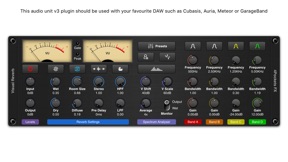
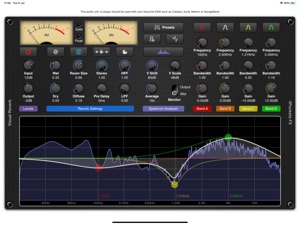
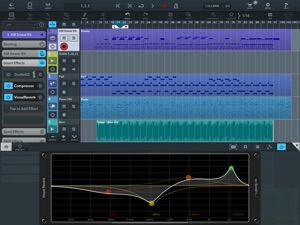
Visual Reverb is a studio quality plate reverb with multi-band EQ and the ability to analyse audio in real time giving an accurate and reliable spectrum representation of your signal flow.
This reverb simulates the sound of those famous plate reverbs of old with high levels of diffusion it has a very smooth and pleasing reverb trail which can be tuned to suite using the EQ provided. It includes your typical set of 4 parametric filters which can be used to directly effect the reverb trail in isolation or if required the entire mix. This can be used in addition to the low and high pass filters which effect the reverb trail only.
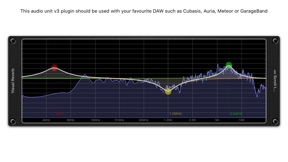
We use a high quality highly hardware optimised FFT to plot the frequency response through the reverb so you can see exactly what effect the EQ changes are having on the reverb trail. The scrolling interface automatically adjusts to the hosts window size to allow a double height display in an appropriate DAW.
One of the great features of this reverb is the ability to create ducking reverb trails so that the reverb doesn't swamp your vocals and make an incoherent mess. You also have the ability to sync the pre-delay to the host tempo of your DAW.
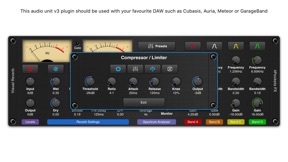
We also include a Compressor / Limiter section to ensure those EQ settings never get too aggressive. This is a specialised compressor that allows you to use either the reverb output as a control signal or the input signal. This allows you to emphesise reverb trails and create swells which follow a vocal line.
You can load and save custom presets as well as copy and paste settngs between instances. This is great if you need to setup multiple instances with the same settings.
This is the second of 3 plugins which will make up part of the 'visual' range of effects.
Main Features:
○ High quality plate reverb with pre-delay.
○ Automatically sync the pre-delay to your host tempo.
○ Ducking options for surpressing reverb trails.
○ 4 resonant paramettic EQ (+/-24dB per band).
○ Pre or Post filtering options.
○ High and Low Pass filters.
○ Stereo widening and Diffuse filter.
○ Reverb comb filter modulation for tape type effects.
○ Touch interface with multi-touch for controlling filter Q.
○ Spectrum Analyser with 'Wet Only' and 'Output' monitoring.
○ Vertical shift and scale options for the spectrum.
○ Create and save custom presets.
○ Copy / Paste presets between instances.
○ Compressor / Limiter with Auto Makup Gain and Ducking.
○ Twin VU meters with ability to view as PEAK or RMS.
○ Quick Reset options for each section of the EQ.
○ Complete with pre-defined presets for the compressor and EQ sections.
What's New in Version 1.05
Fixed an iOS15 issue which prevents the graph from being updated.
Information
Developer
Categories
Version
1.05
Size
13.9 MB
Game Center
No
VPP Device Licensing
Yes
Rating
Rated: 4+
Compatibility
iOS 9.3 or later
Devices
iPhone 4S, iPhone 5, iPhone 5c, iPhone 5s, iPhone 6, iPhone 6 Plus, iPhone 6s, iPhone 6s Plus, iPhone SE, iPhone 7, iPhone 7 Plus, iPhone 8, iPhone 8 Plus, iPhone X, iPhone XR, iPhone XS, iPhone XS Max, iPhone 11, iPhone 11 Pro, iPhone 11 Pro Max, iPhone SE (2nd generation), iPhone 12, iPhone 12 Pro, iPhone 12 Pro Max, iPhone 12 mini, iPhone 13, iPhone 13 Pro, iPhone 13 Pro Max, iPhone 13 mini, iPhone SEThirdGen, iPad 2 (Wi-Fi), iPad 2 (3G), iPad (3rd Generation) (Wi-Fi), iPad (3rd Generation) (4G), iPad (4th Generation) (Wi-Fi), iPad (4th Generation) (4G), iPad (5th Generation) Wi-Fi, iPad (5th Generation) Wi-Fi + Cellular, iPad (6th generation) Wi-Fi, iPad (6th generation) Wi-Fi + Cellular, iPad Pro, iPad Pro (Cellular), iPad Pro (9.7-inch), iPad Pro (9.7-inch) (Cellular), iPad Pro 12.9-inch (2nd generation), iPad Pro 12.9-inch (2nd generation) Wi-Fi + Cellular, iPad Pro (10.5-inch), iPad Pro (10.5-inch) Wi-Fi + Cellular, iPad Pro (11-inch), iPad Pro (11-inch) Wi-Fi + Cellular, iPad Pro 12.9-inch (3rd generation), iPad Pro 12.9-inch (3rd generation) Wi-Fi + Cellular, iPad Air, iPad Air (Cellular), iPad Air 2, iPad Air 2 (Cellular), iPad Air (3rd generation), iPad Air (3rd generation) Wi-Fi + Cellular, iPad mini (Wi-Fi), iPad mini (4G), iPad mini Retina, iPad mini Retina (Cellular), iPad mini 3, iPad mini 3 (Cellular), iPad mini 4, iPad mini 4 (Cellular), iPad mini (5th Generation), iPad mini (5th Generation) Wi-Fi + Cellular, iPad (7th generation) Wi-Fi + Cellular, iPad Pro 11-inch (2nd generation), iPad Pro 11-inch (2nd generation) Wi-Fi + Cellular, iPad Pro 12.9-inch (4th generation), iPad Pro 12.9-inch (4th generation) Wi-Fi + Cellular, iPad Air (4th Generation) (Wi-Fi), iPad Air (4th Generation) (Wi-Fi + Cellular), iPad (8th generation) Wi-Fi, iPad (8th generation) Wi-Fi + Cellular, iPad Pro 11-inch (3rd generation), iPad Pro 11-inch (3rd generation) Wi-Fi + Cellular, iPad Pro 12.9-inch (5th Generation), iPad Pro 12.9-inch (5th Generation) Wi-Fi + Cellular, iPad (9th Generation), iPad (9th Generation) Wi-Fi + Cellular, iPad mini (6th Generation), iPad mini (6th Generation) Wi-Fi + Cellular, iPad AirFifthGen, iPad AirFifthGenCellular, iPod touch (5th generation), iPod touch (6th Generation), iPod touch (7th generation)
Languages
English
App Store: Customer Ratings
Ratings & Reviews
0.0 of 5 (No rating)
App Store: Customer Reviews
No Entry