AboutTermsPrivacyContact
 
Updating
GPS Navigation & Converter

GPS Navigation & Converter

Released: 2019-08-19
© 2019 GPS Converter
GPS Navigation & Converter - QR Code
Version 2.1
4+
Download on the App Store
Version 2.1
4+
Download on the App Store
Released: 2019-08-19
© 2019 GPS Converter

iPhone Screenshots

Screenshot
Screenshot
Screenshot
Screenshot
Screenshot

iPad Screenshots

Screenshot
Screenshot
Screenshot
Screenshot

Description

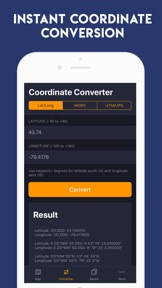
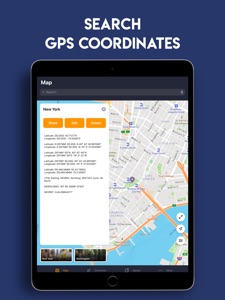
GPS Converter is an essential, an advanced, yet simple to use mobile application which is designed to convert geographic coordinates to/from different types of coordinate systems. It provides more options than any other GPS Converter out there!
Easily and quickly convert coordinates from/to:
==================================
- UPS/UTM using WGS 84
- MGRS using WGS 84
- Latitude Longitude Decimal Degrees
- Latitude Longitude Degrees Minutes Seconds (D°M'S")
- Latitude Longitude Degrees Minutes (D°M')
Save and recall:
============
Save and recall frequently used coordinates.
Share coordinates:
=============
Share coordinates via Notes, Messaging, E-mail, Twitter, and other App extensions.
GPS Coordinate Pro (IAP required to unlock some items):
- Unlimited Pin Save
- Unlimited GPS Conversions
- No Ads
Privacy Policy is available at https://gpsconverter.thecloudtutorialusers.com/main/articles/1617692472643
and Terms of Use: https://gpsconverter.thecloudtutorialusers.com/main/articles/1617692472737

What's New in Version 2.1

- Fixed crashes which some of the users faced
- UI/UX Improved
- Fixed other minor bugs

Seller

Name

Veena Makhija

URL

Information

Developer

Categories

Version

2.1

Size

61 MB

Game Center

No

VPP Device Licensing

Yes

Rating

Rated: 4+

Compatibility

iOS 12.1 or later

Devices

iPhone 5s, iPhone 6, iPhone 6 Plus, iPhone 6s, iPhone 6s Plus, iPhone SE, iPhone 7, iPhone 7 Plus, iPhone 8, iPhone 8 Plus, iPhone X, iPhone XR, iPhone XS, iPhone XS Max, iPhone 11, iPhone 11 Pro, iPhone 11 Pro Max, iPhone SE (2nd generation), iPhone 12, iPhone 12 Pro, iPhone 12 Pro Max, iPhone 12 mini, iPad (5th Generation) Wi-Fi, iPad (5th Generation) Wi-Fi + Cellular, iPad (6th generation) Wi-Fi, iPad (6th generation) Wi-Fi + Cellular, iPad Pro, iPad Pro (Cellular), iPad Pro (9.7-inch), iPad Pro (9.7-inch) (Cellular), iPad Pro 12.9-inch (2nd generation), iPad Pro 12.9-inch (2nd generation) Wi-Fi + Cellular, iPad Pro (10.5-inch), iPad Pro (10.5-inch) Wi-Fi + Cellular, iPad Pro (11-inch), iPad Pro (11-inch) Wi-Fi + Cellular, iPad Pro 12.9-inch (3rd generation), iPad Pro 12.9-inch (3rd generation) Wi-Fi + Cellular, iPad Air, iPad Air (Cellular), iPad Air 2, iPad Air 2 (Cellular), iPad Air (3rd generation), iPad Air (3rd generation) Wi-Fi + Cellular, iPad mini Retina, iPad mini Retina (Cellular), iPad mini 3, iPad mini 3 (Cellular), iPad mini 4, iPad mini 4 (Cellular), iPad mini (5th Generation), iPad mini (5th Generation) Wi-Fi + Cellular, iPad (7th generation) Wi-Fi + Cellular, iPad Pro 11-inch (2nd generation), iPad Pro 11-inch (2nd generation) Wi-Fi + Cellular, iPad Pro 12.9-inch (4th generation), iPad Pro 12.9-inch (4th generation) Wi-Fi + Cellular, iPad Air (4th Generation) (Wi-Fi), iPad Air (4th Generation) (Wi-Fi + Cellular), iPad (8th generation) Wi-Fi, iPad (8th generation) Wi-Fi + Cellular, iPad Pro 11-inch (3rd generation), iPad Pro 11-inch (3rd generation) Wi-Fi + Cellular, iPad Pro 12.9-inch (5th Generation), iPad Pro 12.9-inch (5th Generation) Wi-Fi + Cellular, iPod touch (6th Generation), iPod touch (7th generation)

Languages

English

App Store: Customer Ratings

Ratings & Reviews

3.5 of 5 (14 Ratings)

App Store: Customer Reviews

2019-08-26

User

Good
instasoks
Version 1.4
2019-08-25

Ugh

Why does this keep asking me to review it?
No longer loyal customer.
Version 1.4
2019-08-21

Good

Good application I guess
nickbimoule
Version 1.3
2019-08-20

Needs some work.

Trying out the app. Pretty basic. The save button does not work. And now any button that you touch now gives a prompting to write a review without an option to cancel out of it. This could be a good app but right now it’s hard to tell.
D1981W
Version 1.3