AboutTermsPrivacyContact
 
Updating
Kuber - Kubernetes Dashboard

Kuber - Kubernetes Dashboard

Released: 2019-05-04
© 2019-2020 Zihua Li
Kuber - Kubernetes Dashboard - QR Code
Version 1.4.1
4+
Download on the App Store
Version 1.4.1
4+
Download on the App Store
Released: 2019-05-04
© 2019-2020 Zihua Li

iPhone Screenshots

Screenshot
Screenshot
Screenshot
Screenshot
Screenshot
Screenshot
Screenshot

iPad Screenshots

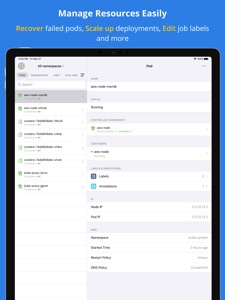
Screenshot
Screenshot
Screenshot
Screenshot
Screenshot

Description

Kuber helps you manage Kubernetes clusters easily via your mobile device, making it possible to view the status of clusters and quickly fix issues from the comfort of your couch.
Kuber has many features (and there are more to come!):
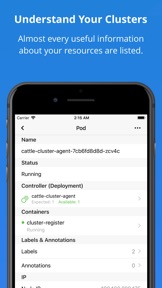
1. View the status of almost any resources. e.g. Pods, Deployments, PVs, Jobs, CronJobs, Nodes, Config Maps, Docker containers and so on.
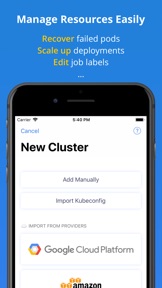
2. Scale deployments (Replica sets/Replication controllers) to accommodate short-term spikes in traffic.
3. Inspect logs of any containers in realtime!
4. Integrate with bash shell to exec commands inside the containers.
4. Edit labels & Annotations via the lovely interface.
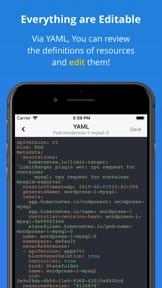
5. View / Update almost any resources via YAML.
6. Support managing multiple clusters.
7. Invoke shell commands inside the container.
8. View top nodes & pods (requires metrics server).
9. Supported authentication methods: Certificate, Credentials, Token, AWS IAM Authenticator (EKS), Google Cloud Platform (GCP), and DigitalOcean.
10. Support Face ID / Touch ID.
11. Support dark mode.
Kuber works with Kubernetes >= 1.9 currently. Please talk to us if you want more features!

What's New in Version 1.4.1

1. We added pod memory usages to the pod detail page for clusters that have the official metrics server installed.
2. Several bug fixes.
Updates in 1.4.0
This is a huge update. Especially for our iPad users!
1. Introduce splitting window to show resource list and details in a same view!
2. Better Dark UI to comfort when you're working at night.
3. Brand new design to make Kuber more enjoyable to use.
4. Introduce Shell support so you can run arbitrary commands inside containers.

Seller

Name

Surge Networks Inc.

URL

Information

Categories

Version

1.4.1

Size

23.7 MB

Game Center

No

VPP Device Licensing

Yes

Rating

Rated: 4+

Compatibility

iOS 13.0 or later

Devices

iPhone 5s, iPhone 6, iPhone 6 Plus, iPhone 6s, iPhone 6s Plus, iPhone SE, iPhone 7, iPhone 7 Plus, iPhone 8, iPhone 8 Plus, iPhone X, iPhone XR, iPhone XS, iPhone XS Max, iPhone 11, iPhone 11 Pro, iPhone 11 Pro Max, iPhone SE (2nd generation), iPad (5th Generation) Wi-Fi, iPad (5th Generation) Wi-Fi + Cellular, iPad (6th generation) Wi-Fi, iPad (6th generation) Wi-Fi + Cellular, iPad Pro, iPad Pro (Cellular), iPad Pro (9.7-inch), iPad Pro (9.7-inch) (Cellular), iPad Pro 12.9-inch (2nd generation), iPad Pro 12.9-inch (2nd generation) Wi-Fi + Cellular, iPad Pro (10.5-inch), iPad Pro (10.5-inch) Wi-Fi + Cellular, iPad Pro (11-inch), iPad Pro (11-inch) Wi-Fi + Cellular, iPad Pro 12.9-inch (3rd generation), iPad Pro 12.9-inch (3rd generation) Wi-Fi + Cellular, iPad Air, iPad Air (Cellular), iPad Air 2, iPad Air 2 (Cellular), iPad Air (3rd generation), iPad Air (3rd generation) Wi-Fi + Cellular, iPad mini Retina, iPad mini Retina (Cellular), iPad mini 3, iPad mini 3 (Cellular), iPad mini 4, iPad mini 4 (Cellular), iPad mini (5th Generation), iPad mini (5th Generation) Wi-Fi + Cellular, iPad (7th generation) Wi-Fi + Cellular, iPad Pro 11-inch (2nd generation), iPad Pro 11-inch (2nd generation) Wi-Fi + Cellular, iPad Pro 12.9-inch (4th generation), iPad Pro 12.9-inch (4th generation) Wi-Fi + Cellular, iPod touch (6th Generation), iPod touch (7th generation)

Languages

English

App Store: Customer Ratings

Ratings & Reviews

4.5 of 5 (4 Ratings)

App Store: Customer Reviews

2019-08-15

Great so far!

Enjoying having easy access to review cluster configuration on the go.
Suggestion:
- Show error connecting when using add manually/Kubeconfig
Feature Request:
- is possible allow shell access (exec)
ninjabreakbot
Version 1.2.5