Updating



iPhone Screenshots


Description
Weekly is a subscription based budget app unlike any other app on the market. Keeping track of expenses on a weekly basis is the most effective way to stay in touch with your spending. Weekly’s simple interface and guided onboarding will get you up and running with a reliable and supportive budget in minutes.
With automatic transaction syncing from your bank and Weekly taking care of all the calculations, you will finally stay in control of your budget. By breaking down your money on a weekly basis you’ll be amazed by how much easier it is to maintain control over your spending.
We, at Weekly, want to make sure that you
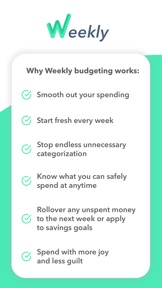
- Understand exactly how much you have to spend at any given time
- Can break free from unnecessary categorization that weighs down the process
- Allow yourself the freedom and flexibility to spend money on things that bring you joy
Start with a guided walkthrough to enter your recurring income and expenses. From there, Weekly will calculate what you can safely spend each week. Use our spending tracker and automatic bank syncing to stay on track.
Step 1: Create Your Budget
** Discover what you can safely spend each week in just minutes
** Add in recurring expenses like mortgage, car payments, loans, and utilities bills
** Set the frequency of your recurring expenses
** Build in a budget for savings goals
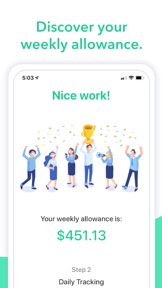
Step 2: Find Your Weekly Spending Amount
** Weekly will calculate what you can safely spend each week
** The calculation takes into account all recurring bills, income and savings goals.
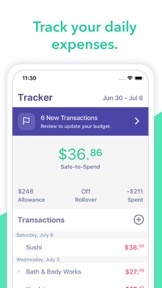
Step 3: Track Your Spending
** Track household spending
** Download and add your transactions automatically from your bank or credit card
** Stay aware of your “Safe-to-Spend” number
** Review and identify any expenses you could eliminate
** Put a stop to useless categorization
** Rediscover the joy of worry-free spending
** Rest assured knowing all your bills are factored in- Rest assured knowing all your bills are factored in
Weekly is free to try for 7-days! Download now and start seeing results!
User Testimonials
“I am having my first child in a month and wanted to get gazelle in my saving for my future. Like ya’ll talk about often, most budget apps/programs are just too busy and complicated. I, like many others, LOVE to spend money and trying to track that for 30 days gets tough and tiring. The concept here is very simple. I am one [who] has major intentions to stay on a budget, but have never been able to stick it out through the entire month. This has already given me a sense of accomplishment and ability to take my budgeting to the next level.”
K. Ball, July 2019
“I was thrilled when I found Weekly, I was like “Yes, finally someone who gets it!” I have tried mint, which was fine, but for some reason I never stuck to it. In my experience with monthly budget, I end up not checking my budget as much as I should and then I miss things, and that sometimes can be a horrible thing. Weekly keeps us in check with our finances, and we don’t have to worry as much. My whole life I have never been a numbers person so it appeals to me to not have to stress whether I calculated or input things right, it’s already there!”
B.Hallstensen, July 2019
Subscription automatically renews unless auto-renew is turned off at least 24-hours before the end of the current period. Account will be charged for renewal within 24-hours prior to the end of the current period, and identify the cost of the renewal. Subscriptions may be managed by the user and auto-renewal may be turned off by going to your iTunes Account Settings after purchase. Any unused portion of a free trial period will be forfeited if you purchase a subscription to Weekly before your trial expires.
Terms and Conditions - https://weeklybudgeting.com/terms
Privacy Policy - https://www.privacypolicies.com/privacy/view/6c2c1200579f8307c4080c7f9cd94723
What's New in Version 1.4.0
We've been working hard to lay the groundwork for great new features. To expand the feature set in Weekly we needed to restructure our navigation. We've also added a few new features and design enhancements to keep things feeling fresh and working well.
- Moved the layout to use a drawer instead of the tabs at the bottom of the screen.
- Rebuilt the week history view to allow users to keep the context of historical weeks and quickly navigate between them.
- Added an all new FAQs section with helpful information and resources to get familiar with Weekly.
- Built in Contact Support form to easily reach out to our support team
- Improved design for the Dashboard and Income & Expenses pages
Seller
Name
Weekly LLC
Information
Developer
Categories
Version
1.4.0
Size
73.5 MB
Game Center
No
VPP Device Licensing
Yes
Rating
Rated: 4+
Compatibility
iOS 9.0 or later
Devices
iPhone 4S, iPhone 5, iPhone 5c, iPhone 5s, iPhone 6, iPhone 6 Plus, iPhone 6s, iPhone 6s Plus, iPhone SE, iPhone 7, iPhone 7 Plus, iPhone 8, iPhone 8 Plus, iPhone X, iPhone XR, iPhone XS, iPhone XS Max, iPhone 11, iPhone 11 Pro, iPhone 11 Pro Max, iPhone SE (2nd generation), iPhone 12, iPhone 12 Pro, iPhone 12 Pro Max, iPhone 12 mini, iPad 2 (Wi-Fi), iPad 2 (3G), iPad (3rd Generation) (Wi-Fi), iPad (3rd Generation) (4G), iPad (4th Generation) (Wi-Fi), iPad (4th Generation) (4G), iPad (5th Generation) Wi-Fi, iPad (5th Generation) Wi-Fi + Cellular, iPad (6th generation) Wi-Fi, iPad (6th generation) Wi-Fi + Cellular, iPad Pro, iPad Pro (Cellular), iPad Pro (9.7-inch), iPad Pro (9.7-inch) (Cellular), iPad Pro 12.9-inch (2nd generation), iPad Pro 12.9-inch (2nd generation) Wi-Fi + Cellular, iPad Pro (10.5-inch), iPad Pro (10.5-inch) Wi-Fi + Cellular, iPad Pro (11-inch), iPad Pro (11-inch) Wi-Fi + Cellular, iPad Pro 12.9-inch (3rd generation), iPad Pro 12.9-inch (3rd generation) Wi-Fi + Cellular, iPad Air, iPad Air (Cellular), iPad Air 2, iPad Air 2 (Cellular), iPad Air (3rd generation), iPad Air (3rd generation) Wi-Fi + Cellular, iPad mini (Wi-Fi), iPad mini (4G), iPad mini Retina, iPad mini Retina (Cellular), iPad mini 3, iPad mini 3 (Cellular), iPad mini 4, iPad mini 4 (Cellular), iPad mini (5th Generation), iPad mini (5th Generation) Wi-Fi + Cellular, iPad (7th generation) Wi-Fi, iPad Pro 11-inch (2nd generation), iPad Pro 11-inch (2nd generation) Wi-Fi + Cellular, iPad Pro 12.9-inch (4th generation), iPad Pro 12.9-inch (4th generation) Wi-Fi + Cellular, iPad Air (4th Generation) (Wi-Fi), iPad Air (4th Generation) (Wi-Fi + Cellular), iPad (8th generation) Wi-Fi, iPad (8th generation) Wi-Fi + Cellular, iPod touch (5th generation), iPod touch (6th Generation), iPod touch (7th generation)
Languages
English
App Store: Customer Ratings
Ratings & Reviews
4.5 of 5 (2 Ratings)
App Store: Customer Reviews
No Entry